Hello everyone!
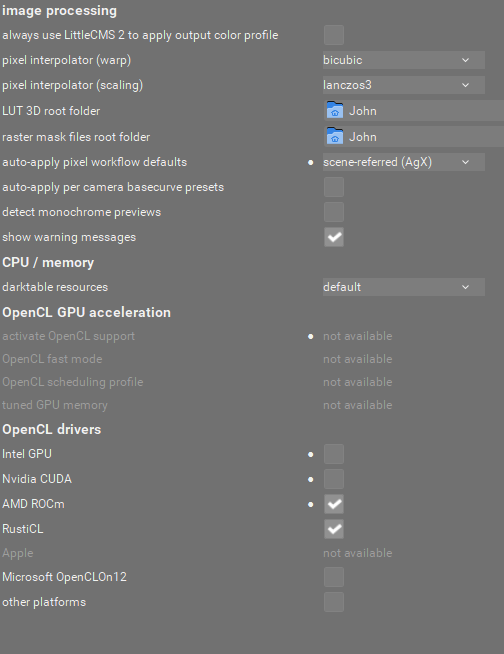
I noticed that 5.6.0 was slow on my system. AI was disabled. I checked the Processing Settings and voila! OpenCL acceleration was totally greyed out!
Tried a few fresh installations of my drivers and darktable. No luck.
Do I have to roll back to previous Darktable version?
My card is Radeon RX 560 Series (Polaris21) on Windows 10.
GPU-Z shows Open-Cl as functional.
Thank you!
In the past, when I had such issues I deleted ~/.cache/darktable/cached_v*_kernels_*, restarted and then it worked.
1 Like
The output of darktable-cltest might help see what the issue is.
@Masterpiga just tried your advise but didn’t work for me. Thank u anyway!
@g-man the output is such:
Compile options:
Bit depth → 64 bit
Exiv2 → 0.27.7
Lensfun → 0.3.4
Debug → DISABLED
SSE2 optimizations → ENABLED
OpenMP → ENABLED
OpenCL → ENABLED
Lua → ENABLED - API version 9.7.0
Colord → DISABLED
gPhoto2 → ENABLED - Camera tethering is available
OSMGpsMap → ENABLED - Map view is available
GMIC → ENABLED - Compressed LUTs are supported
GraphicsMagick → ENABLED
ImageMagick → DISABLED
libavif → ENABLED
libheif → ENABLED
libjxl → ENABLED
LibRaw → ENABLED - Version 0.22.0-Release
OpenJPEG → ENABLED
OpenEXR → ENABLED
WebP → ENABLED
AI → ENABLED
See resources | darktable for detailed documentation.
See Sign in to GitHub · GitHub to report bugs.
[opencl_init] opencl disabled via darktable preferences
[opencl_init] opencl library ‘OpenCL.dll’ found on your system and loaded, preference ‘default path’
[opencl_init] found 1 platform
[opencl_init] found 1 device
DEVICE: 0: ‘Baffin’
CONF KEY: cldevice_v6_amdacceleratedparallelprocessingbaffin
PLATFORM, VENDOR & ID: AMD Accelerated Parallel Processing, Advanced Micro Devices, Inc., ID=4098
CANONICAL NAME: amdacceleratedparallelprocessingbaffin
DRIVER VERSION: 3444.0 (PAL,HSAIL)
DEVICE VERSION: OpenCL 2.0 AMD-APP (3444.0) API=300
DEVICE_TYPE: GPU, dedicated mem
GLOBAL MEM SIZE: 4096 MB
MAX IMAGE ALLOC: 3264 MB
MAX IMAGE SIZE: 16384 x 16384
MAX CONSTANT BUFFER: 3342336 KB
LOCAL MEM SIZE: 32 KB
ADDRESS ALIGN: 256 B
COMPUTE UNITS: 16
MAX WORK GROUP SIZE: 256 (32)
MAX WORK ITEM DIMENSIONS: 3 [ 1024 1024 1024 ]
ASYNC PIXELPIPE: NO
PINNED MEMORY TILING: NO
SUPPORTED ATOMICS: INT32
EVENTS HANDLED: YES
OPENCL FAST MODE: NO
TILING ADVANTAGE: 0,000
DEFAULT DEVICE: NO
*** marked as disabled ***
[opencl_init] no suitable devices found.
[opencl_init] FINALLY: opencl PREFERENCE=NO is NOT AVAILABLE and NOT ENABLED
I had the same problem after upgrade to 5.6 with a Radeon 9070 on Windows 10. I went back to 5.4 and everything works again.
It did make me appreciate how much OpenCL helps with performance when using my lowly Ryzen 3600
Can you share your darktablerc file?
For some reason it is marking the opencl to be disable.
Its the amdapp. Will take care of that
2 Likes
There is something in the release notes about using Rustic? Does it apply?
I think hanno is referencing this PR. Let's blacklist AMD-APP OpenCL driver by jenshannoschwalm · Pull Request #20344 · darktable-org/darktable · GitHub
amd-app was blacklisted. If you edit the darktablerc device opencl string, you can enable it until 5.6.1 gets released.
1 Like
@g-man would the windows insider build of 5.7 from a couple of days ago have the fix required for the OP?
No. No fix in GitHub at the moment.
1 Like
Exactly.
The old AMD-APP had been blacklisted because leading to problems regularly.
If still required for some reason it must be enabled manually via the “enable flag” in the per-device conf setting. On my system that looks like
cldevice_v6_rusticlamdradeon8060sgraphics=250 0 1 0 0 0.000 0.250
In your case there will be a 1 at the 5th position that must be changed to 0
Nope. No change with rusticl
1 Like
Thanks for helping. Appreciate every answer. I’ll try all suggestions later back home and keep you informed!
This fix works for me. Thank you for helping.
I also tried rusticl and it didn’t work. Do I need to install something first? I am on Windows 10.
Rusticl is a Linux driver. On windows, just download the latest drivers directly from AMD.
@hannoschwalm , found this line:
cldevice_v6_amdacceleratedparallelprocessingbaffin=250 0 1 0 1 0.000 0.250
changed it to:
cldevice_v6_amdacceleratedparallelprocessingbaffin=250 0 1 0 0 0.000 0.250
Still the opencl support is locked in DT
I can see the following lines in my Darktaberc:
cldevice_v6_amdacceleratedparallelprocessingbaffin=250 0 1 0 0 0.000 0.250
cldevice_v6_amdacceleratedparallelprocessingbaffin_id0=600
clplatform_amdacceleratedparallelprocessing=TRUE
clplatform_apple=FALSE
clplatform_intelropenclhdgraphics=FALSE
clplatform_nvidiacuda=FALSE
clplatform_openclon12=FALSE
clplatform_other=FALSE
clplatform_rusticl=TRUE
opencl=FALSE
opencl_checksum=
opencl_device_priority=/!0,//*/!0,**
opencl_disable_drivers_blacklist=
opencl_drivers_rusticl=TRUE
opencl_fast=FALSE
opencl_library=
opencl_mandatory_timeout=1000
opencl_scheduling_profile=default
opencl_tune_headroom=FALSE
Don’t know what to poke in those lines (if I should)
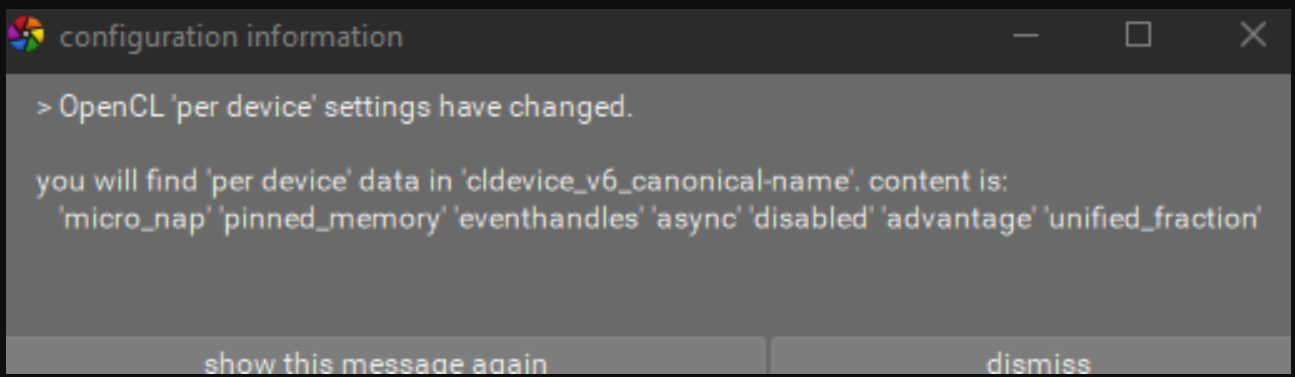
Oh, I think thiw might be a good tip. When I first opened 5.6.0, I got this pop-up warning. Luckily I/ve saved a screenshot.
1 Like
You need to make the changes to darktablerc with dt not running.
1 Like