Hi all,
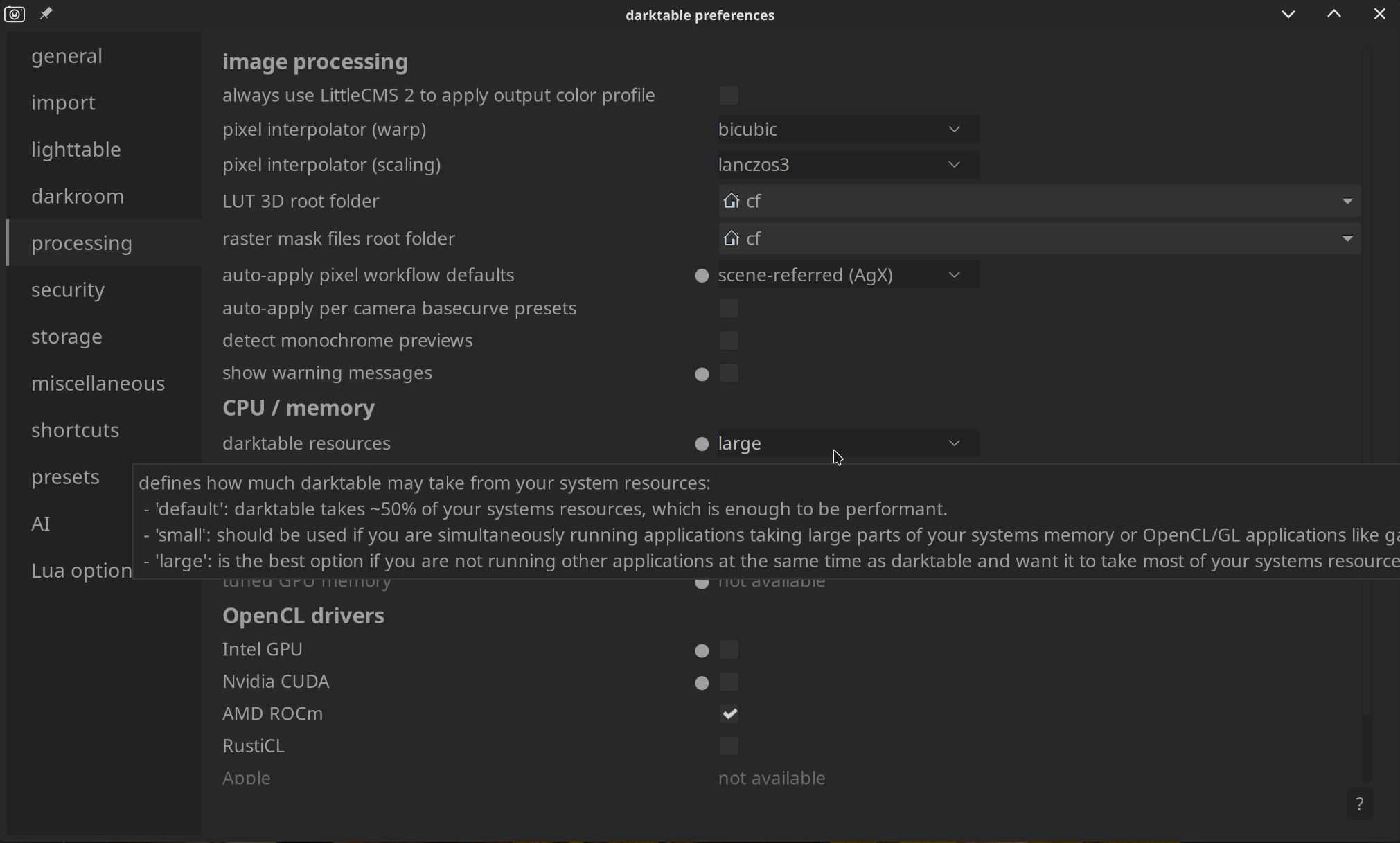
I cannot bring openCL to work on my machine.
OS: Windows 11
Hardware: CPU Intel Core 7 240H, Intel Graphics (Integriert)
Darktable version: 5.4.1
Intel Driver version: 32.0.101.7048 (latest)
What I tried so far:
- updated Graphics Driver (all drivers, actually) using official Intel Driver tool omitting using Lenovo tool → confirmed Intel Raphics Driver is latest one after that → But did not help
- adding this directive to rhe darktablerc, also did not help: opencl_disable_drivers_blacklist=TRUE
Output of darktable-cltest.exe below.
In previous threads (also showing “”) I read about checking for a line like
cldevice_v5_intelropenclgraphicsintelririsrxegraphics=a b c d e f g 1 i j k
and changing the “1” part. but: In my darktablerc there is no entry starting with cldevice_ at all.
Can anybody help here?
cltest output
C:\Program Files\darktable\bin>darktable-cltest.exe
darktable 5.4.1
Copyright (C) 2012-2026 Johannes Hanika and other contributors.
Compile options:
Bit depth → 64 bit
Exiv2 → 0.27.7
Lensfun → 0.3.4
Debug → DISABLED
SSE2 optimizations → ENABLED
OpenMP → ENABLED
OpenCL → ENABLED
Lua → ENABLED - API version 9.6.0
Colord → DISABLED
gPhoto2 → ENABLED
OSMGpsMap → ENABLED - map view is available
GMIC → ENABLED - Compressed LUTs are supported
GraphicsMagick → ENABLED
ImageMagick → DISABLED
libavif → ENABLED
libheif → ENABLED
libjxl → ENABLED
LibRaw → ENABLED - Version 0.22.0-Release
OpenJPEG → ENABLED
OpenEXR → ENABLED
WebP → ENABLED
See resources | darktable for detailed documentation.
See Sign in to GitHub · GitHub to report bugs.
 2,0364 [opencl_init] opencl disabled via darktable preferences
 2,0409 [opencl_init] opencl library 'OpenCL.dll' found on your system and loaded, preference 'default path'
 2,0972 [opencl_init] found 2 platforms
[opencl_init] found 2 devices
[dt_opencl_device_init]
DEVICE: 0: ‘Intel(R) Graphics’
CONF KEY: cldevice_v5_intelropenclgraphicsintelrgraphics
PLATFORM, VENDOR & ID: Intel(R) OpenCL Graphics, Intel(R) Corporation, ID=32902
CANONICAL NAME: intelropenclgraphicsintelrgraphics
DRIVER VERSION: 32.0.101.7084
DEVICE VERSION: OpenCL 3.0 NEO
DEVICE_TYPE: GPU, unified mem
GLOBAL MEM SIZE: 14712 MB
MAX MEM ALLOC: 4096 MB
MAX IMAGE SIZE: 16384 x 16384
MAX CONSTANT BUFFER: 4194296 KB
ADDRESS ALIGN: 128
COMPUTE UNITS: 64
MAX WORK GROUP SIZE: 512
MAX WORK ITEM DIMENSIONS: 3
MAX WORK ITEM SIZES: [ 512 512 512 ]
ASYNC PIXELPIPE: NO
PINNED MEMORY TRANSFER: NO
AVOID ATOMICS: NO
MICRO NAP: 250
ROUNDUP WIDTH & HEIGHT 16x16
CHECK EVENT HANDLES: 128
TILING ADVANTAGE: 0,000
DEFAULT DEVICE: NO
*** marked as disabled ***
[dt_opencl_device_init]
DEVICE: 1: ‘Intel(R) Core™ 7 240H’
CONF KEY: cldevice_v5_intelropenclintelrcoretm7240h
PLATFORM, VENDOR & ID: Intel(R) OpenCL, Intel(R) Corporation, ID=32902
CANONICAL NAME: intelropenclintelrcoretm7240h
DRIVER VERSION: 2025.20.10.0.23_160000
DEVICE VERSION: OpenCL 3.0 (Build 0)
DEVICE_TYPE: CPU, unified mem
GLOBAL MEM SIZE: 32260 MB
MAX MEM ALLOC: 16130 MB
MAX IMAGE SIZE: 16384 x 16384
MAX CONSTANT BUFFER: 128 KB
ADDRESS ALIGN: 128
COMPUTE UNITS: 16
MAX WORK GROUP SIZE: 8192
MAX WORK ITEM DIMENSIONS: 3
MAX WORK ITEM SIZES: [ 8192 8192 8192 ]
ASYNC PIXELPIPE: NO
PINNED MEMORY TRANSFER: NO
AVOID ATOMICS: NO
MICRO NAP: 1000
ROUNDUP WIDTH & HEIGHT 16x16
CHECK EVENT HANDLES: 128
TILING ADVANTAGE: 0,000
DEFAULT DEVICE: NO
*** marked as disabled ***
[opencl_init] no suitable devices found.
2,1554 [opencl_init] FINALLY: opencl PREFERENCE=OFF is NOT AVAILABLE and NOT ENABLED.
press any key to exit