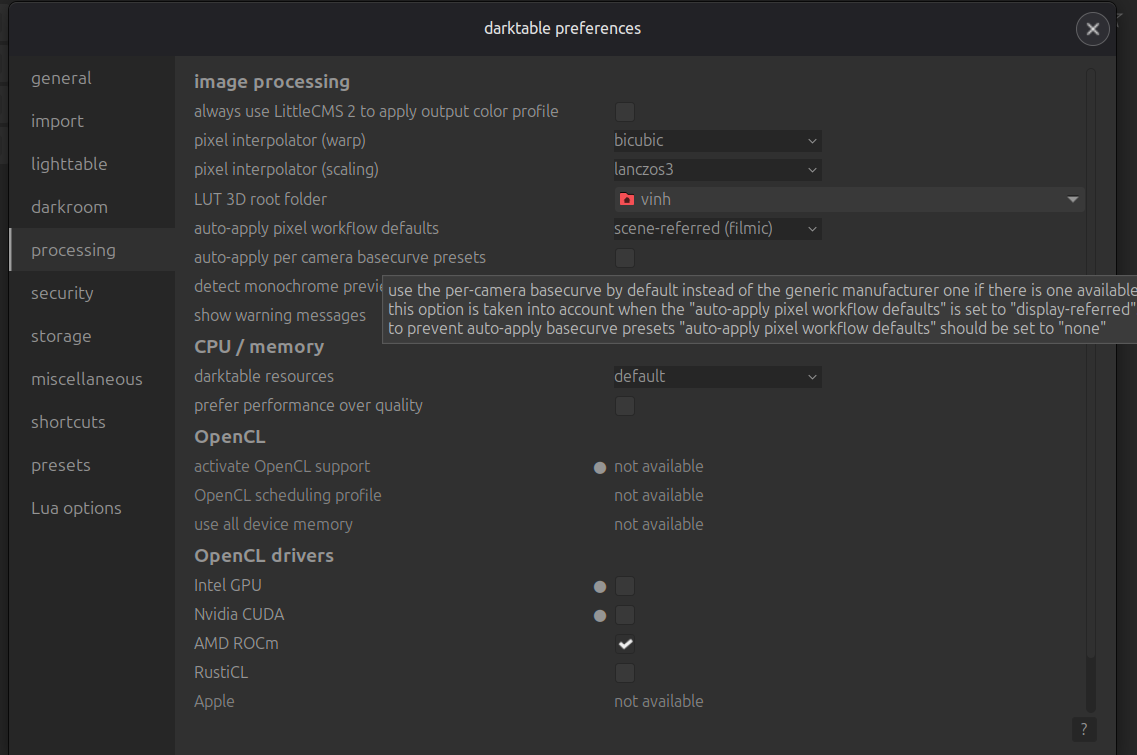
Darktable neophyte here who just installed today. I’m running a ThinkPad T14 Gen 1 with AMD Ryzen 5 4650U for my CPU and integrated AMD ATI Radeon RX Vega 6 for my GPU. My OS is Linux Mint. Is there any way I can enable OpenCL support for Darktable and/or install OpenCL? Right now Darktable is saying that it doesn’t detect any OpenCL drivers.
Two options:
a) Install ROCm (sudo apt-get install rocm-opencl-runtime)
b) Use RustiCL (if that doesn’t work, then install -
sudo apt-get install mesa-opencl-icd )
2 Likes
I installed both of them and Darktable still didn’t give me the option to enable OpenCL support? I don’t know what’s going on.
What does clinfo display?
Please also post your darktablerc - ./config/darktable/
1 Like
I doubt a Vega 6 IGPU opencl will work. What’s the output from darktable-cltest?
1 Like
First would be clinfo to check for ocl loader.
1 Like
Since you’re on Linux mint, are you using the flatpak? If yes, then opencl is only available for nvidia.
2 Likes
This is what clinfo displays
$ clinfo
dlerror: /lib/x86_64-linux-gnu/libRusticlOpenCL.so.1: undefined symbol: amdgpu_va_get_start_addr
Number of platforms 1
Platform Name AMD Accelerated Parallel Processing
Platform Vendor Advanced Micro Devices, Inc.
Platform Version OpenCL 2.1 AMD-APP (3590.0)
Platform Profile FULL_PROFILE
Platform Extensions cl_khr_icd cl_amd_event_callback
Platform Extensions function suffix AMD
Platform Host timer resolution 1nsPlatform Name AMD Accelerated Parallel Processing
Number of devices 0NULL platform behavior
clGetPlatformInfo(NULL, CL_PLATFORM_NAME, …) No platform
clGetDeviceIDs(NULL, CL_DEVICE_TYPE_ALL, …) No platform
clCreateContext(NULL, …) [default] No platform
clCreateContext(NULL, …) [other] <error: no devices in non-default plaforms>
clCreateContextFromType(NULL, CL_DEVICE_TYPE_DEFAULT) No devices found in platform
clCreateContextFromType(NULL, CL_DEVICE_TYPE_CPU) No devices found in platform
clCreateContextFromType(NULL, CL_DEVICE_TYPE_GPU) No devices found in platform
clCreateContextFromType(NULL, CL_DEVICE_TYPE_ACCELERATOR) No devices found in platform
clCreateContextFromType(NULL, CL_DEVICE_TYPE_CUSTOM) No devices found in platform
clCreateContextFromType(NULL, CL_DEVICE_TYPE_ALL) No devices found in platform
My darktablerc can be found below:
darktable-cltest gives me this:
$ darktable-cltest
darktable 5.4.1
Copyright (C) 2012-2026 Johannes Hanika and other contributors.Compile options:
Bit depth → 64 bit
Exiv2 → 0.27.6
Lensfun → 0.3.4
Debug → DISABLED
SSE2 optimizations → ENABLED
OpenMP → ENABLED
OpenCL → ENABLED
Lua → ENABLED - API version 9.6.0
Colord → ENABLED
gPhoto2 → ENABLED
OSMGpsMap → ENABLED - map view is available
GMIC → ENABLED - Compressed LUTs are supported
GraphicsMagick → ENABLED
ImageMagick → DISABLED
libavif → DISABLED
libheif → ENABLED
libjxl → ENABLED
LibRaw → ENABLED - Version 0.22.0-Release
OpenJPEG → ENABLED
OpenEXR → ENABLED
WebP → ENABLEDSee resources | darktable for detailed documentation.
See Sign in to GitHub · GitHub to report bugs.0.4604 [opencl_init] opencl disabled via darktable preferences 0.4605 [opencl_init] opencl library 'libOpenCL' found on your system and loaded, preference 'default path'dlerror: /lib/x86_64-linux-gnu/libRusticlOpenCL.so.1: undefined symbol: amdgpu_va_get_start_addr
0.5398 [opencl_init] found 1 platform
0.5399 [opencl_init] no devices found for Advanced Micro Devices, Inc. (vendor) - AMD Accelerated Parallel Processing (name)
[opencl_init] found 0 device
0.5399 [opencl_init] FINALLY: opencl PREFERENCE=OFF is NOT AVAILABLE and NOT ENABLED.
Something is not right with the opencl drivers. I don’t know Ubuntu (mint) too much. Someone else will need to help.
1 Like
I have rusticl OpenCL runing on AMD APU on Ubuntu 24.04, but it’s a bit tricky. I had to manually downgrade the mesa-opencl-icd package to version 24.0.5 as all newer versions (latest version on Ubuntu is 25.2.8) have issues.
What AMD GPU? An older vega architecture? Can you assist the OP with how to get it to work on his system?
yes, I have a AMD Ryzen 9 5900HX with Radeon Graphics laptop with AMD ATI Radeon Vega APU. As I already wrote, I had installed mesa, llvm and also the corresponding mesa-opencl-icd. It was working with llvm-17 and mesa 24.0.5.
Then there were automatic updates to mesa 24.x and llvm-18/19/20. Each of these updates broke rusticl and I had to downgrade mesa-opencl-icd to version 24.0.5 to get it running again.
I am then starting darktable with
RUSTICL_ENABLE=radeonsi /opt/darktable/bin/darktable
and darktable runs with rusticl support for the AMD-APU … even though there is not much performance difference to running it on CPU only.
and darktable runs with rusticl support for the AMD-APU … even though there is not much performance difference to running it on CPU only.
Do you personally think I shouldn’t bother with configuring OpenCL and just use darktable with CPU only considering the supposed hassle?
I have ryzen 2200G with vega igpu, will try it later if opencl works.
Here are you can find the benchmarks of my CPU /APU, my system is “AMD-Ryzen-9-5900HX-32GB-CPU” resp. “AMD-Ryzen-9-5900HX-32GB-iGPU-24MP”
so you can decide by yourself if this “performace gain” is worth it.
2 Likes
With Arch Linux (CachyOS) ROCm and RustiCL works.
APU: Ryzen 2200G
clinfo-Vega8.txt (31,5 KB)
darktable-cltest.txt (4,3 KB)
1 Like
Did you try the proprietary driver? I got opencl working in darktable with a Ryzen IGPU.
- Download and install amdgpu-install: https://www.amd.com/de/support/download/linux-drivers.html
- run it like this: amdgpu-install --usecase=graphics,opencl,multimedia --no-32
- add user to groups render and video: sudo usermod -a -G video $LOGNAME && sudo usermod -a -G render $LOGNAME
- restart PC, start darktable you will see notification that stuff is built
- restart darktable and enable opencl in settings
- restart dt again. opencl should be working now
There’s still the question “Is it worth it?”. In the benchmark linked by @dirksagwitz the gain seems to be 0.77s…
An internal GPU is just not comparable to a mid- or high-level external GPU: less calculation units, (much) less internal memory.
out of around 7 total seconds…