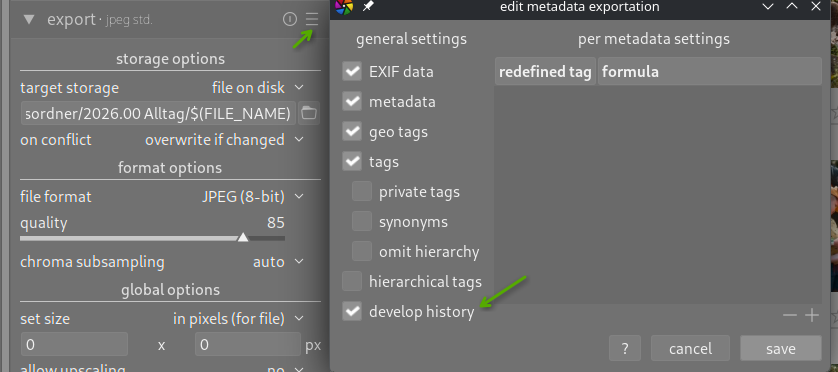
When I export my edit to a dedicated folder (“Desktop/playraw/exports” in my case) I always have to dig into my Pictures/darktable//… folder to pickup the XMP.
It would be nice to have an option to copy the xmp next to the exported jpg. (but maybe I am missing something completely)
I select an image in lighttable and then click on the right side “actions on selection” / “copy”. This copies both raw file and its xmp to the destination folder.
This is honestly a good idea, I find it ever so slightly frustrating as well.
Copying the RAW file is wasteful, but as a partial solution… I guess, yeah. I forgot what Darktable can even do, I don’t use much from these lighttable modules
I have a photodownload folder I use for play raws and I just export my JPGs back to that folder and drag and drop the xmp file and the JPG file for this forum. Not answering your question but explaining how I avoid the hassle.
Does this, as a feature, make sense for any other purpose though? I would say to just bite the bullet and do the two clicks to find the file, its not like that you cant bookmark your photo/download folder and have the xmp file ready.
You can use also lua script “contributed/show in explorer”.
Just one click, and the explorer is open. One more ctrl+click to select the xmp file. Then drag and drop in the forum.
Yes! This is one of my favourite wishlist items. Have an option so that DT can output the XMP to wherever the export (jpeg etc) is going and NAME IT the same as the jpeg file name.
You now have a secure XMP which neither you nor DT will accidentally change (assuming you’ve named the jpeg in some way).
If you’re doing a playraw, you can include your name, then anyone downloading versions will know who did what without messing about themselves.
I think this fits more as a script than as a core feature, since playraw is an activity we do but not a core photo development task.
I’m not very experienced at dt scripting, but I’d expect it to export (to a temporary folder) a jpg with size settings appropriate for playraw, copy the xmp, copy the raw. And if it exists, export the grouped jpg (with a different filename suffix to avoid confusion). Then the script should open a file browser window in that folder.
In most cases as noted by @mino you can just load the jpg as a sidecar… unless that is turned off during export or some rare cases it works most of the time whenever I have tried it…
Loading the stack from a JPG is harder (the file selector window is filtered to “XMP only”), and wasteful (not just on your side, where you delete the file afterwards, but mostly on the pixls.us side, who have to pay for a lot larger download).
Like others, I just have a Creative Commons folder where I keep images people share as play raws, along with images I share. All edits and sidecars in one place.
But back to the actual topic: yes, I would love to have more options for easily handling things like this in the app itself. Lua scripts are cool, but having it built in would be nice. I often use the “show in finder/explorer” action in Coding IDEs.
Looks like there are a lot of options here. The reason why I want the XMP to be saved next to the JPEG is a convenient way to keep track off multiple edits ( for example a colour and black-and-white version, since duplicates jpegs will get a serial number).
Personally, I do not like the jpg act as XMP file
This sounds indeed like a Lua script to export and copy the relevant files.
Thats exactly what duplicate manager is for, it gives you “virtual” copies of the image, so you can have multiple xmp sidecars with different edits for one raw file.
Under normal circumstances you would still have to share the raw file too, so the first response you got is a solution for that.
Jpeg and an xmp sidecar for a raw file on its own is mostly useless, I just dont think we should be bloating darktable just because some people on a forum do “playraw” and dont want to search for an xmp file
One option would be to implement dragging the duplicate thumbnail onto the desktop (or any drop target that understands dropping a file onto it, like Pixls’ message editor) to create a copy of the xmp. That would be the dual of dragging the xmp into the darktable to create a duplicate, which is implemented.
But then there is that, right, so my proposal above would have limited usefulness.