Is there a way to chose which drawn mask I want to edit if the masks are overlapping? I often have to move the whole drawn mask to have access to the knots of the underlying drawn mask.
Can the mask manager solve your problem?
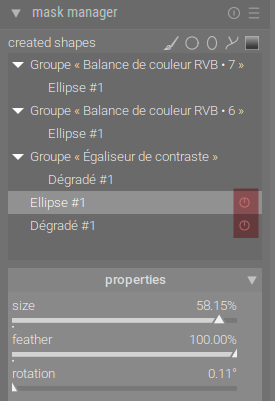
In this menu, you can manage the masks you use, and one of the options is ‘turn off’.
5 Likes
Very cool; I didn’t know about this. Thank you.
I was using overlapping masks just yesterday, and to make changes I would drag and drop one mask away from the other(s) in order to edit. Then I’d move it back, obviously. This looks like a better method.
2 Likes
Not at my machine at the moment. But yes this looks like a proper solution. Thank You! 
4 Likes
If you ctrl left click on the little icon that is the toggle to show drawn masks you can also leverage the restricted mode that wont allow you to shift or move the mask only edit nodes…I find with this active and hovering over the desired drawn mask to highlight it that you can usually edit the nodes of overlapping or underlying masks without too much problem…
5 Likes
Will try that as well, thanx.
Ok tried that. But I don’t know how this helps. Maybe you can describe a bit further. How do you decide which mask you want to edit. In this mode, I even lose the ability to move the mask which is overlapping out of my way.
@dqpcoxeas your solution works very well. Not the most intuitive way, though. Anyway, much better than moving one mask around.
Ideally, you could just use a key + scroll wheel to switch between the masks or click the mask you want to edit in an area where they are not overlapping and activate it this way.
1 Like
I don’t know. I don’t often have the situation but for me if I just hover over the drawn mask element I want to edit it is selected and putting it in restricted mode stops me from accidentally moving the other drawn elements …
I tried overlapping 3 drawn paths and then experimented trying to edit them and I found that I didn’t have too much problem editing them… I didn’t have a hundred points or anything so I’m sure it’s still an issue in some situations for sure
After lots of years with Darktable, I still find the mask manager unintuitive (for me) and hard to get to grips with. I would love an overhaul of the masking system where the mask manager is retired, and we can do everything within the modules themselves.
But I know this would be a massive project that would need lots of careful thought and multiple challenges solved, so until I or someone else can properly come up with a better alternative, it isn’t going to happen!