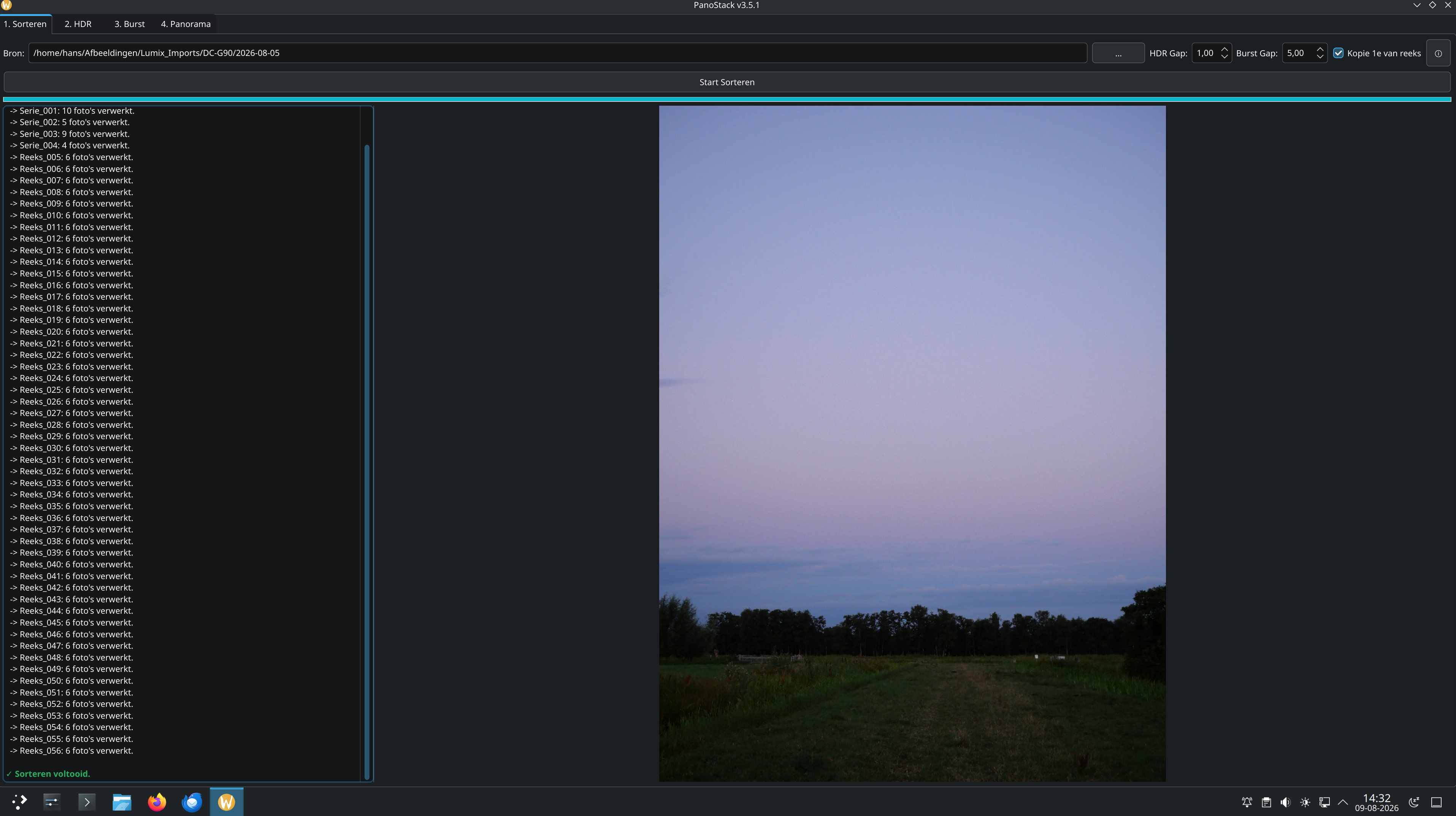
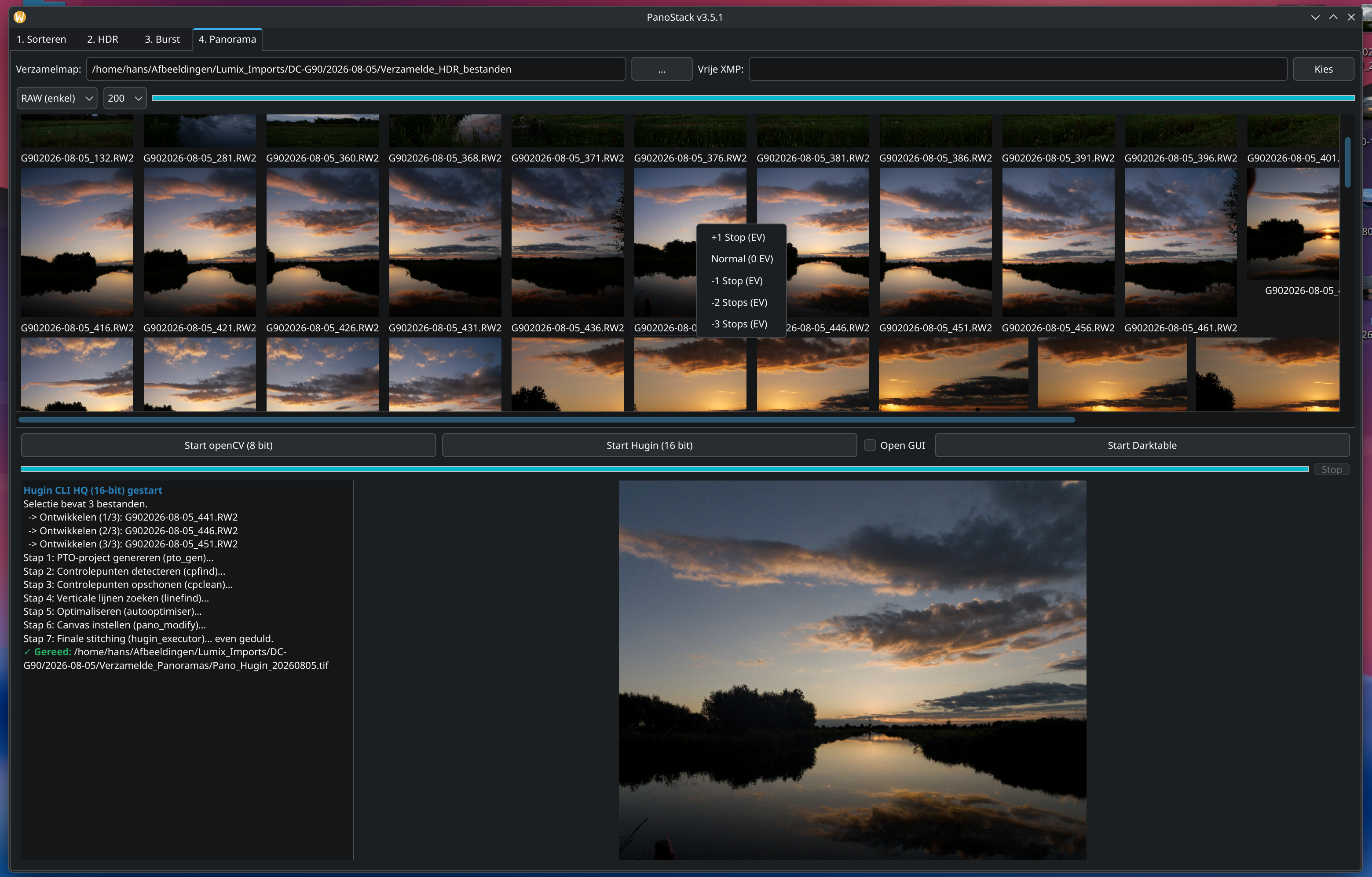
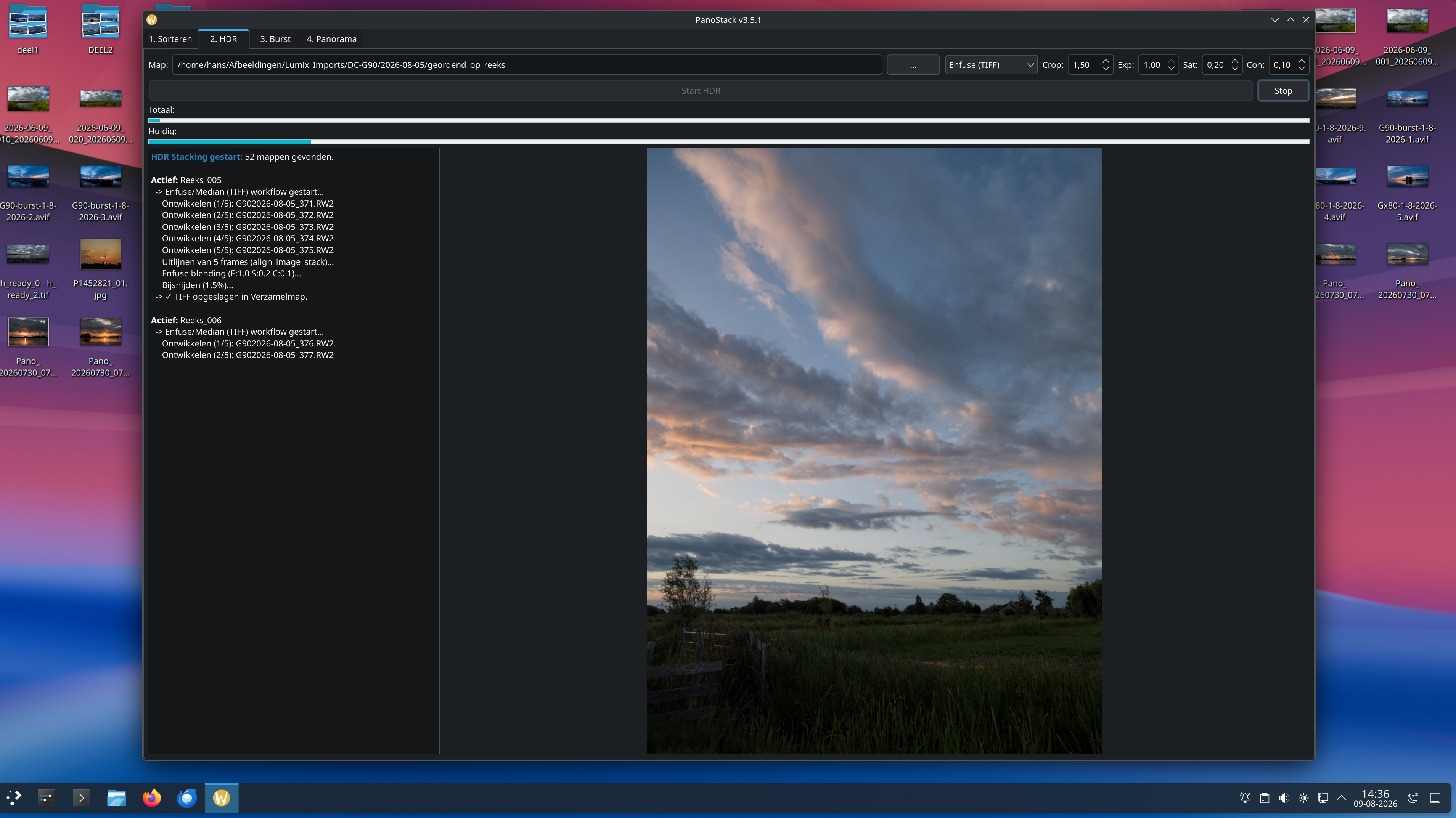
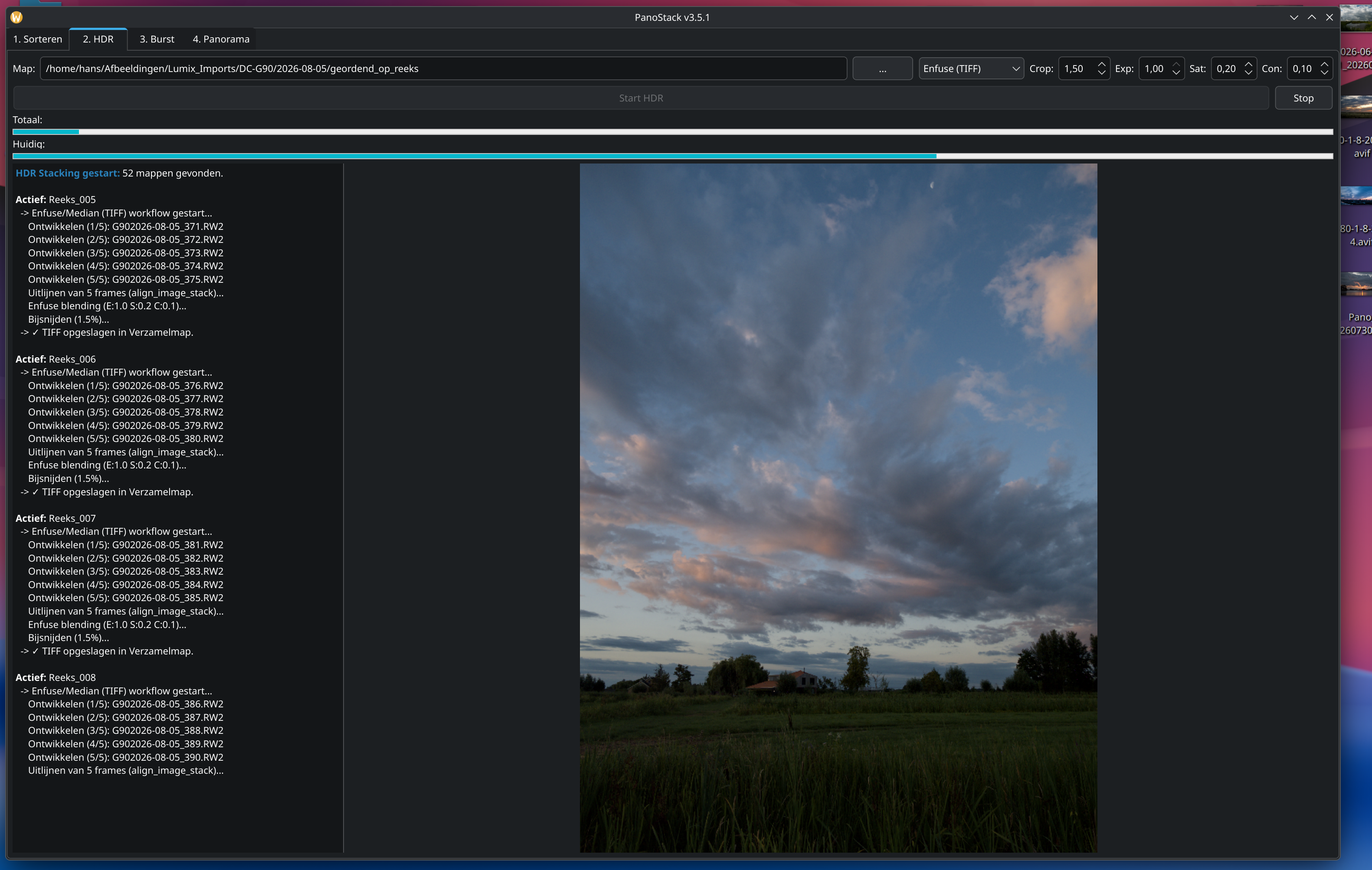
Here is a new program to organize a large number of photos from a session, such as a landscape photo at sunrise (with very little or very strong backlight), and process them into high-quality HDR and/or Burst panoramas. It is a Python script that can be easily installed in Archlinux using PKGBUILD. The program works well with Darktable, HDRmerge, and Hugin.
PanoStack is an automated utility for Arch Linux designed to organize, stack,
and stitch professional-grade panoramas using Darktable, Hugin, and OpenCV.
XMP Workflow: PanoStack uses Darktable for RAW development.
Lens Correction: Use a Free XMP with Lens Correction enabled in Tab 4. This ensures perfect alignment and a straight horizon.
16-bit Quality: All intermediate files are 16-bit TIFFs to preserve maximum
dynamic range. Tab 1: Sorting & Non-HDR Workflow
HDR Gap: Max time between bracketed frames.
Burst Gap (5.0s): Max time between panorama frames.
Pro Tip: Enabling “Copy 1st of series” puts standard exposures in your root
folder. Use these in Tab 4 for a lightning-fast Non-HDR panorama preview
without waiting for HDR processing. Tab 2 & 3: Stacking
HDRmerge (DNG): Best for 32-bit editing flexibility.
Enfuse (TIFF): Best for ready-to-use tone-mapped results.
Burst (Median): Aligns handheld sequences and removes sensor noise while maintaining sharpness. Tab 4: Panorama & Exposure Fix
Stitching Engines: Choose between fast OpenCV (8-bit Ultra-HQ) or
professional Hugin CLI (16-bit) with automatic horizon leveling.
Individual EV Fix: If frames have different brightness (common in HDRmerge):
Right-click the thumbnail.
Select +1 to -3 EV.
PanoStack injects this fix into your XMP history, maintaining your
color/noise settings while only adjusting brightness.
No, the script as it stands will not work directly on Windows without modifications. Although the Python code (PySide6, OpenCV, NumPy) is cross-platform, the technical logic relies heavily on specific Linux commands and paths. I cannot port it to Windows (haven’t touched Windows in 28 years
Here is an explanation in English regarding the compatibility and limitations of
PanoStack across different operating systems.
Why the “Package” is Arch-Specific (PKGBUILD)
The reason you can only “install” the program easily on Arch Linux is the
PKGBUILD file.
Arch Build System: A PKGBUILD is a specific script for the Arch Linux tool
makepkg. It instructs the system how to download, compile, and place files
in specific system directories.
Package Manager: It relies on pacman to handle dependencies. Other Linux
distributions (like Ubuntu, Fedora, or Debian) use different package formats
(.deb, .rpm) and different tools (apt, dnf), so they cannot read or execute
a PKGBUILD.
Why the “Python Script” works on other Linux Distros
The core file (Ontwikkel.py or panostack.py) is standard Python 3. It can run on
any Linux distribution (Ubuntu, Mint, Manjaro, etc.), provided the following
conditions are met:
Python Dependencies: The user must manually install PySide6, opencv-python,
and numpy (usually via pip).
System Dependencies: The external engines used by the script must be
installed and available in the system’s “PATH” (the terminal must be able to
find them). These include:
darktable & darktable-cli
hugin & align_image_stack
enblend-enfuse
exiftool
imagemagick
hdrmerge
If these tools are installed, the script will behave exactly as it does on Arch.
Why Windows is extremely difficult
While Python itself runs on Windows, PanoStack is currently written to “talk” to
a Linux system. Porting it to Windows would require a major rewrite for three
main reasons:
Linux-Specific Shell Commands: The script uses commands like cp
–reflink=auto. Windows does not have a cp command (it uses copy or xcopy),
and it does not support the --reflink feature, which is unique to Linux file
systems like Btrfs or XFS. It also uses pgrep to check if Darktable is
running; Windows would require tasklist.
External Tool Installation: On Linux, installing dependencies is a single
command (sudo pacman -S…). On Windows, a user would have to download and
install 6 different programs manually. Furthermore, most Windows installers
do not add the “command line” versions of these tools to the System PATH.
Without manual configuration of Environment Variables, PanoStack wouldn’t be
able to “find” Darktable or Hugin.
File Path Logic: PanoStack looks for configurations in ~/.config/ and lock
files in specific Linux directories. Windows uses a completely different
structure (e.g., APPDATA), meaning the script would get lost looking for
files that aren’t there.
Summary: The PKGBUILD makes it an Arch Linux “native” application. The Python
script is a “Universal Linux” application. Windows support is currently blocked
by fundamental differences in how the two operating systems handle commands and
external software.
The recent updates to PanoStack (v3.6.0) focus on professional workflow
efficiency, file protection, and significant time-saving features. Here is a
summary of the practical improvements added for the user:
Selective HDR Processing (Time Saver)
Users can now manually exclude specific sequences from TIFF-HDR processing
directly from the Panorama tab.
How it works: Right-click the first photo of any sequence (Reeks, Serie, or
Burst) and select “Exclude from TIFF-HDR.”
Benefit: PanoStack will skip the time-consuming process of aligning and
blending these specific folders into a TIFF file while still allowing
a 32-bit DNG to be created. This is perfect for re-shoots or sequences where
you only need a quick preview.
Visual Feedback: Excluded sequences are clearly marked with a dark gray
background and a [UITGESLOTEN] prefix.
Intelligent File View (Clutter-Free RAW Workflow)
The “RAW (enkel)” viewing mode has been completely optimized to provide a
cleaner overview of your project:
No Duplicates: The system now intelligently filters out the reference copies
in your root folder. You will no longer see the same photo twice.
First-Frame Only: For bracketed stacks (HDR reeksen), only the first frame
is shown. This prevents the list from being flooded with hundreds of
similar-looking photos.
Accurate Filtering: The “RAW (Serie)” mode is now strictly filtered to show
only files categorized as series, making it easier to manage large panorama
projects.
Safety & Deletion Management
To help manage the large amount of data generated by HDR projects, a new
deletion system has been added with strict safety rails:
DNG/TIFF Only: You can now mark files for deletion by double-clicking them.
This is strictly restricted to intermediate result files (.dng and .tif).
RAW Protection: Original RAW files are “read-only” in this tab; they cannot
be marked for deletion, ensuring your master files are always safe.
Consolidated Deletion: Use the new “Verwijder Gemarkeerd” (Delete Marked)
button to clear out unwanted results in one go. The button intelligently
darkens and disables itself when browsing RAW files to prevent accidental
input.
Smart Exposure Correction (DNG Only)
Correcting exposure jumps in HDR results is now easier:
Contextual Control: Right-clicking a thumbnail allows you to shift exposure
from +1 EV down to -3 EV.
Restricted to DNG: This function is now intelligently restricted to DNG
files, where exposure metadata can be manipulated most effectively.
Visual Confirmation: Folders with exposure fixes applied change color (green
for brighter, red for darker) so you can see your adjustments at a glance.
UI Responsiveness & Integration
In-Place Updates: When you exclude a sequence or change exposure, the UI
updates instantly. The program no longer needs to re-scan the entire
directory, making the experience feel much faster.
Smart XMP Field: The “Vrije XMP” field now provides visual feedback; it
darkens and disables itself when you select TIFF/JPG mode, as these files do
not support RAW-based sidecar processing.
Darktable 5.6.0 Optimization: The background engine is fully tuned for the
latest Darktable release, ensuring the most stable and high-quality
“oppepper” (auto-enhancement) application possible.
 Dependencies (Arch Linux)
 Key Concepts
 Tab 1: Sorting & Non-HDR Workflow
 Tab 2 & 3: Stacking
 Tab 4: Panorama & Exposure Fix