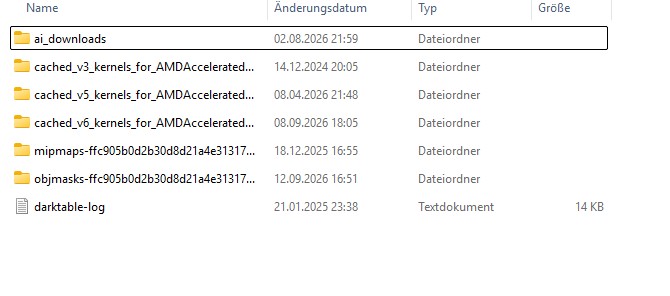
"I’ve been running Darktable 5.6.0 on an AMD machine and previously had to re-enable OpenCL manually. I have now upgraded to 5.6.1, and while OpenCL is still active, Darktable 5.6.1 feels slower. Should I have disabled OpenCL in 5.6.0 before making the switch to 5.6.1?
I suspect it might be an OpenCL cache issue, but I’m having trouble figuring out how to properly clear it on Windows. Could anyone guide me on how to do that?"
Hallo Chris, ich nochmal, ich besuche regelmäßig Eure Webseite zu Darktable. Eine kleine Bitte/Wunsch, könnt Ihr eventuell einen Menüpunkt einbauen “Neue Beiträge”. Es würde helfen, um schnell Neuigkeiten zu lesen. Danke auch nochmal für Eure grossartige Webseite.
Du kannst die v5 Zeilen löschen, die werden nicht mehr benötigt.
Ich vermute du verwendest eine AMD APU, hier kannst du den letzten Wert auf 0,5 ändern. Damit solltest du mehr Speicher an die GPU weiterreichen können.
Deinen Vorschlag bezüglich neuen Seiten habe ich auf meine ToDo Liste aufgenommen, das ist eine gute Idee. Aktuell habe ich relativ wenig Zeit, das wird zum Ende des Jahres wieder besser, aber ich schau was ich zeitnah machen kann.
Falls die Änderung nichts hilft, melde dich einfach.
There has been no improvement. Modules and the execution feel slower now. After making changes to a module, it feels like it takes 1-2 seconds before the result becomes visible.
1.) what system are you on? What graphics card exactly? I vaguely remember having read others having problems with AMD GPUs. Maybe try using RusticCL
2.) you could try to launch dt with an empty config directory and see if performance improves. That would hint towards a configuration issue. To do this I recommend simply renaming the config dir to e.g. darktable.config.backup. This way you can easily go back
3.) you could try to actually clear the cache
Locations for configuration and cache directories are in the manual.
Note that this is just a guess and I don’t know much about darktables caching: I’d personally nuke it all. Possible with a backup beforehand (e.g. By renaming the entire folder).
Can you be more specific around what is slow? Maybe a video? The log doesnt show a slow system, but maybe the slow actions were not triggered. Is it with the ai?
You can delete the folders named cache. A new one will be generated on start up.
Thank you very much for your support. I think it was some kind of Windows 11 issue over the last few days. I haven’t made any further changes, but DT is running at a decent speed again. Still, I learned something from it about where and how to check and adjust things.