Is there a tutorial to help follow the Play Raw procedure for downloading sidecar files and following how they were processed?
Hi and welcome to the forum!
Which software do you want to use the sidecar files for?
Thanks for the welcome. Should have said in original post, I’m using darktable. I’m slowly getting to grips with it, but I’ve been looking at some of the pics uploaded here and the results of others processing them are spectactuclar, and I would love to learn how it’s done.
You can do that by importing your RAW and then click load sidecar file
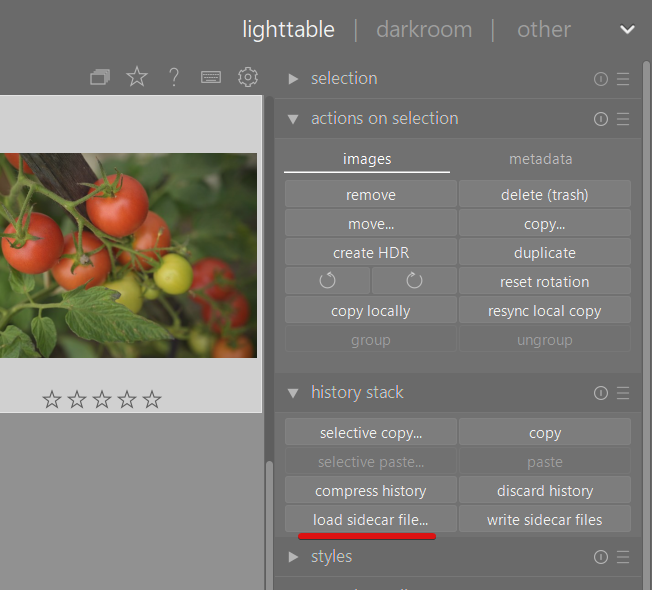
If you already have an edit and just want to load someone else’s changes, create a duplicate first, then discard history (only for the duplicate!) and then load sidecar file
2 Likes
Just upload your raw and if you want to share your edit then include the xmp side car. If you upload the JPG of your edit keep it small scale it to something on the order of 2000 px wide and use some JPG compression. The preview will look the same on line as a large JPG and people will have your sidecar to generate the edit if they choose to.
Finally you just have to state the licence that allows others to edit your photo…I am on my phone and can update this later…but you can just get the link from another playraw …
Welcome to the forum…
I’m really thinking more about uploading others sidecars so that I can see the processes they have done in order to get the image looking like they did. I might upload one of my own at a later date!
That should have been “downloading” others sidecar files.
NP…you just make duplicates of the base image and then load the downloaded sidecar. Both actions you can do in the light table view…Then review the history stack. Enable and disable modules to see the impact on the image
OK! Thanks Tod, I’ll give it a try.
Not needed, the loaded sidecar always replaces (completely and irrevocably overwrites) the current history.
Ah, that’s nice. I wasn’t sure about that