…which means when you exit out of Darkroom back into Lighttable view without making any other edits the thumbnail shown doesn’t update and still shows unedited embedded JPEG. I just wondered if this was known behaviour as I couldn’t find anything when I did a search?
Edit: This also effect the ‘F’ full size preview as well, which is more important when making comparisons, as I am doing right now with a duplicate with no edits showing only the embedded JPEG. Obviously I was a bit confused after loading the file into Darkroom and checking the auto edits were applied only to return to compare view and find both embedded JPEG view and edited view were identical…
Once an image has been processed in the darkroom, thumbnails will always be generated from raw data (you can revert back to the JPEG preview by discarding history).
Conversely : if you do not edit the image the embedded jpeg will be displayed if the thumbnail is below the size you selected in your settings.
Thanks, yes I’ve been playing with those settings, but they are only applied when the image has been edited. The problem seems to be that DarkTable does not register the image has having been edited unless those edits are applied manually - auto applied presets don’t seem to trigger this behaviour.
Which means that auto applied edits, even after visiting the Darkroom module, are not applied to thumbnails, whatever size or resolution I chose in settings. I don’t wish to turn on the setting so that I see the flat grey view of the basic adjustments in the thumbnails obviously, and especially not in the full screen views - but then according to the manual I should be seeing the edited view calculated for the RAW data when the file has been edited.
It seems to me this is a ‘feature’ of the software, as when I go into Darkroom view for the first time I see the basic edits AND my auto applied settings already in the history stack waiting to be applied. Which seems to me why DarkTable isn’t registering auto applied presets as actual user instigated edits, it just adds them to its own default rendering and doesn’t count them as user applied.
I can of course put the edits into a style and apply them manually, this then does trigger the expected behaviour - but doesn’t that defeat the point of auto applied presets?
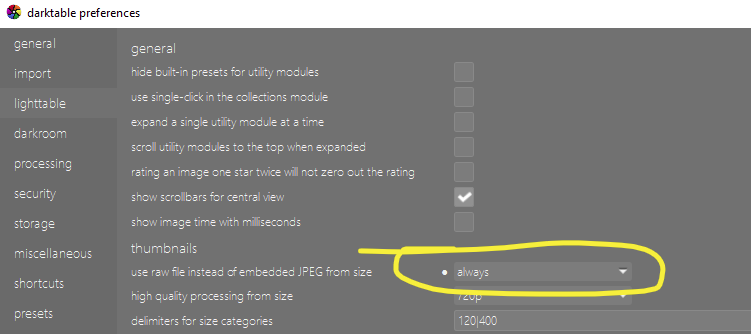
The whole point of the setting is that you can force processing the raw:
generating thumbnails for images that have not yet been processed in the darkroom, if the thumbnail size is greater than this value, generate it by processing the raw image data
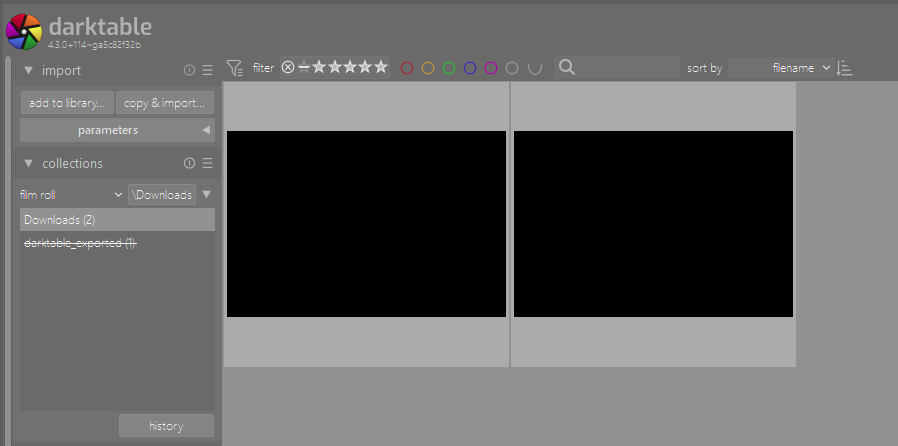
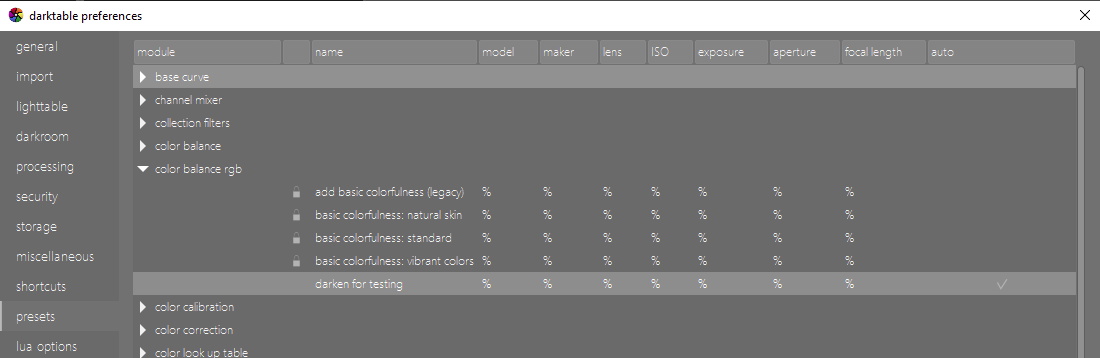
Here is my lighttable. I’ve just imported 2 raw images; they have a preset auto-applied that turns them very dark.:
Again, thank you I see that - but as you can tell from my post above I don’t want ALL my thumbnails to be generated from the RAW, I only want those thumbnails where the original image has been edited in Darkroom. I still want all the other thumbnails, before editing is applied, to be rendered from the embedded JPEG… which is I believe the intended behaviour?
But there are always auto-applied presets for raws. So dt should distinguish between “system” presets, user-defined presets, and perhaps even between needed modules, modules auto-applied through workflow selection (e.g. filmic or basecurve), and others.
Another point: once a preset is applied, it’s part of the history stack as if the module was added manually. Updates to presets aren’t applied to edited files. So if you consider auto-applying user presets as editing, you also prevent updates to images which only have auto-applied presets in the history.
Current behaviour is simple: an image is not marked as edited if only auto-applied modules are present. Changing that might get complicated…
To illustrate I can go into an image for the first time in darkroom, the auto edits are applied and shown. Without touching any edit modules I come back out to lighttable view and the edits are not shown, either in thumbnail view or fill preview - all I get is the default embedded JPEG. If I then go back into darkroom view and touch any of the editing modules (say to turn on crop, with no parameters) when I come back out to lighttable view both the thumbnail and full preview are now getting their data from the edited raw file and not the embedded JPEG as expected.
As you say, DT should distinguish between ‘system’ edits and auto applied presets edits, treating the latter as manually applied edits and updating the thumbnail/preview when exiting darktable view and going back to lighttable view. I wouldn’t expect the software to update thumbnails before the image has been opened in darkroom view, as its only at that point that edits are applied - system edits or auto presets.
The reason it should distinguish is because this is the default behaviour for all other user applied edits and auto applied edits are user applied edits. If my auto applied edits are good enough to get back to close what the OOC JPEG would have given me no further editing is required, I don’t want to edit every single image I take just for the fun of it (actually that’s probably a lie!! )
But really I only want to get clever with the ones that look like they could become something wonderful with some effects and adjustments. So coming out of darkroom once I see no further edits are required should apply the auto applied edits to the thumbnail and other scale views. It just seem logical and as this isn’t the case it means my thumbnails are always the embedded JPEG when the auto edits are all that was required - misleading.
Edit: It wouldn’t be such an issue if I could get DT to give me the colours my camera is encoding into the JPEG, but it can’t (well not with ORF files anyway), so the thumbnail isn’t accurate to what would be exported even with just the auto applied presets. Just thinking about it, styles applied in the lighttable view do update the thumbnails and full screen views - maybe I was just being too clever making my style edits individually auto applied?
That’s not quite what I said, as far as considering auto-applied user presets as edits.
As it happens, I don’t agree with that idea, as I regularly look at an image in darkroom, without doing any further edits beyond the auto-applied “stuff”.
Then again, I don’t use presets to create a finished image, only to apply settings needed for specific lenses or cameras (so mostly pure technical things like raw white point). All other settings vary too much between images for presets or styles to be more than a starting point.
Yes, because those are explicitly applied edits through user action.
Different strokes for different folks, it’s how it works so I’ll leave it there. But I do maintain my assertion that deliberately creating module presets with specific adjustments and then choosing to have them automatically applied makes them most definitely “explicitly applied edits through user action” - your interpretation is welcome to vary…

 )
)