Just spent the last few months trying to move over to Linux Mint and ditch Adobe but I keep getting obstacles thrown at me. After trying various raw editors I finally decided to go with Darktable but now I’m having trouble with the print module. No matter what I do I can’t get the image to centre in the box. I can move it up or down but it will not move away from the left side no matter what image sizes I put in the boxes below.
I read there may be a problem with CUPS but there’s so few tutorials on the printing side of Darktable that I’m wondering if I’m just missing something obvious?
Not sure what printer you are using but you may want to look into Turboprint. It is not FOSS so you will have to pay for it but it does do a good job.
I went through the same process as you a few years ago - dumping Windows and switching to Linux Mint and Darktable. Turboprint was the only realistic option but it will depend on your printer. Good luck.
1 Like
Yes, I have already started using the trial version of Turbo Print just to get my Epson Stylus Pro 3880 to print at all - I can’t believe it’s not possible to print without it!
However, it doesn’t help with the positioning of the image on the paper. I’m sure it’s to do with Darktable but whether it’s me or a bug I have no idea…
Hi Graham welcome to pixls!
It has been a long time since I tried using the print module. I remember there being an alignment tool in layout. I assume you double checked that is centered? I assume you double checked your margins?I also seem to recall you can add more image to the canvas, and it reserves space until you delete that area. I don’t know if any of that is helpful.
Very few people print from darktable (for a host of issues not related to dt specifically) and without a recognized printer plugged in you cannot access the print module. It may take some time to get a response.
It does appear that Turboprint supports your printer
Positioning the image on the paper must be done with darktable - and it can be quite confusing. I use a Canon Pro100 but may be able to help you setup your Epson 3880. Can you post what size paper and what size print you want to make? I can try to do the setup on my computer and then post a screen grab of the settings for you to follow.
Best to give as many details as possible including whether or not you want borderless.
1 Like
Reassuring or not I had an Epson Stylus Pro 3880 and I have used TurboPrint (in fact I did implement the TurboPrint support in Darktable) and had not issue (quality or positioning).
Sorry to sidetrack this discussion; I’m planning to use Turbo Print as well. Can I use the same paper manufacturers’ ICC profiles as on Windows and Mac?
@ bastibe
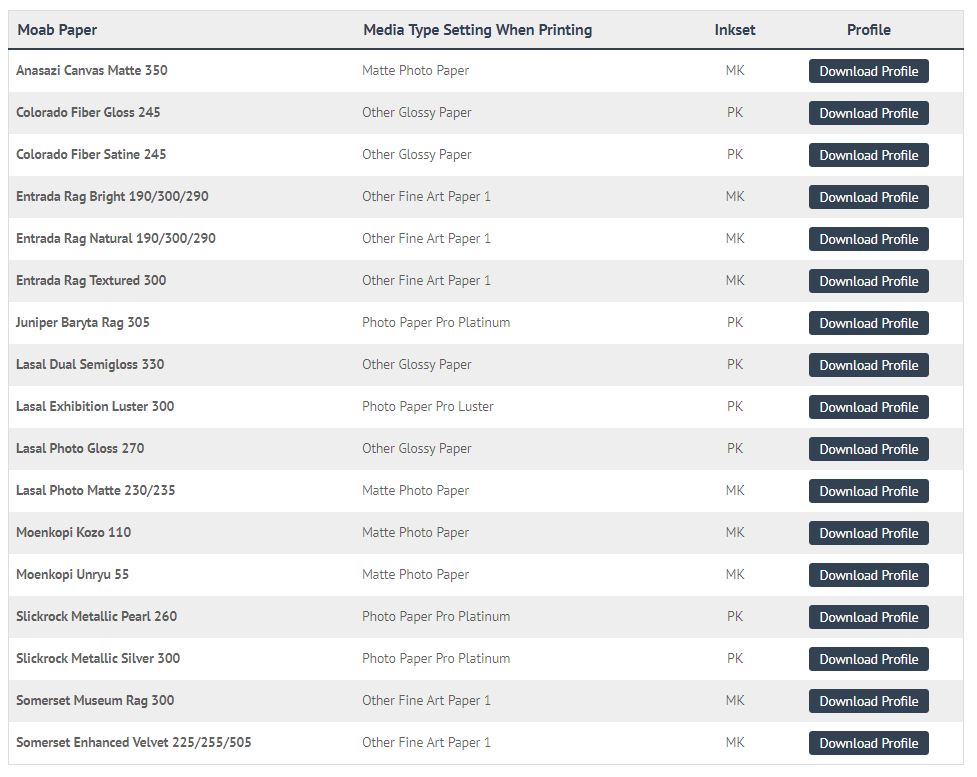
I think it depends on your paper/printer combination. I use MOAB paper on a Canon Pro100 and with Windows there were specific paper profiles. With Linux I cannot use the MOAB profiles but they provide a table to convert to Canon profiles.
Also I never used darktable with Windows - it was another app. You may be limited in the profiles you can use because of darktable rather than linux.
Bottom line is I have been very happy with the results printing RAW images directly from darktable with the Turboprint driver.
1 Like

I’m with you. Printing continues to be a source of frustration! The crop sizes in the development section don’t seem to match up with any of the gray shaded sections in the paper sizes in the print module. The only sizes that match up are my photos in original size, no cropping, with the A4 paper size. But the photo paper is usually 8X11.5 size. So I go round and round and usually give up. I’m using Manjjaro linux with the current update and gutenprint. Darktable doesn’t see to integrate with gutenprint the way it does with Gimp.
Has anyone been able to print borderless on linux? I can’t get it to work even with turboprint installed.
I print borderless all the time with Linux and Turboprint. Actually I don’t think Turboprint has much to do with it - you must set things up in darktable.
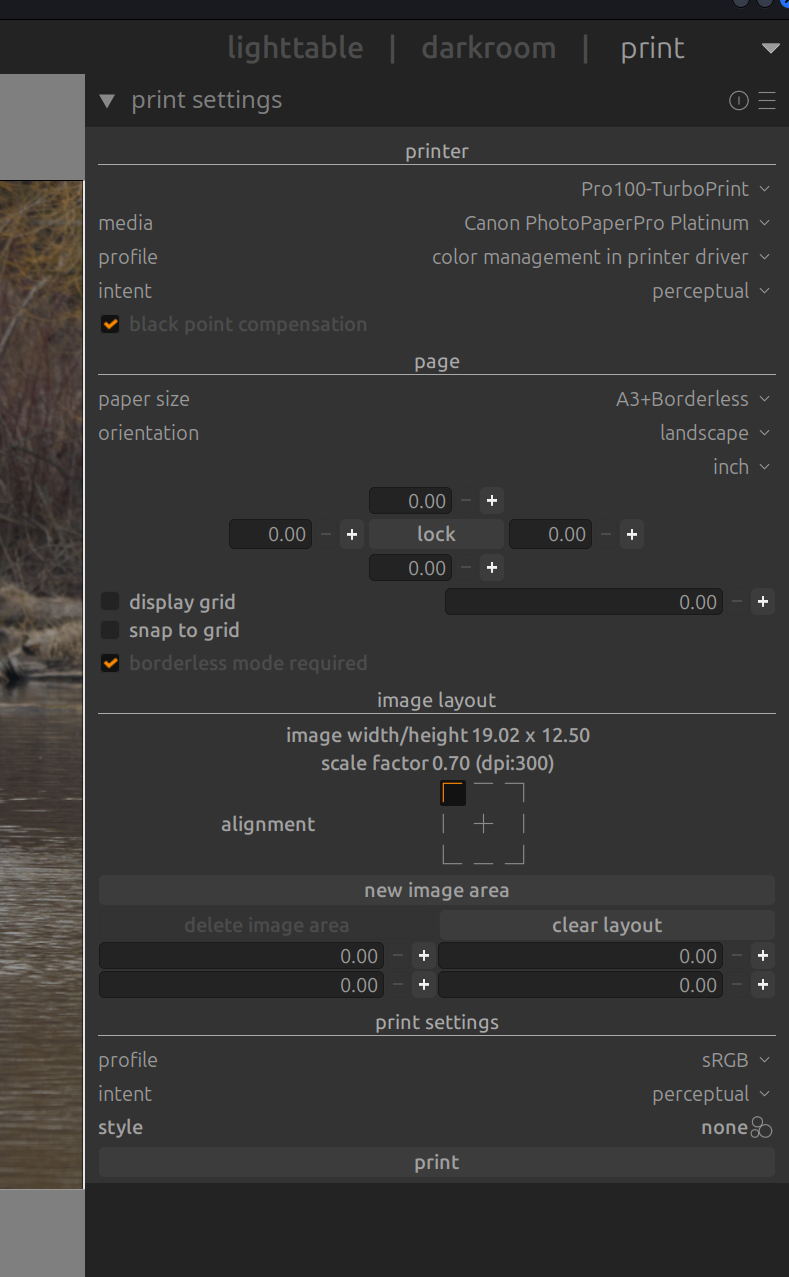
What size paper do you want to use? I think 8 1/2 x 11 is pretty straightforward. I print a lot on 13 x 19 paper and had to make a special preset in the crop module to make the print 13:19 rather than 3:2. I’ve attached a screen grab of the print settings in darktable.
2 Likes
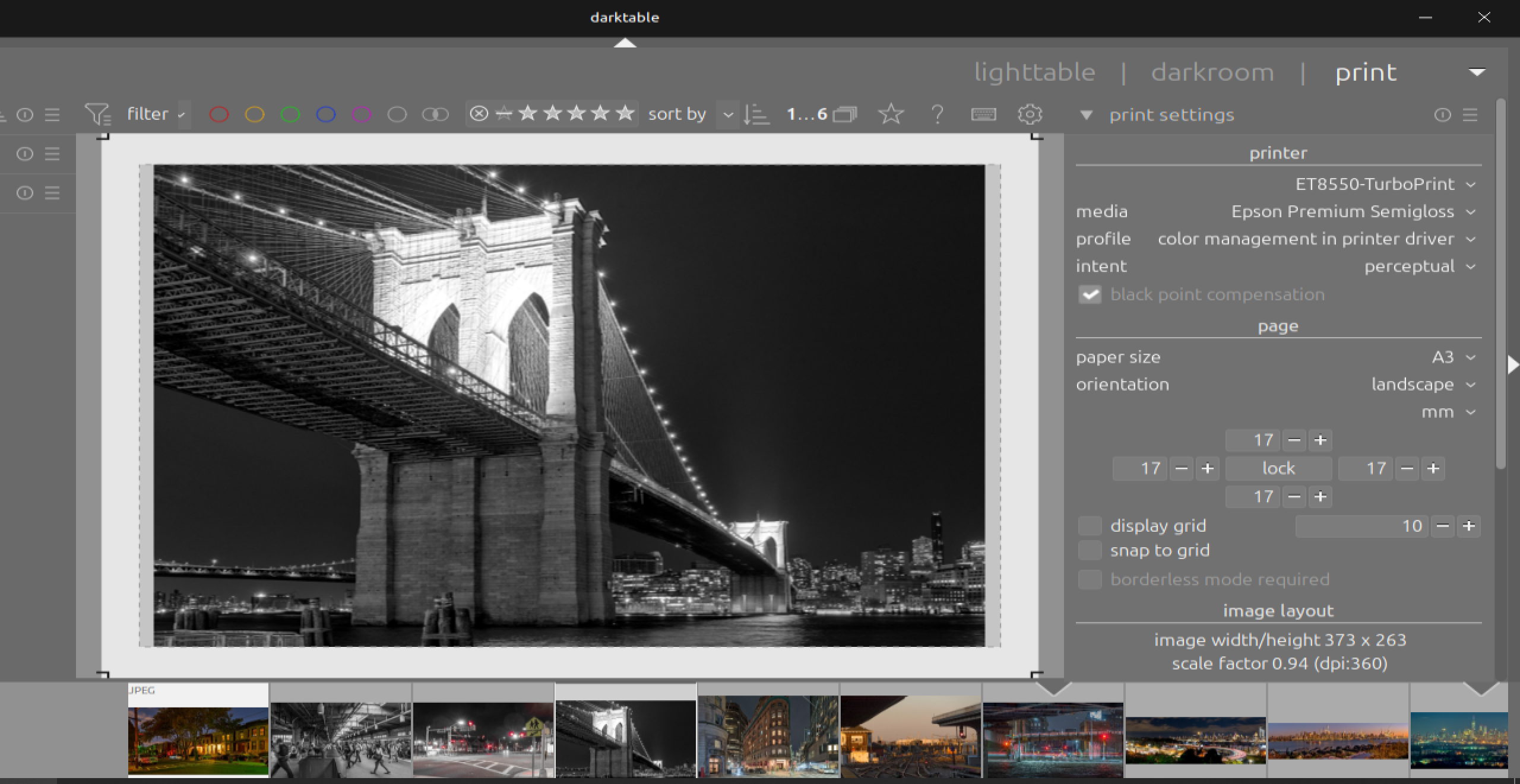
I think you need to select the “A3 borderless” paper size first.
Depending on the exact specifications of the paper you may have to select A3+ borderless and change the border from 17 to 0 on all sides (as well as changing the 10 to 0).
Once that is done you may still have a small border on either the left & right edges or the top & bottom edges. That can be eliminated by going back to darkroom and making small adjustments to the crop margins. Once you get make those adjustments save the crop aspect ration with an appropriate name.
I do my printing though Gimp which gives me my printers dialog and allows me to select borderless. I would love to be able to print directly from darktable.
I think this is not possible. You need to use the embedded paper profiles provided by TurboPrint.
Thank you. How do you work with third party papers then? I’ll probably need the “Studio” version, and import the ICC?
I think the third party supplier provides a conversion table. Here is the one I use from MOAB. It converts their paper type to a Canon equivalent (which are included in Turboprint because I am using a Canon driver).
Caveat on that: the flatpak doesn’t provide the proper gimp printing function.
That’s the paper type. Printing on third party paper usually requires an “equivalent” first-party paper type and a third-party ICC profile. As far as I can tell, the paper type determines print speed and ink density, whereas the ICC profile modifies the colors with a lookup table, to compensate for the paper’s characteristics.
My question is whether the ICC profiles that the paper manufacturers publish for use with the Canon driver will work the same with the TurboPrint driver.
But no worries, I’ll just try it out myself.