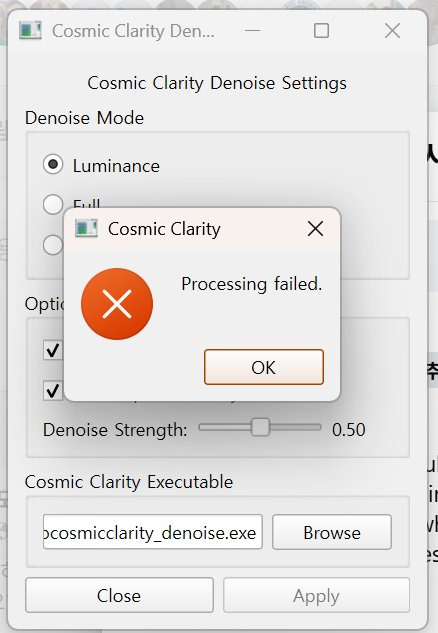
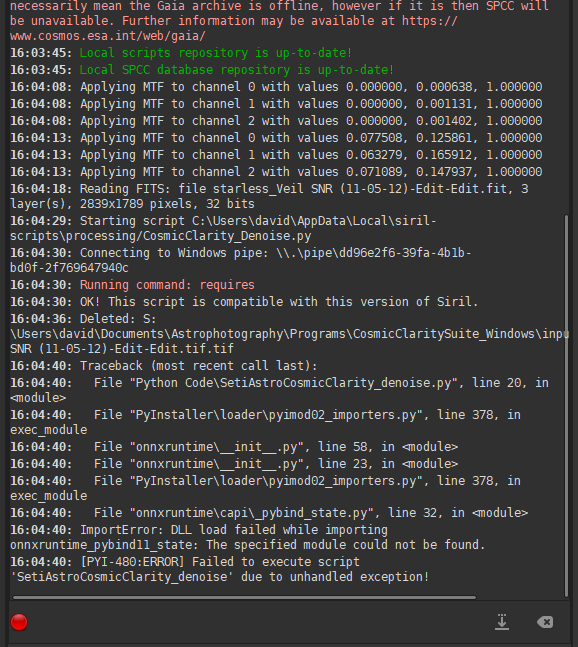
I’m new to Siril and having trouble with the Cosmic Clarity denoising script. I successfully installed the script (it’s over 3GB in size) via the Script menu, but when I try to run it on my stacked image sequence, I get a “processing failed” error right at the start.
The installation went fine, but it bombs out during the initial stats computation or something similar. Any common fixes for this? Or is it a compatibility thing?
Thanks in advance for any tips – astrophotography newbie here!
00:11:48: Starting script C:\Users\Lee\AppData\Local\siril-scripts\processing/CosmicClarity_Denoise.py
00:11:49: Connecting to Windows pipe: \.\pipe\a8dcd2d0-fd16-4d7b-aae8-312a53c72db1
00:11:49: Running command: requires
00:11:49: OK! This script is compatible with this version of Siril.
00:12:12: Deleted: G:\CosmicClaritySuite_Windows\input\NGC_281_1249x10sec_T12degC_2025-10-28.fit.tif
I ran into this issue. I had to select ‘setiastrocosmicclarity.exe’ as the EXE for the Sharpen process and ‘setiastrocosmicclarity_denoise.exe’ as the EXE for the Denoise process. Works for me now.