Hi,
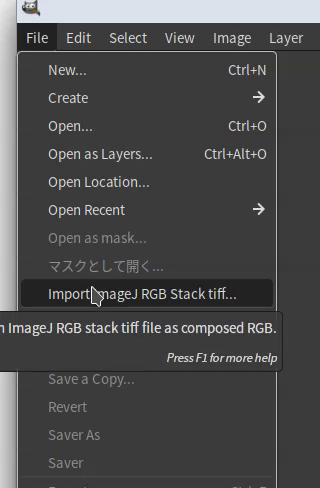
I have made a new python plug-in “ ImageJ-stack-2-composedRGB for GIMP3”.
ImageJ, known as scientific FOSS image editor, can export 16 or 32 bit RGB image files only as RGB stack TIFF format. (In other formats, ImageJ can export only 8bit (8 x 3 = 24bit) RGB image.) This format is not compatible with other image editing software, and in them this format is recognized as multi-image TIFF which has 3 gray-scale images or one gray-scale image TIFF.
This plug-in enable you to import ImageJ RGB stack TIFF as composed RGB xcf file in GIMP3.
It seems that my explanation is inadequate and causes some misunderstanding. ImageJ originally could only handle 8 bit RGB color images. Now ImageJ can handle 16 or 32 bit RGB color images, but it handles them a little tricky and causes some incompatibility with other image software. In ImageJ, a 16 or 32 bit color image is treated as a stack of three images: R, G, and B images. Therefore, when handling 16 or 32 bit RGB color images, I always stack my color channel image data in ImageJ.
I have internationalized this plug-in (ver. 0.2). In this version, I provide following language translation files as usual.
Català
Deutsch
Español
français
Italiano
Japanese
Korean
Magyar
Nederlands
Polski
Translation files are “locale” directory under this plug-in’s directory.
Even if your language is not included this list, you can easily make your language locale file. Throw “defaut.txt” in locale directory to online AI translation service, and save the result as [your language code].txt in locale directory. For example, you would like to add Vietnamese translation, save the result as vi.txt in locale directory. You can find the list of language code in [Edit] > [Preferences] > [Interface]>[Language].
And if you use Mac OS, please set your language explicitly in preferences and do not use system language setting. Otherwise my plug-in will be displayed in English.