Im am a new user, just installed the software and already have a few questions:
1 Where is the variable $(PICTURES_FOLDER) set? I use a different drive for my library and could of course simply override the variable with an explicit path but would prefer to reset this vaiable if possible.
2 Is it impossible to leave the originals where they are and just write edits to the program’s library (as LR does)? I have tens of thousands of images - all already cataloged by LR where my import (a third piece of software) left them - I would hope not to need to make another copy of the (just under 4TB) files. BTW, as you might have surmised, I store my photos untouched as raws, only storing the info to make them “presentable”. Is that mode perhaps not supported (which would mean I don’t need answers to the other questions, I’d have to stick with LR).
3 I noticed that people are referred to “the manual” for some queries - where is that to be found? I searched online and found a manual - but it was for version 4.8
4 When setting up this account I tried twice to have my activation info sent to my gmail address, no joy. Searched the spam folder, nothing there. Used my hotmail (now outlook) address, no problem. Does this site dislike gmail?
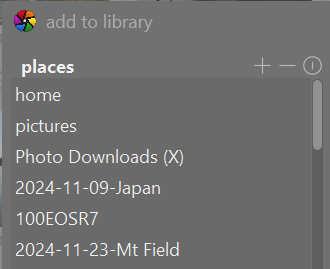
add to library
Add existing images to the darktable library without copying or moving files. If you only add a single image to the library it will be automatically loaded in the darkroom. copy & import
Create copies of images from the filesystem and then add those copies to the darktable library.
darktable is non-destructive - it never alters the original RAW file.
I don’t know if you can alter the $(PICTURES_FOLDER) value - I think it is always as defined in the manual: the pictures folder as defined by the system (usually “$HOME/Pictures”).
Welcome to DT and the forum.
here is the online link I use for the manual. I hope it is the latest.
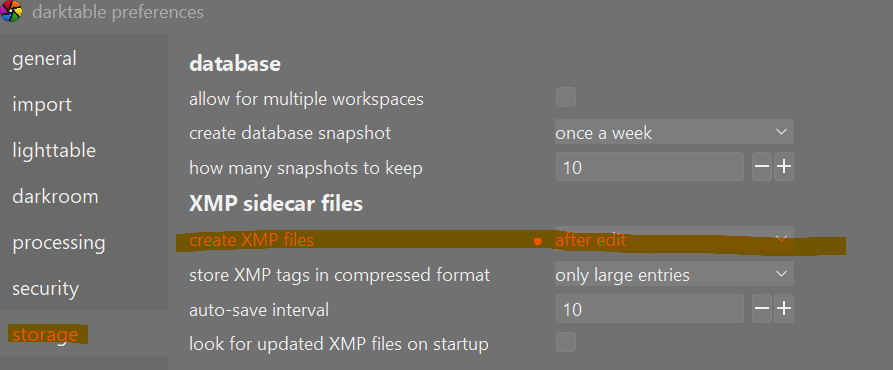
You can set preferences to never write a sidecar file. I have mine set to write sidecar files after edit. I must say I am glad I have done this because if the database gets corrupted or stuffed up some how this will save the day. When I first started using DT after having used LR this system seemed messy but I have come to appreciate the extra safety it gives. This is especially true if the images are on an external drive and you move from one computer to the next or need to replace a stolen or broken computer. But the option to just depend on the database like LR is certainly there.
I don’t understand the context of this question. What are you trying to use the variable for? Is this a question related to copy and importing? It sounds like you use a third program for this rather than DT or LR?
Like you I’m reasonably new to dt and I came from LR/PS.
The value for this variable is taken from the folder your pictures reside in. But as I’m not sure what is your problem / goal to be achieved I invite you to further describe what you want here.
This is exactly what dt does. Your RAW’s remain untouched. Changes are stored in a database (catalog in LR’s terms). Beside that you might wish to save the changes in .xmp’s as well. Which provide a kind of backup but also is a means of communicating what you’ve exactly done to a photo. So no need to make a copy of 4TB worth of photo’s.
Another thing is that dt has no way of knowing how you’ve developed your pic’s in LR.
Welcome to this wonderful program and its community! It took me some time to learn but I am much happier with working with it and have now better results then before. Please do invest in knowledge of the development modules. It will pay you back!
$(PICTURES_FOLDER) is indeed related to importing - the software wants to know where to fetch the images. My “pictures” folder is in Microsoft’s cloud (aka OneDrive) but even though I have Office 365 with lots of storage there still isn’t enough room for all my 4 terabytes so I use a separate drive (known as “P” for photos ). I don’t want to change the computer’s notion of wkere pictures belong, I just want to point DarkTable in a new direction. The manual actually has a section on these variables so I guess it answers this question.
Thanks a bunch for your answer. The manual does in fact answer a lot of my questions BUT the first thing I did was try to create a local copy, only to find that both the PDF link and the epub link return the dreaded “404” error.
I guess I’m not making myself clear. The statement “The value for this variable is taken from the folder your pictures reside in” is not true because how could the program know where my pictures are? It points to the folder where Windows THINKS I should store my pictures (in my case “C:\Users\leifu\OneDrive\Pictures”) - they are in fact elsewhere (“P:\Public\Pictures\Digital Pictures”).
I can hard-code that location by simply overwriting (PICTURES_FOLDER) but I was hoping I could instead find the .ini file where the "(PICTURES_FOLDER)" is initialized and change THAT. Never mind, I’ll use the easy way
First I think we need to be sure which route of importing pictures you (are going to) use. Lighttable has two tastes to offer, 1) ‘add to library’ and 2) ‘copy&import’.
When using nr.1 you are the one who puts pictures somewhere in your drive system and after that imports them into darktable. I solely use this process. Not because it is better, I’m simply used to it. The variable you ask for is only used in the second process. The manual (search for 'PICTURES_FOLDER) says this: $(PICTURES_FOLDER) the pictures folder as defined by the system (usually “$HOME/ which I think is clear. So all your pictures will be copied to you pictures (sub)folder. In the ‘filmroll name’ field you will define where exactly, the preset - you wish to change - uses the (YEAR), (MONTH), (DAY) and (JOBCODE) fields.
Think of PICTURES_FOLDER as an OS level variable. It points to the directory where users of a certain OS generally store their photos. It is not configurable (unless you build from source and change the default value for your OS).
IMHO it makes sense to keep it around only if you start from zero and want to let the software decide where to copy all the photos that you download from the camera. Otherwise, just replace the variable with your preferred path and live a happy life
You are probably overthinking this. With the add to library option DT is not copying or moving pictures. It is just learning where they are and adding the picture’s location to the database (catalog). In the dialog just use the + option to add the location of where the pictures are. Forget the variable because you are unlikely to use it. I have used DT for years and have never used that variable.

 (i’m a slow typer and eating in the meanwhile). Kind regards, Jetze
 ). I don’t want to change the computer’s notion of wkere pictures belong, I just want to point DarkTable in a new direction. The manual actually has a section on these variables so I guess it answers this question.