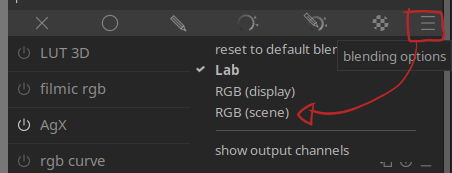
Used the AI object mask on the bird and branch, works well. Inverted the mask to use Blurs on the background.There was a faint edge/halo around the bill and belly area… Adjusted feathering as per guidelines and changed the blend mode for the background to “harmonic mean”. It “removed” the halos and edge. Applied Tone and Contrast Equalizer modules and slight color calibration.
Edit done in Darktable running Zorin OS 18.1 (Linux)
To me, it still looks like there is some halos around the bird, especially above the bill and the ruffled feathers near the tail. The background also looks like it has quite a few artifacts (blue splotches against gray?)
Geometric Mean is like Average, but it leans towards the lower of the two values.
Harmonic Mean is like Geometric Mean, but it leans a bit further towards the lower value.
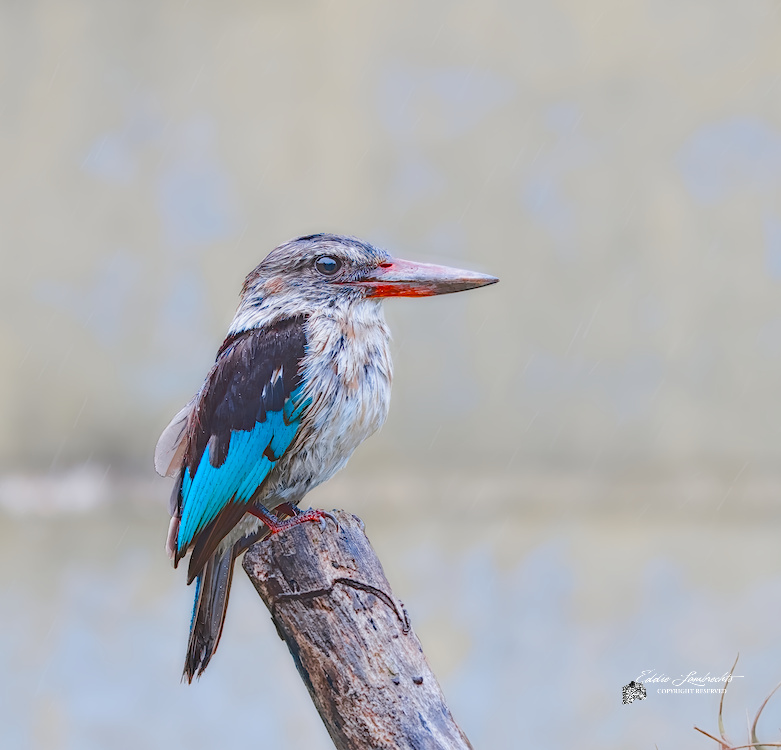
Its’s quite possible for some faint halos around the tail, bill I don’t agree with. I don’t see blue(ish) splotches against the background. I colour calibrate my screens. The background is a grayish precast cement wall.
Plaing with these can really change the outcome of the adjustment…but one quick one I have found if I generate a halo is I just pull up the edges refinement to be level wiht the smoothing diameter…so assuming its still at 5% I just do the quick change to bump that up or if a smaller or larger change works go for it…
Thats a sort of quick fix and it often is all that is needed…but do experiment with these sliders…
In this instance I’ve used only 2 masks, viz object mask on the bird and then the inverse of it for the background. I would guess the remaining halo is from the object mask as I could not reduce the feathering sufficient. When moving the edge of the mask inwards on the bill, the feathering reduced the detail and edge of the bill. Drawn masks are more controllable I find. I’m still fairly new to DT, approximately 2+ months. Still need to improve on the refinements.
It’s a good reason to never use it IMO any algo that produces halos should be completely avoided in this day and age, there are almost always alternatives which do not produce any halos and look better as a whole
It is more subtle than what you are saying. The algorithm itself (guissain blur) does not create halos. However with a mask, you get a perception of a halo, cause the pixels that are under the mask, are bleeding (as they should) into the pixels under the other side of the mask, causing a perceived halo.
For what it’s worth, I think you’re learning the tools pretty well! But I’d like to suggest that it’s much more worth it to put in the time to take photos that need more subtle editing, rather than put a lot of effort into using all these fancy tools to edit to this level. I think if a photo needs such complex processing at this level, then it’s more of a sign to improve your fieldcraft rather than your editing. As is true in many disciplines, less is often more…