RasterFlow 0.1.5 — new release is out!

RasterFlow has a new update focused on improving interaction flow and cross-platform reliability.

What’s new in 0.1.5:

  • Infinite graph panning for smoother navigation across large node setups,
  • New universal scale widget used across all numeric properties, improving precision and UI consistency,
  • Windows compatibility fix for conflicts with GIMP related to BABL_PATH and GEGL_PATH,

This release makes everyday work with RasterFlow more comfortable and predictable, especially on larger graphs and multi-platform setups.

Download RasterFlow:

5 Likes

I’m very curious if this version works correctly for other users on Windows 10 (I had to find a workaround, but I don’t rule out that my Windows 10 settings/configuration might be the cause).

A few requests for the author to consider my suggestions:

  1. Add the ability to launch RasterFlow by dragging an image to a desktop icon (most image processing programs have this functionality) and from the “Open with” context menu. Dragging onto an open program window is great, but (in my opinion) it’s insufficient for using Shellout (a RobA plugin for invoking other programs from the GIMP 2.10 and 3.2 menu).
  2. Add icons to the program bar that create a start (file loading) and end (preview) graph.
  3. Add the ability to select the background color, interface font, line connecting graphs, and a global color for all graphs (with the option to preserve the selection across restarts).

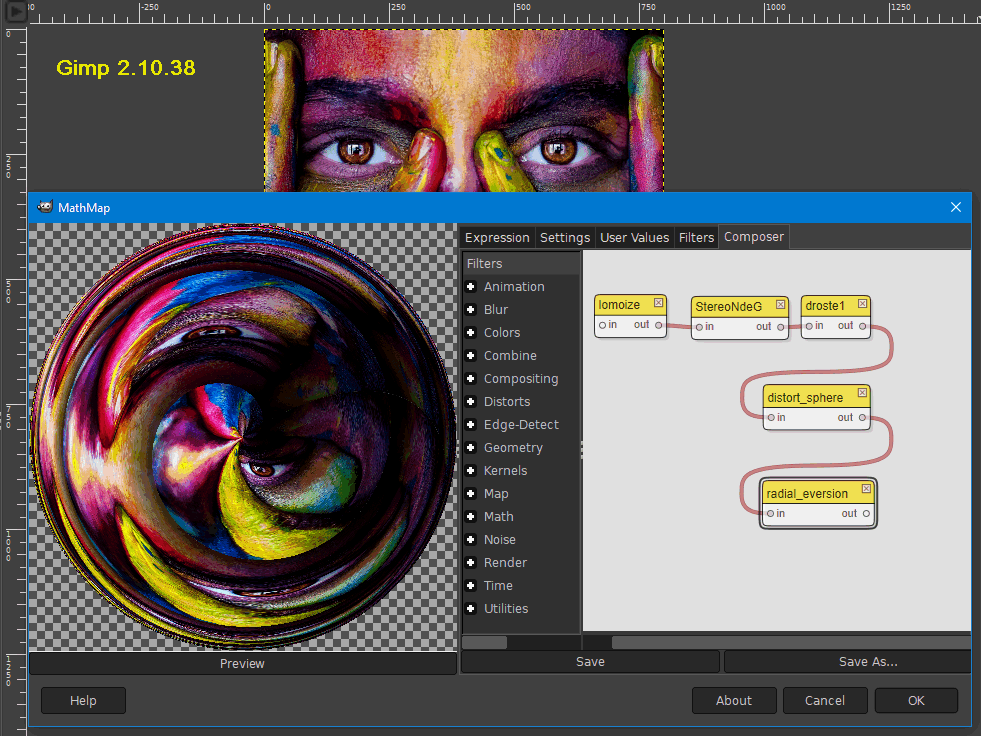
I am sure that in the next versions (especially with G"MIC) RasterFlow will surpass the capabilities of the iconic MathMap:

1 Like

Oh, I didnt know MathMap, need to check it out, thanks!

I will check whats wrong with win10 build, no worries, but first i need to find some time :wink:

All the features you suggested are cool :slight_smile: Thanks!

Any chance of getting a node that can load and use CTL scripts?

Humm… Can I ask you to shed some light on what CTL is and where I can read some more about it? ;> thx

Absolutely: GitHub - ampas/CTL: The Color Transformation Language (CTL) and https://www.oscars.org/science-technology/sci-tech-projects/color-transformation-language

The editor ART implements CTL, and its pretty cool

https://artraweditor.github.io/Luts

2 Likes

Okay, so I need to say I’m not sure what it exactly does but I’m not saying no :slight_smile: If it would be possible to implement it as a GEGL plugin then who knows, but most probably not for now.
Anyway thanks for the suggestion tho! :slight_smile:

1 Like