RawTherapee - Selective Editing - Common Color Mask

I’d like to start a discussion about the Common Color Mask tool in the Selective Editing tab of RawTherapee, but focus the conversation on how to use this tool to best advantage on a single image, or perhaps a small group of images. Is this best suited for PlayRaw or here, do you think?

Terry

1 Like

Perhaps an actual image to kickoff this topic is needed, rather than a question. My aim is to learn how to achieve the stated promise in RawPedia that the Common Color Mask (CCM) tool can be used to “change the … contrast, luminance, color, [or] texture” of an image. If we all stick with this one image I believe it would be easier for all to understand the process. Please reply with your own PP3 file to help me and others understand how you achieved your CCM result. Thanks!

Terry

X9065781.ORF (18.5 MB)

This file is licensed Creative Commons, By-Attribution, Share-Alike.

3 Likes

Hey @tbransco I’ve been reading Local Adjustments - RawPedia and trying to understand… and change the colour of the letter ‘E’. I kind of get it, but have no results to show you… Can you give me 5 to 10 words on what I am trying to achieve please?

I appreciate I am at least trying to use the…

I’m a novice still… but trying to learn, and help… :blush:

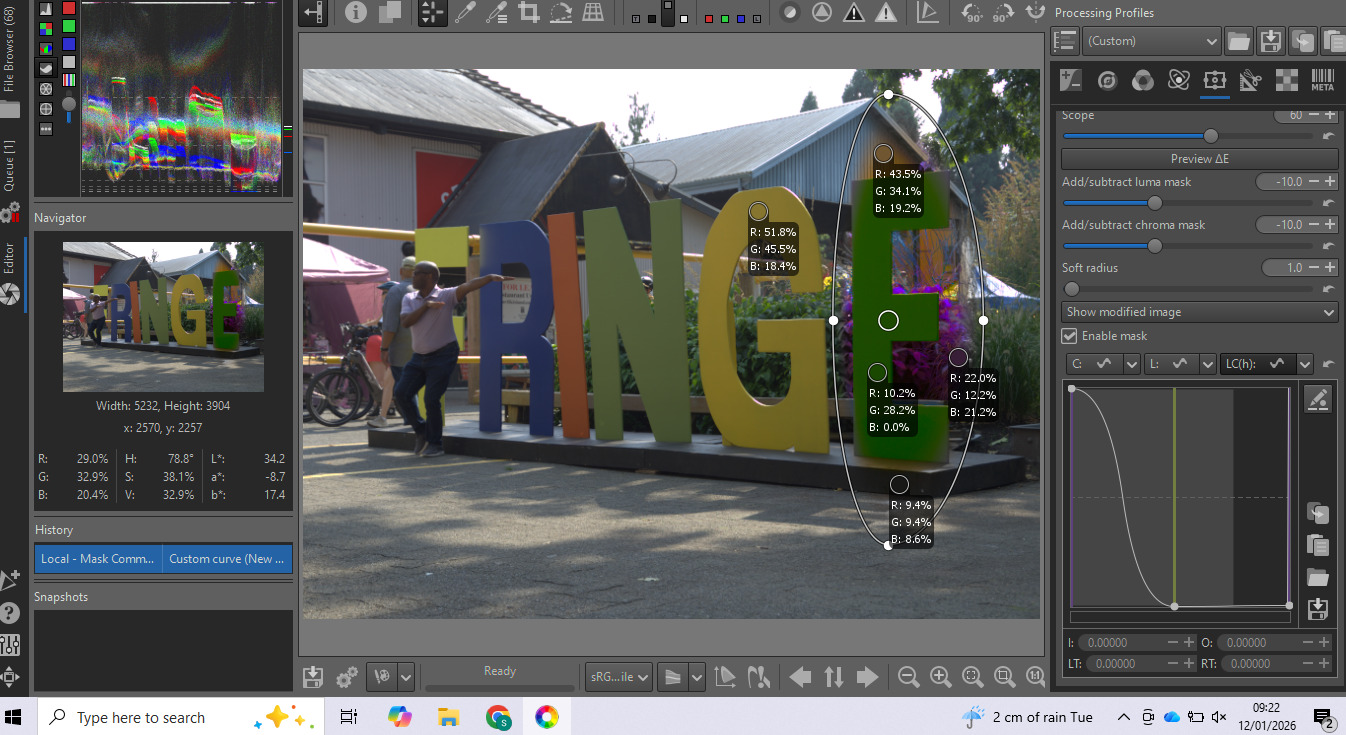
Here is a screen shot… But it’s all gone a bit wrong…

Thanks for getting in on this little exercise, @SCHA . My aim here is to learn what CCM can do, and what it cannot. The RawPedia example does not really explain what is going on and what all the tools within CCM are there for, so this thread is, I hope, about fleshing all that out. One way to begin is to pick a goal like you did, and see how CCM measures up.

The LC(h) mask you’ve highlighted is a great place to begin. What exactly does the vertical gray/black line on the curve represent? My reading of RawPedia is that it’s related to the delta-E of the spot and delta-E is comprised of hue, chroma, and luminosity; but, the line is clearly not located on a hue that matches your spot. The line is also located at a different spot than the lines in the other two masks, C(C) and L(L), so, what does that tell us about the relation between the line’s position and delta-E? I can’t begin to guess. In the case of the C(C) and L(L) masks, the line’s position seems to represent the input C and L values respectively. Why and how is the LC(h) mask different?

Another basic question might be: why does your curve produce the result it does?

Hopefully, someone involved with the design of the LC(h) mask will chime in soon. Cheers.

Terry

Ok, that gives me some good perspective, and challenge to work with. Thanks.

I’ll see if I can spend a bit more time tomorrow morning… But I have to go into the actual office and talk to colleagues…

Otherwise I’ll have a play on Wednesday… :+1:

In the meantime, I believe this thread from 2024, and in particular the example provided by @marter is a good place to start for understanding what the LC(h) curve is (and is not). I’d be interested to hear your take on that discussion as it relates to where we are in this one.

Cheers,
Terry

in the thread you are pointing at, i demonstrated the power of the scope-slider, which is still my favorite of “masking” the local edits and I must admit that i am not yet into the common color masking tool itself. Maybe @jdc could help out with an example?

Thanks, @marter . I’m hoping this thread can - eventually - serve as a bit of a temporary howto for the CCM tool until RawPedia is readily available again for editing.

Any thoughts on how your 2024 example of the LC(h) curve actually gave you the result it did? You placed your spot on blue sky, but the point you pulled down on the LC(h) curve was green, not blue. I find this very confusing and not really covered anywhere (in my reading, anyway). Thanks.

Terry

Well I’m all done… I’ve learnt a lot about masks, scope and spots… But I can’t fathom CCM. Color & Light, Shadows etc… to some degree… but not CCM. I’ll wait for others to add something helpful… sorry I can’t oblige. :confused:

Hello everyone.

I’m not going to perform any ‘miracles’ with masks in Selective Editing. Just so you know, I added them because I was asked to. It was a lot of work… Personally, I never use them, either for personal projects or for tutorials. Except in the case of Capture-sharpening (which is generated automatically) or in a few cases for “denoise” or “blur,” but these are associated with the specific tool.

RT’s masks are inferior to what exists elsewhere (RT, ART, and of course GIMP or Photoshop). They could be improved somewhat easily (by copying a little bit of ART, for example) , but making them compatible with deltaE and the principles of Selective Editing is a challenge I can’t tackle alone (at least at the GUI level… remember, I’m not a computer scientist at all, but a scientist…). If anyone knows how to do this with a mouse, it would be a significant advantage for Selective Editing by adding the ability to draw polygons (which must meet the algorithm’s requirements).

I remain convinced, though you’ll certainly find cases where it doesn’t, that Selective Editing, as it stands, solves 95% of problems if you master it. And contrary to what I’ve seen elsewhere, it’s not “incomprehensible”… We work in “positive” mode instead of “negative” mode. As a reminder, masks originated from what was done under the enlarger. Given my age, I’m approaching 80, I remember that era (black and white, slides, color negatives…) and did everything in my own darkroom. I never found working in “negative” mode intuitive… even when I was 20 or 40.

One of the major problems with Selective Editing is the graphical interface of the “Settings”… a significant improvement was planned a few years ago, but it would introduce a loss of compatibility. So we have to make do.

The specific problem with “common” masks also stems from a demand… why a mask for each tool? The common mask has some particularities for mask enthusiasts, but with the limitations I mentioned. I’ll take a look, without touching the code, to see if I can offer anything, but no promises.

Jacques

1 Like

Thank you for weighing in, @jdc. Just to avoid any misunderstanding, I created this thread in the hope that others who use the CCM tool could share their insights on why and how to use it ‘as is’, i.e., my aim is to ‘master’ CCM and all the other tools in RT that you’ve so generously and ably created and improved. If there was a lifetime achievement award I could nominate you for, I would not hesitate.

Terry

1 Like

Hi Terrence, yes it is confusing. I tried to reproduce, but wasn’t able to. What i found out:
The LA-tool i used was “Color and light”. The LC(h)-curve shown in my example didn’t have any impact. Since my goal was to show the power of scope, i must have had reduced the chromaticy for this spot.

Sorry for the confusion…

Thanks, @marter. This thread is about the limits of CCM as well as its possibilities, so your clarification is very helpful. Hopefully, someone can shed more light on why the LC(h) curve is designed the way it is.

JDC’s recent comment seemed to suggest that the CCM tool, while described in RawPedia as a tool in its own right, was developed, at least partly, as a response to criticism that each tool duplicated the mask functions. As such, the CCM masks were always intended to function in combination with other tools. If that was obvious to everyone else, I apologize for being a little dense on the subject. At any rate, it seems to be a step forward for this thread.

Terry