Over the years, my approach to sorting and organising photos has been… well, chaotic. As a result, I’ve got photos scattered over multiple drives, with various different attempts to organise them started and abandoned.
I’ll have duplicates all over the place, including renamed files, and probably ones with incorrect exif data.
A mess, to put none too fine a point on it.
What I want to try to do is consolidate my various different dumps into a single directory structure (ye olde YYYY/MM/DD/<file_name>) which I can then work through to curate and prune more fully.
I want to minimise risk of target filename clashes resulting in lost/overwritten images, and to avoid re-importing binary identical images time and again…
I figure I can’t be the only person to look for help on something like this – any suggestions?
Copy everything to a new big (2* space needed) hard disk
work on this disk. use dupeguru for finding and deleting dupes
try with exiftool from command line (i think there are examples in the man page), or with iirc rapid photo downloader, to import the “big mess” and organize it into YYYY/MM/DD folders.
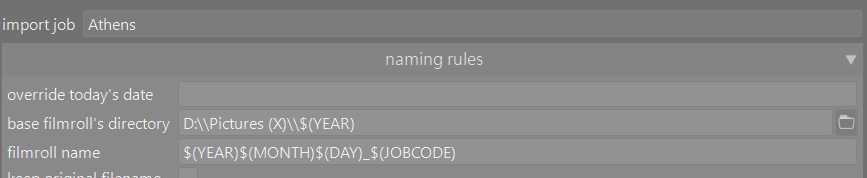
I personally approached this problem using DT to copy and import Into folders based upon year and then day. I then sorted these for duplicates. Now when copying from camera I use a jobcode for clarity. In the screenshot here the jobcode is Athens because I was downloading images shot during a day in Athens recently.
DT let me compile and sort images from external drives, computer c drives, CDs, DVDs, USB sticks and other sources. Over 20 years of mess organised just with DT.