a0.gmz stores a 32-bit linear float image of One of if not my best Photograph. exported by PhotoFlow. Although slow, I normally don’t have any issues processing it. The error happened when I did colormap 0, which I rarely use on large images. Not easy for me to test. It takes an inordinate amount of time to run this command. I tried it on another similar file just now. It hasn’t stopped running and I can’t keep it running, so I aborted it. Hope you find a solution. bad_alloc doesn’t sound good.
It simply means, the program tried to allocate a certain amount of memory and didn’t get it.
I know and don’t like it. I want it to work. 
Typos
retinex: Is offset 1 or 5?
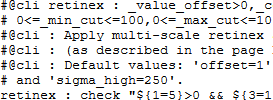
Again, which is it? Is scheme 0 or 3? Verified that it is 0. Should it be? What do the others mean?

Feature request?
Thought of what may be a useful command at least for myself. Even though I am familiar with my own commands, sometimes I want to check the text files containing them. Wouldn’t it be neat if I could somehow see the code printed out in command line? Or even better, view code written by others without going into my browser, etc.? That would save a lot of time. So, something like help but for displaying or browsing code.
I guess the trend of my recent questions is about displaying useful and easy to read info in the command line space. 
I use Kate to look at updatexxxx.gmic file to see others code. The only issue is that I have to press tabs sometimes to make code clearer.
Maybe $$command might help you?
e.g.
gmic e $$gradient_norm
[gmic]-0./ Start G’MIC interpreter.
[gmic]-0./ e[^-1] “Compute gradient norm of image$?.” repeat ! l[>] g sqr s c + sqrt endl done
[gmic]-0./ End G’MIC interpreter.
Still it is only helpful for custom commands, internal commands show no output (like gradient), there is no script!
1 Like
Website issue. When I key in gmic.eu, I sometimes go to http://gmic.eu/ and then Firefox warns me about an insecure connection. Looks like the website sometimes resolves to http instead of https.
Awesome!
Any chance of a short example for https://gmic.eu/reference.shtml#nn_new_fullyconnected ?
@zyx Welcome to the forum! @David_Tschumperle is just getting started. I would also like an example when it is ready for one.
Bug hunting Both have (no arg) options:
gmic + r=1
works but
gmic sp r=1
doesn’t.
Fixed.
New in 2.8.1 :
As you may know, G’MIC defines its own script language and embeds the corresponding interpreter. In upcoming version 2.8.1, a special running mode will be added in G’MIC, allowing gmic to implicitly generate an entry point in a .gmic file, so that including such a file with command input automatically runs the code defined in the entry point.
This mode is activated only when gmic is called with a single argument, which is the .gmic file to consider, i.e.
$ gmic test.gmic
In this case, if test.gmic contains some code defined outside the body of some user-defined commands, then it will be considered as a part of a new implicit command _main_, and executed after loading the file.
Moreover, on Unix systems, you can use a Shebang line in test.gmic and make it directly executable (just as you can do it with python or php). For instance, define your file test.gmic like this:
#!/usr/bin/gmic
# This file can be made executable.

echo "Starting entry point"
if date(3)==1
  echo[] "\nIt's monday !\n"
else
  echo[] "\nToday is not monday !\n"
fi
echo "Exiting entry point\n"
And then, on Unix :
$ chmod a+x test.gmic
$ ./test.gmic
[gmic]-0./_main_/ Starting entry point

Today is not monday !

[gmic]-0./_main_/ Exiting entry point
On other systems (that do not support Shebang), you can get the same behavior with
$ gmic test.gmic
You can see in the first and last echo output on the command line that you are indeed running code in a newly created command named _main_.
If you want to debug such a script file, you have to explicitly call _main_', because if you activate the debug` flag on the command line, you are not in the situation of the special running mode, so:
$ gmic test.gmic _main_ debug
In you are interested, you will find some example of such executable files here :
1 Like
- 2019/12/19 : Release of 2.8.1.
Well, I asked afre whether it’s possible to blur by image instead. It’s not possible to do $ . blur.. . rm. without errors. I really would like to know what this would look like, and what interesting effect can this give.
EDIT:
For reference - This is how it would look like:
Target Image

Applied Blur by image

2020/01/06 :
[gmic-qt-282] New filter Repair / Unpurple removes purple fringing from photographs. This is a port of GitHub - mjambon/purple-fringe: Removal of purple fringing from digital photos by new G’MIC contributor, Stanislav Paskalev.

3 Likes
Hi David,
trying again to make dt use the compressed lut GMIC feature.
I don’t succeed in making the cmake command find_package() retrieve the G’MIC version.
Should that work ? Is there any known issue about this ? Any advice ?
(currently testing on Debian 10).
Thanks
I’ve really no clues about how cmake work, so I won’t be of great help here, but … 
I know at least one way to get the G’MIC version number, with a call to gmic, so it may help finally :
$ gmic v 0 echo_stdout[] \$_version
282
If you know how to retrieve this result in cmake, then it should be ok ?
This, for instance:
$ VER=`gmic v 0 echo_stdout[] '\$_version'`
$ echo $VER
282
Thank you for the quick answer. At least we can check the version at run time.
Making progress but …
g_instance.run("v 0 echo_stdout[] \\\\$_version");
gives
\281
while
g_instance.run("v 0 echo_stdout[] \\$_version");
gives
$_version
Any idea ?
So, probably :
g_instance.run("v 0 echo_stdout[] $_version");
is OK. I’ve added the backslashes because I was calling this from a bash console.
Great, that works. Just have to redirect the standard console now.
Thanks