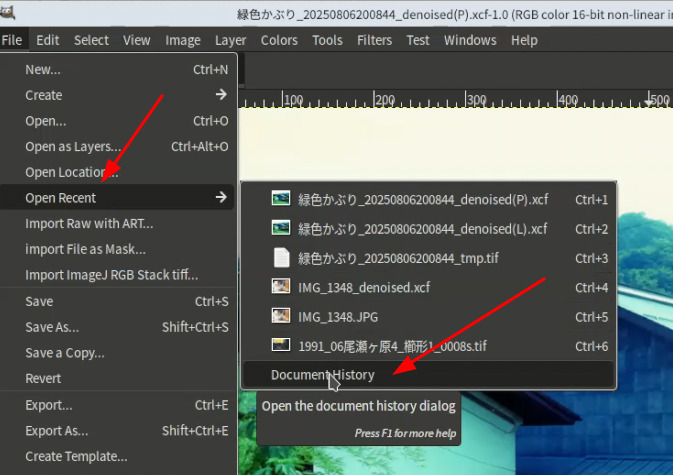
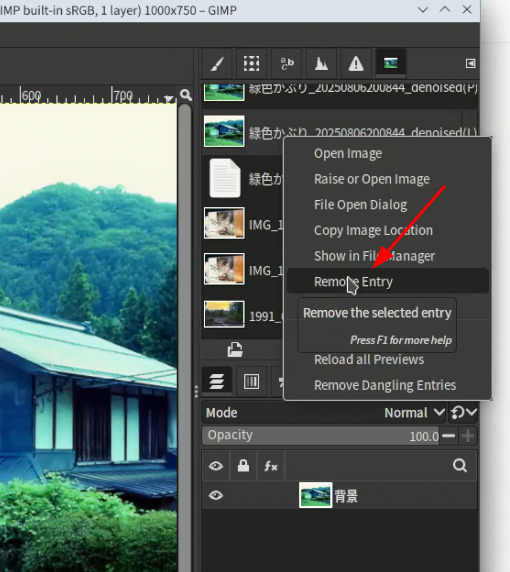
Hello, I cannot seem to find a way to delete images when they appear in the “open” screen.
There are a few images on that screen that I am done editing, and would like to remove them from that screen so I dont see them each time I “open” an image.
Its top left: File, Open,then go up to Open Recent. I have a few images in there I have worked on and want to now remove from Open Recent.
When I click on any image under Open Recent, there are no options like you show.
The only options are:
Visit File
Open with File Manager (shaded)
Copy Location
Add to Bookmarks (shaded)
Then the following with boxes to check:
Show Hidden Files
Show Size Column
Show Type Column
Show Time
Sort Folders before Files
I’m still unsure what you are trying to achieve. You edit your picture. Save in GIMPs format or export it. When you exit GIMP you are asked to save any unsaved edits. During an editing session you have a series of thumbnails at the top of the screen. To remove these now rather than wait until the end of your session you can click on the X or right mouse and delete. Knowing GIMP there are more than one ways to carry out a task.
I rarely use GIMPS file format so it could be that’s the reason photos are waiting for you to finish off by exporting them.
You are correct as to what I am trying to clean up. Sometimes after i edit the image njust doesnt look right, so I just want to remove from recent open. I will try what you suggest .
Thank you
Hi,
I confirmed in my PC running Windows11 that even raw files are displayed in
document history dialog and they can be deleted from Open recent list in GIMP3.