Reveal: An open-source spot-color posterization engine (looking to escape Photoshop)

Hi everyone,
For the past couple of months I’ve been building an open source posterization and spot-color separation engine called Reveal, in collaboration with Claude (Anthropic) and Gemini (Google) — AI pair programming, not AI-generated art. We just released v1.0.0.

It was built specifically to solve a mechanical problem in screen printing and risograph: taking full-color continuous-tone images and separating them into a limited number of flat, printable spot colors without relying on digital halftones or CMYK workarounds.

The Tech / How it Works
It doesn’t just do a dumb pixel count. The engine analyzes an image’s structural “DNA” in the Lab* color space (measuring lightness standard deviation, chroma boundaries, hue entropy, and spatial weighting).

Based on that math, it automatically routes the image to one of 28 built-in archetypes (25 strict profiles like “Film Noir” or “Faded Vintage,” plus 3 adaptive “pseudo” profiles for edge cases). It then clusters the palette and outputs separated layers.

The Catch (And why I’m posting here)
Right now, the tool is packaged as a Photoshop plugin (built using their JS/UXP architecture). However, the core logic is written in dependency-free JavaScript that reads like pseudocode — no frameworks, no Node.js APIs in the core, just pure math. This makes it straightforward to port to any language.

I would love to see this ported to GIMP or Krita, but I’m not well-versed in GIMP’s Python architecture or Krita’s PyQt environment.

I wanted to drop the repository here to see if any FOSS developers find the color science interesting enough to want to build a bridge or port the core logic over to the open-source imaging ecosystem.

Links:

Happy to answer any questions about the clustering math, the posterization algorithms, or how the archetype routing works under the hood!
2 Likes

it might be interesting to have a way to do duotone, quadratone images etc in open source software, I think photoshop can do this already but I think it is fairly lacking in open source land, I just found out that paintshop pro supports CMYK separations (I got a copy cheap in a humble bundle), then some printers like the HP indigo series support up to 7 or 8 colours I think, I guess the guys who run those with more than CMYK also have their own software for doing the separations, it’s not lofi artist gear really

Great distinction! Those extended gamut presses (HP Indigo, etc.) are doing process printing — overlapping millions of tiny halftone dots to simulate photorealism. Totally different world with proprietary RIP software.

Reveal goes the opposite direction: solid, flat, non-overlapping spot colors. It’s built for screen printers, Riso operators, and anyone working with discrete ink layers rather than process blends.

On duotone/quadratone — Reveal won’t give you the smooth overlapping gradient curves of a traditional Photoshop duotone, but if you set the target to 2-4 colors, the engine will map the image into the best flat-color plates for those inks. Different aesthetic, but that’s kind of the point.

Several years ago I proposed a posterization module for Darktable. There was a fair bit of discussion but it didn’t really take off. Do you think your algorithm / process could produce the sort of results I was looking for, and would still like to see? Here is the discussion - Idea for a new dt module - Posterize

There seems to be too many new ideas for the devs to cope with at present, but I’d be interested to know how easy it might be to implement your processing in Darktable.

Great question, and thanks for linking the original thread.

I built this as a separation engine for screen printing, not as a visual effect, though of course it can be used that way. While standard posterization is often about creative “lo-fi” quantization, Reveal is a production-grade engine. It handles perceptual color quantization in Lab space with archetype-driven palette selection, delivering separated plates ready for the press.

On the darktable question: Reveal’s core engine is pure JavaScript with zero external dependencies — deliberately designed that way so it can run anywhere. Porting the math to C would be straightforward since it’s all array operations on pixel buffers. The algorithm works on Lab data, which is darktable’s native working space, so there’s a natural fit.

The Technical Pipeline:

  1. Median Cut (Lab): Initial perceptual reduction to N colors.
  2. Centroid Refinement: Iterative k-means to optimize the palette.
  3. Nearest-Neighbor Mapping: Final pixel assignment to the optimized gamut.
  4. Production Trapping: (Optional) Expanding lighter colors under darker for print registration.

What makes it different from “posterize via tone curves” is that it operates on the full 3D Lab gamut, not per-channel. It finds the actual color clusters in the image rather than slicing individual channels into steps.

The core lives in packages/reveal-core/lib/engines/PosterizationEngine.js [link]. I’d be happy to help anyone who wants to take a crack at a darktable module; the math is well-documented and backed by 900+ unit tests.

Would you be willing to share the original hi-res versions of the images from your 2021 thread? I’d love to run them through Reveal and show you what comes out.

hi, thanks for the reply.

You might have noticed there are “playraws” in the forum and several of the images in my old thread were these, submitted by various people, and I can’t find them all now.

The photo of the old square is here - Help to improve skies using filmic and other modules.

This one I took - it was with the Uni-white-balance method so will need a good white balance to start with otherwise it’s all green.
_6D_11521.CR2 (27.2 MB)

That’s great if you’re happy to do some examples, and you can use any of the playraws you fancy of course.


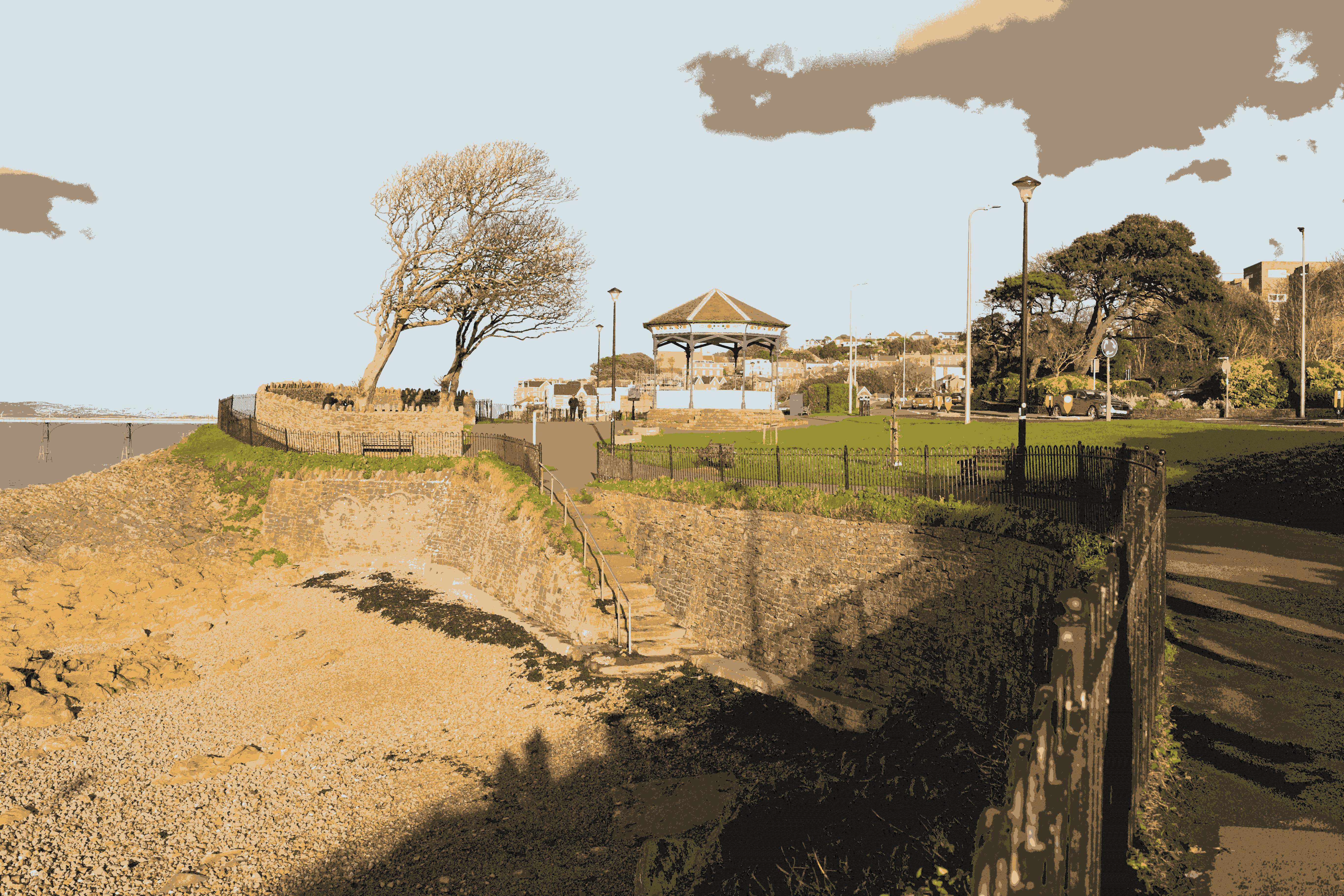
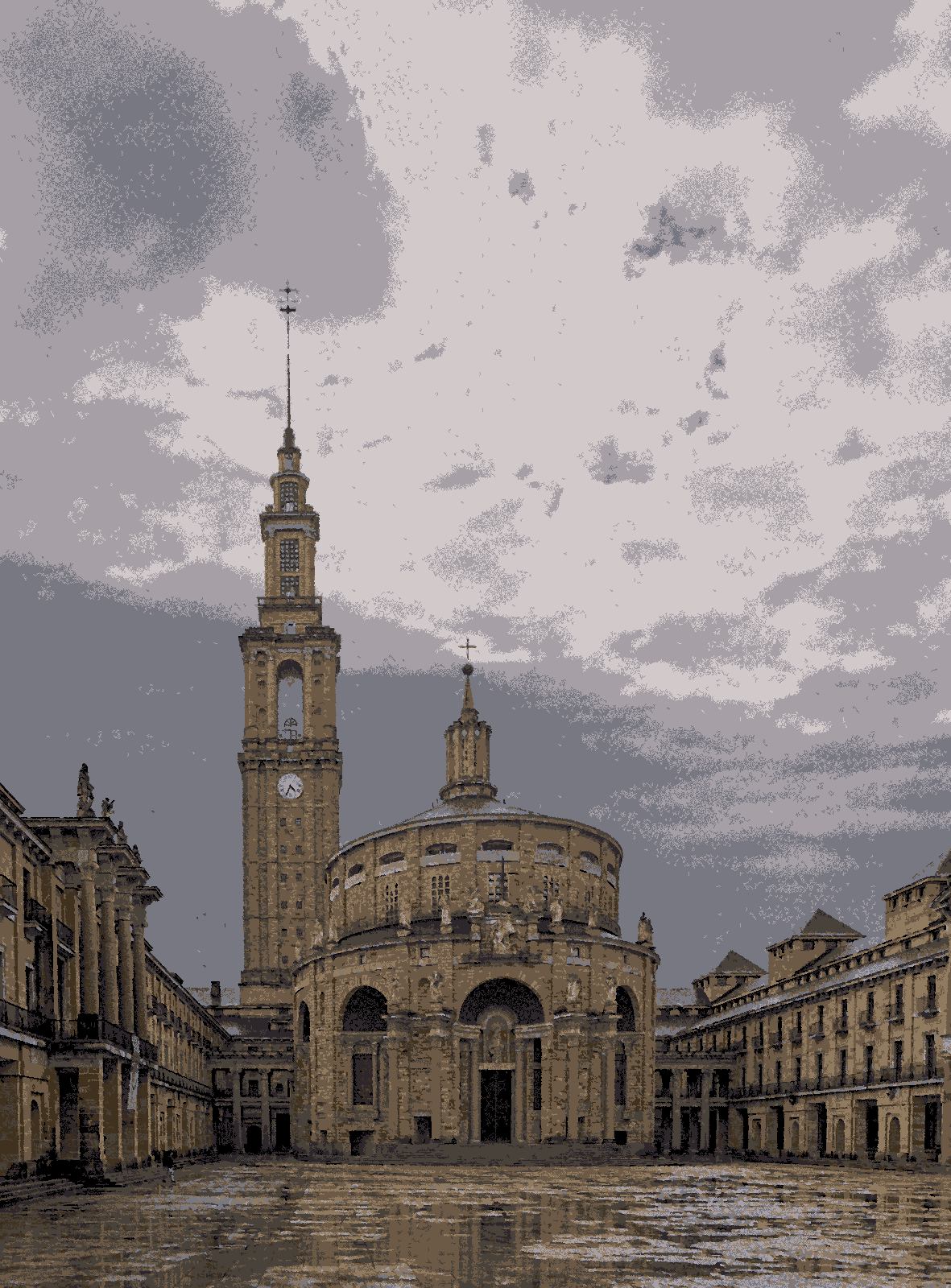
A 10 color posterization. This is flattened of course. I wanted to upload a .ora so you could see the individual color layers, but that’s not possible it seems.


A 9 color posterization.

Let me know what you think.

You inspired me to make a CLI which can be run via Node anywhere. You feed it a single pixel layer 8-/16-bit Lab/RGB image as PNG/TIFF/JPG/PSD and it spits out several posterization variants (in the GUI you can browse these interactively). The README for it is at reveal/packages/reveal-cli/README.md at main · electrosaur-labs/reveal · GitHub.

The dither module was renamed dither or posterize and extended to include some posterisation presets

Thanks again. I’ve had a go at the CLI but I’m somewhat out of my depth.
When I try to install, I get these two worrying warnings -

"npm WARN deprecated inflight@1.0.6: This module is not supported, and leaks memory. Do not use it. Check out lru-cache if you want a good and tested way to coalesce async requests by a key value, which is much more comprehensive and powerful.

"npm WARN deprecated glob@7.2.3: Old versions of glob are not supported, and contain widely publicized security vulnerabilities, which have been fixed in the current version. Please update. Support for old versions may be purchased (at exorbitant rates) by contacting i@izs.me

I did “npm audit fix --force” as suggested and got these -

npm WARN using --force Recommended protections disabled.
npm WARN audit Updating vitest to 4.0.18, which is a SemVer major change.
npm WARN audit Updating @vitest/coverage-v8 to 4.0.18, which is a SemVer major change.

So I don’t know what state it’s in now or whether it’s safe. It doesn’t look safe to me!

Thanks. It looks like this was two years later in June 2023 with 4.4. I don’t remember this. I’ll have a look.

Extremely sorry about that. Some development only dependencies got left in. If you wouldn’t mind please delete the clone directory and start afresh. The instructions are slightly different (the README has been updated).

  git clone https://github.com/electrosaur-labs/reveal.git                      
  cd reveal                                                                     
  npm install --omit=dev           

The npm install --omit=dev should now end with found 0 vulnerabilities.

You can then run the CLI from the root of the cloned directory via:
node packages/reveal-cli/bin/reveal.js your-image.png -o output/

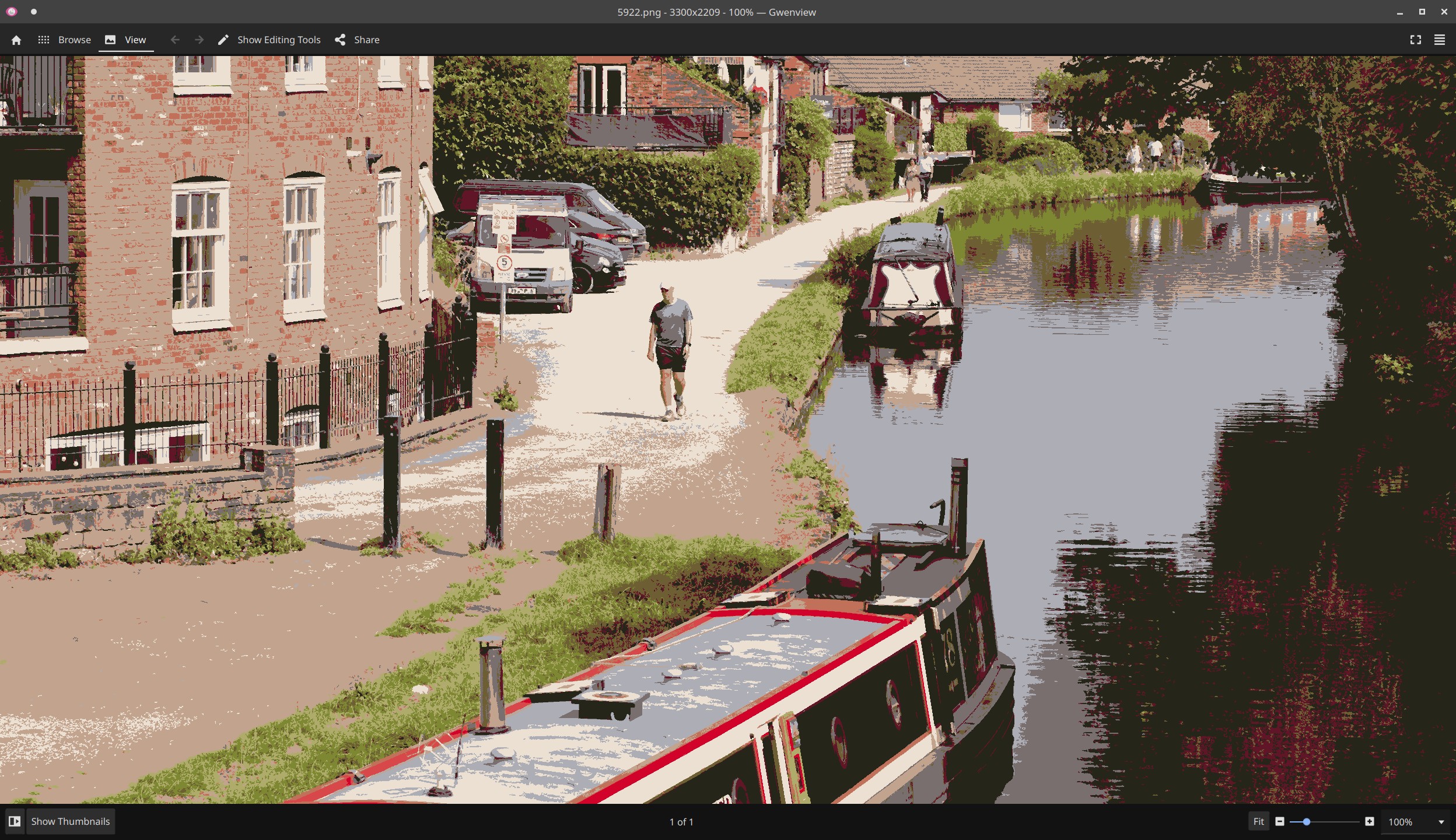
Thanks, that’s much better! I’ve had a quick look. I think it’s good, well done. So far I just ran the default action. One of the archtypes, zoomed in a bit -

I should have more time later in the week and I’ll try the parameters. Ghost plate, ink body clamp etc, are these standard terms in commercial printing?

1 Like

Great! Glad you’re able to access and run it.

No, those are our own names — the concepts are real but there’s no standard terminology for them in screen printing software. “Ghost screen removal” drops screens below a coverage threshold (a screen carrying 0.3% of the image isn’t worth burning). “Ink body clamp” sets a minimum printable density so you don’t get patchy, barely-visible coverage on press. “Speckle rescue” is morphological despeckle — cleaning up isolated single-pixel clusters that would print as dust.

Your canal scene looks good for a default run. Try playing with the knobs — shadowClamp might give the water reflections more body. In the UI you get to see how the posterization would look under different archetypes, edit the suggested palette by adding/removing/modifying the, get real time feedback via the preview to settings changes.

Looking forward to hearing how it goes with the parameter tweaking. The knobs make a real difference on images with lots of closely-spaced tones.

Reveal now has a minimal web UI - more friendly than the command-line tool, though not as flexible. It was fairly straightforward to create the web UI because its all pure Javascript.

If you’d like to try it out. you can either blow away your current clone (recommended) or run the following incantations in the clone directory

  git fetch --all
  git reset --hard origin/HEAD

Once you’ve updated your clone

  npm install --omit=dev
  npm run server

You can access Reveal at http://localhost:3700

See the README for the web UI.

You drag-and-drop or select the image file to posterize. You get back 4 possible posterizations. You can also posterize via other archetypes than the initial 4. Finally, you can export to a layered .ora, a flat .png, or a layered .psd.

Thanks for your efforts with this.
I’m busy this weekend but should be able to have a good look next week. I use darktable and not photoshop, so it’ll be the command line - this is good in that it gives access to all the parameters if I understand ok.

Do try the web interface if you can.