I searched the forum and the DT github and I didn’t find anything about this. If I missed some similar discussion, sorry. If not, here we go.
Duplicate manager is already very good working with multiple edits. I use it a lot, with almost any edited image. I first create a basic edit (color calibration, exposure, basic saturation, denoise and tone mapping).
Starting from the basic edit (duplicate 0) I create other duplicates and try different styles/moods, compare them and choose the best one.
Suppose I’m currently working on duplicate 1, the editing is finished and I need to start over a new copy based on the duplicate 0. To do that, I need to load the duplicate 0 first (double - click on it), then click on “duplicate” button. On my computer, this takes some time (ca. 5 sec).
I propose to add 2 new buttons (duplicate and original) for every duplicate, on the right side, and remove the two buttons on the bottom of the module:
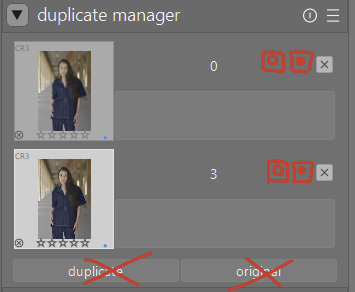
Doing so, in my workflow from above, when I want to start working on duplicate 2, I just need to push the button “duplicate” of the duplicate 0.
This way, creating duplicates will be a little bit faster and more than that, we save also a little bit space at the bottom of the module.
What do you think? Would it be useful to you also? Does this require big changes in code? Is this change easy to maintain?