How do I specify the location where the DT XMP files are retained?
change it in the source code 
darktable expects the xmp sidecar files in the same directory as the related image.
1 Like
As already stated, you cannot change the location, but you can turn them off completely. See darktable 4.4 user manual - storage
@irishconger … just don’t.
Really, you want the xmp sidecar files next to your image files.
Which you should not do unless you know exactly why - and having a “clean” folder is not an argument.
1 Like
Having the sidecars in the same directory as the image file, as ..xmp is the easiest way to guarantee a 1:1 correspondence between sidecar and image. And you need that guarantee to avoid nasty surprises.
Most other options to store sidecar files cannot guarantee that 1:1 correspondence.
(LR’s system of using only the basename of the image file to name the sidecar would cause trouble with dt if you store an exported file next to the original raw; imagine what happens when you import that exported file in dt…)
Or you have no choice…
Even then you can not guarantee… Having matching *.xmp files as RAW files is easy to eyeball - but the directory is irreverent. By now most file move/copy/delete programs allow split viewing of directory file lists side-by-side.
I would surmise that the majority of people run DT on Windows - although, development seems to be undertaken on Linux. But those that run/program on Linux run their systems like Windows. So there isn’t the imagination or need beyond a home Windows way of doing things.
I have encountered the same problem as the OP - and got the same response.
I have for over a decade - run a no storage Desktop + NAS home environment which has worked well. Though, the current NAS has limitations where export permissions are not granular and are set by mount point. Currently, that file share is limited to be read-only. In theory as DT is non-destructive it should work (and does minus *.xmp files). Upgrading the NAS to something more Unix’y is a future TODO. Saving *.xmp files to a different file share that can be writable would work well in this environment. Over the decade DT is the only software I’ve come across that has challenges running in this environment.
But I understand that 99% of people probably don’t run this way.
Going against a decade of use - I have succumbed and just purchased a new computer with storage. It should arrive sometime this week. The next challenge to solve is how to change the file paths in the database? Might need to dust off some SQL-foo.
That is truly a scary setup in my book - because with all due respect for the darktable devs, a single hiccup can destroy all your edits and metadata from all those years. And while I consider edits a fleeting thing, metadata is for eternity. Also, as you have discovered already, it makes your setup very hard to transport to a new system.
Honest question: how do you add new images to your NAS if it is read-only?
but a generic file manager program isn’t going to do anything with xmp files.
I wouldn’t, but there isn’t really a good way to count linux installs. Assumptions like this don’t do anyone any good.
I wouldn’t call this the “windows” way of doing things certainly, it is an application specific way of doing things and varies from program to program.
darktable is a non-destructive editor. I don’t see how you could consider a sidecar file as “destructive.”
Just turn off XMP writing and make sure you have a backup of your databases.
Shouldn’t be difficult, it is documented in the manual and somewhere in this forum several times.
2 Likes
It is only “scary” in relation to DT because of the assumptions that DT has made in how it will be used. For everything else I’ve ever had to do for now a decade - this environment has worked as initially designed/needed. Most other software allows you to save associated files or other metadata files separately from the source files. So far - it is only DT that has this limitation of assuming it has the ability to write anywhere.
Simply - the Desktop is considered untrusted and is a consumer only and is not part of the ingress path for anything significant or valuable. Photos are considered valuable. All ingress paths are treated separately and isolated as much is practical. The scanner for example has its own ingress path to the NAS. The small user home mount point is also considered separately. There are a few ingress channels to get photos onto the NAS. One is a dedicated WiFi transfer from the camera that doesn’t touch the Desktop, another is an old mini with the ability to wake-up when the SDcard slot changes state. It then determines if the SDcard is readonly and a camera card. If so - it calls back to the NAS and the NAS then pulls the data from the card to the required location.
Most people have got use to the Windows idea that the Desktop has unfettered access to data whether local or remote. People are use to the “convenience” and spend a lot of time trying to mitigate when things go wrong either accidentally or maliciously. So in my environment for valuable data - I don’t have to worry as much as the Desktop cannot modify anything either accidentally or maliciously. I haven’t gone to the extent of Qubes OS - but my environment has worked for a decade well enough.
But I understand that 99% of people probably don’t run this way.
1 Like
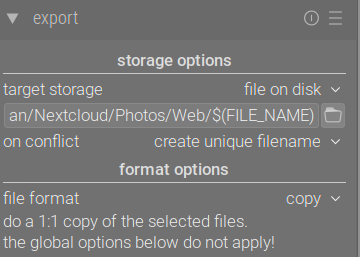
I’m not going to comment in your opinions around how to handle your NAS, but you can setup darktable to export as Copy. This will create a copy of the raw file and the XMP at that moment in time. Send this export to the portion of your NAS that has write access.
1 Like
Well, and RawTherapee (and ART) (edit: they are actually configurable). And DXO. And, it seems, Lightroom Classic, too. And ON1.
1 Like
What about creating ‘local’ copies for the edits, from which you could sync the sidecars to a directory of your choice? You would need to do that manually, as darktable would still want to write the sidecars to the images’ location.
The local copies are stored in (configurable) cache directory. However, the filenames are badly mangled, so this may not be easy at all:
Local copies are stored within the
$HOME/.cache/darktabledirectory and namedimg-<SIGNATURE>.<EXT>(whereSIGNATUREis a hash signature (MD5) of the full pathname, andEXTis the original filename extension).
https://darktable-org.github.io/dtdocs/en/overview/sidecar-files/local-copies/
1 Like
But just demonstrates the thinking “it must be this way - because it has always been this way - despite the consequences”. It is why for example in 2023 we still have news articles of data being held to ransom. A small change in the mindset of how data should be created, moved and consumed and it is no longer a problem while still allowing ease-of-use.
I also use RawTherapee - I was using RawTherapee before I came over to DarkTable. RT allows you to save the *.pp3 file where ever you wish. So was never a problem.
For the other software - I haven’t used. If I’m not wrong - DXO and Lightroom are Windows based? So I still hold my opinion of the Windows mindset causing problems - past, present but hopefully not future.
Thanks for this. Yes - I do this for the images I contribute to RAW Play as I can then export the *.xmp file for upload. It is a solution for small number of images which I need to share. Not really for the large on-NAS library.
For the images I upload to RAW Play - you’ll see “darktable_local_copy” in the EXIF text in the white border of my uploaded images. 
Ah yes, sorry, it can be changed, indeed: Preferences - RawPedia
I have not used RT for long, and always had my PP3 (and, before that, PP2) files stored next to the images. I stopped reading too early, after I got to
Processing profiles (with a PP3 extension for version 3 or PP2 for the older version 2) are text files which contain all of the tool settings which RawTherapee applies to the associated photo. […] They are stored alongside their associated photos.
(Sidecar Files - Processing Profiles - RawPedia)
Still, it seems darktable is far from being the only raw processor to store the sidecars next to the input data – in fact, RawTherapee (and, I presume, ART) is (are) the exceptions.
1 Like
This was in response to the @rvietor - regarding " easiest way to guarantee a 1:1 correspondence between sidecar and image"… The easiest way to guarantee there is a 1:1 match is to eyeball that there is indeed a 1:1 match. Slightly less easy is to script it. My point is that the directory is irrelevant as you can verify either by sight with most modern file manager programs or via a script.
I disagree. The paradigm of a monolithic software application I fully attribute to the Windows way of doing things. As Windows is what people know - the paradigm lives on in how an application makes assumptions on how it will be run when it is developed. In many cases based on what came before or what is already popular - typically something Windows focused. Doesn’t mean that it is the only way to do things - as RT demonstrates.
I don’t - which is why it works at all in the environment. The sidecar file is not “destructive” but it shouldn’t assume it can write anywhere it likes.
This I do - mainly to avoid the constant error prompts every time a control is touched.
I suspect you are right - I don’t expect this to be too onerous. Though, I didn’t find any detailed discussions on this forum? The manual entry is here and will be my first attempt:
https://darktable-org.github.io/dtdocs/en/module-reference/utility-modules/shared/collections/#updating-the-folder-path-of-moved-images
If the above has hiccups regarding mount points - I will try following a more direct approach…
Although, it has been a few years since I had to touch any SQL.
Thank you all for the lively debate.
I received the response I needed; I can specify the location where the DT XMP files are retained, namely (only) in the
same folder as the RAW (in my case NEF) ‘pictures’ are placed for processing (by DT).
Alternatively, I can configure DT to suppress producing XMP files.
I consider the latter ‘solution’ to be ignoring one of the benefits offered by using DT.
For those who wish to know, the background to my question, comes from the (perhaps outdated?) engineering adage of
INPUT —>> PROCESS —>> OUTPUT.
In this case, it is (IMO) unwise to mix the results with the input data.
My thoughts extend to long-time storage, where, in the farther future, there may be tools that go way beyond what we have now.
There, the presence of supplementary files may simply obfuscate.
My simplistic way of achieving that would be to place the XMP files in a separate ‘sidecar’ folder within the
folder where the RAW ‘pictures’ are placed for processing (by DT).
All of the above is derived from a simplified workflow I have adopted over years using LR.
This process integrates seamlessly with the simplified backup / archiving workflow I use.
As a one-man-show user, this is what works best for me. The weak link is (currently) LR, which works fine now (for me), but it is
losing attractiveness, when compared to a good open source tool like DT.
Yes, new tools will bring their own limitations. It just seems a pity to me that in the age when everything
is configurable, that something as trivial as configuring a path to a folder has been overlooked.
From the responses to date, it would seem there is a need for this.
The xmp is not an output. It is a recipe. An output would be an export to JPG, TIFF, JXL. That’s the desired outcome, a processed image. Otherwise why bother?
Can you describe how you are exporting only the xmp via LR? I’m not aware of a method for that.
1 Like
I wasn’t thinking so much about copying/moving the sidecars with their main files, as about how to make sure that the programs using the sidecars can be sure to find and use the proper one, even when you have seceral main files with the same name.
Problem is that DT (at least the 4.x.x. series I have recently used) isn’t that good with this either. For example if I make duplicates - DT will have the duplicate processing history for the original and duplicates in the database. However, when DT saves the sidecar file (during processing or manually) - it will save the last image touched under the primary image name. It doesn’t seem to be able to deal with one sidecar per duplicate. I have to manually rename for each duplicate. This is something that DT should handle automagically.