Hello Luca,
Is there a way to disable the Exif parsing into the stack?
I mean an option to do so at the very beginning (before pressing: run job.).
I have searched in the variuos menus to no avail…
Hello Luca,
Is there a way to disable the Exif parsing into the stack?
I mean an option to do so at the very beginning (before pressing: run job.).
I have searched in the variuos menus to no avail…
Hello Luca!
As regards the bug, occurring both on Windows 10 - 11 (reproduced on every version so far):
[INF] D850-TIFF-STACK-bunches: completed
[INF] D850-TIFF-STACK-focus-stack-pyramid: 4 files in folder: D850-TIFF-STACK-bunches
[ERR] === job: D850-TIFF-STACK-stack-job failed: No valid image files found ===
Job failed
which does not allow to select only a subset of images (TIFF or Jpeg) I have just discovered that it only occurs when you check the option to Create bunches
Whenever you do not check this option everything works fine.
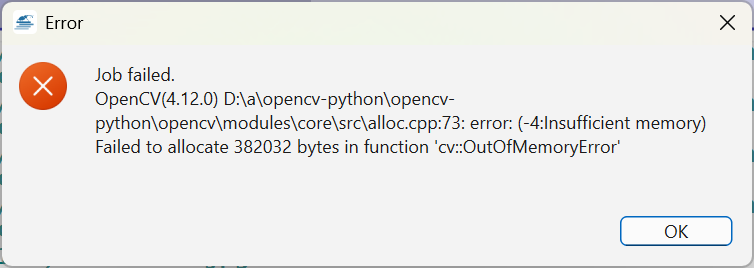
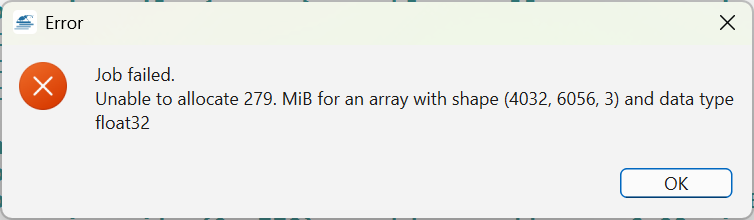
In this case, though, you are out of luck with big stacks of Jpeg - Tiff images because the software might run out memory 
While I investigate this “insufficient memory” issue, I tried to fix the EXIF issues and improve GUI options when saving:
This information was crucial, and I could reproduce this crash.
It should be fixed in release 1.9.5:
Hello Luca,
Just tried version 1.9.5
As usual on Windows 11 (32 gb of Ram)
Just tested to stack a subset of Tiff -16 bit images (“create bunches” is disabled)
Unfortunately the process fails:
Here is the full log (dropbox link as usual):
LOG
With further tests I have tried a subset of TIFF images with the “create bunches” selected.
This time it works flawlessly. Very good indeed
I have noticed a little bug, though.
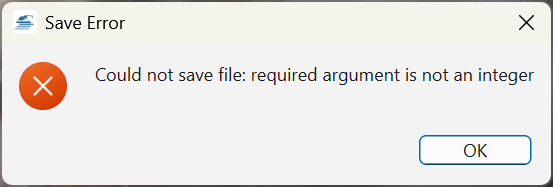
When you save the image as Jpeg an error always appear:
This jpeg image is saved but there are no Exif data inside.
EDIT:
Strangely enough, I have just noticed that the Exif data (exposure, ISO speed etc) are available in the retouch menus (e.g. File > Show Exif data).
Unfortunately, they are not saved into the image (jpeg)
Tested various NIKON stacks (from TIFF of Z6-iii, d850, D700)
Silvio, your feedback is very valuable because it helps me discover any corner of possible failures of Shine Stacker. On the other hand, it is really frustrating to see that there are all the times new bugs, and we never reach the end of the story.
Nonetheless…:
As usal, if you could pass me your new images maybe I can try to reproduce the problem. It looks like a memory or I/O issue this time that I have never encountered so far.
In the meanwhile, if you try to reduce the max. number of cores and/or max amount or RAM in the stacker module maybe it could be a temporary fix.
Concerining the “required argument is an integer” problem, I can try to reproduce it and make Shine Stacker tolerant about this error, though I thought I added enough protection, but it looks like it was not enough…
Hello Luca,
it is really frustrating to see that there are all the times new bugs, and we never reach the end of the story.
If I might crack a joke: “A software is bug-free as long as there is only one developer (its creator) testing it”
For instance: Just checked the GIMP gitlab web page: 2676 open issues (after 30 years of development); or QGIS github web page: over 5K+ open issues (after over 20 years of development).
All in all, Shine Stacker is already quite stable (on the whole…) considering it is quite a young project. IMHO.
Hello Luca,
Here is the link to download 4 Tiff images (16 bit):
TEST_FILES
The stack works fine.
The EXIF data are available if you check through: File > Show Exif
But…
When you save the image as JPEG the Exif are not saved and an error message appear:
Could not save file: required argument is not an integer
The jpeg image is saved, though. Only its Exif are missing.
ExifTool Version Number : 13.39
File Name : prova2.jpg
Directory : C:/Users/gross/Download/Z6-IIII_LAOWA_TIFF_SHINESTACKER
File Size : 16 MB
File Modification Date/Time : 2025:11:10 20:53:06+01:00
File Access Date/Time : 2025:11:10 20:57:45+01:00
File Creation Date/Time : 2025:11:10 20:53:05+01:00
File Permissions : -rw-rw-rw-
File Type : JPEG
File Type Extension : jpg
MIME Type : image/jpeg
JFIF Version : 1.01
Resolution Unit : None
X Resolution : 1
Y Resolution : 1
Image Width : 6056
Image Height : 4032
Encoding Process : Baseline DCT, Huffman coding
Bits Per Sample : 8
Color Components : 3
Y Cb Cr Sub Sampling : YCbCr4:2:0 (2 2)
Image Size : 6056x4032
Megapixels : 24.4
BTW, the same Tiffs images are saved correctly as Tiff and they have their EXIF data (shutter speed, ISO etc).
Therefore it is only the JPEG which is at fault.
EDIT
As regards the other bug (unable to allocate…) I could only reproduce it with BIG stacks. With small stacks (a few imags) everything works fine.
Hello Luca,
From the very beginning of my tests I had a question…
What’s the use of the option to “NOT Create bunches”?
In short, when you are supposed to prefer it?
I have just tried with a big stack of 80 Tiff 16 bit images and the software ran out out memory. On the contrary, with “Create bunches” everything works fine.
Therefore, why the option “Create bunches” is not the default one?
The EXIF issue in TIFF → JPEG conversion is fixed, now I’ll try to work on the other issue, but I have to reproduce one of your very large stack…
Do you have a set of your problematic images?
Indeed, I don’t know why you run out of memory. I can run >200 frames without problems, but it is possible that with a different resolution I am not properly calculating the way the algorithm splits the stack processing.
If you don’t need the final retouch you could run without bunches. I actually use bunchers for post-processing retouch, otherwise I’d only use one focus stack step.
Hello Luca,
I need to try another different computer (Windows 10 - 16 gb Ram).
Just to make sure my problems (out of memory) are not related to this hardware configuration (Windows 11 - 32 gb Ram)
@Luca_Lista - I’ve been working with Shine Stacker for a few days now, and I’m getting some pretty nice results. My Windows 11 PC went through a stack of 50 full size TIFF images in bunches of 10 without problem, and the retouch options work nicely.
The shift+drag option to pan doesn’t seem to work for me. What I have to do instead is center the retouch brush over a spot on the image and then use the left or right arrows to pan horizontally. The up and down arrows scroll through layers as explained in your documentation.
Am I doing something wrong? Thanks!
Hi Dave,
thank you for your feedback!
Have you tried space + drag? You can find all the shortcuts going to:
Help > Shortcuts and Mouse
Please, let me know if you find something that does not work. I am preparing next bug fix release.
I’m working on getting this packaged up for nixpkgs/NixOS! 
Sorry, I meant to say space+drag isn’t working
Wow, let me know if you succeed!
I used space + drag on both macOS and Windows. If you give me more details about your setup I may try to reproduce your issue.
Hello Luca,
Is it possible to dodge and burn the image in the retouch view with the brush?
With GIMP there is an opton to do so.
Sometimes, with Shine Stacker, I am able to do this (e.g. burning some part of the image in order to darken its pixels).
However, I am not able to understand how it works this brush stuff. Therefore, I am unable to consistenlty reproduce this option (e.g.“burning”) later on with other stacks…