Looking at the list of XPan lenses and camera specs we can attempt to copy the look of these lenses by taking the “reverse crop factor” into account to translate it to the FOV of 35mm digital sensors. So a lens with 17mm (30mm equiv), 25mm (45mm equiv, probably the most common look) and 50mm (90mm equiv) would work. These focal length are not uncommon on 35mm.
But what is needed is a 65:24 ratio in editing software. You can of course pick a custom ratio but I really enjoy the presets like the golden cut and 5:7. I know there are plenty of darktable users and developers here, so what do you think about adding the XPan aspect ratio to the crop module as a preset? I would love one as a belated Christmas present and if there is interest I can look into submitting a PR.
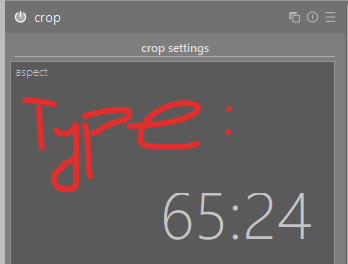
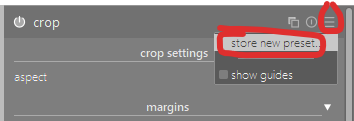
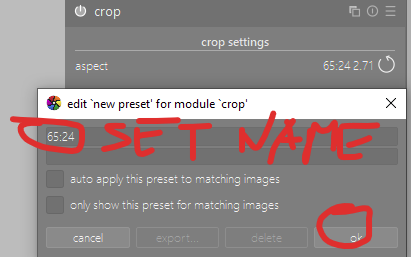
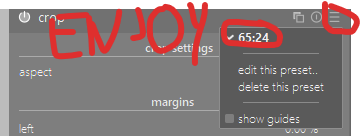
I’m not sure I understand what you need. Would you simply like to have 65:24 as a crop preset? If so, for now you can simply make one for yourself (sorry if I’m stating the obvious):
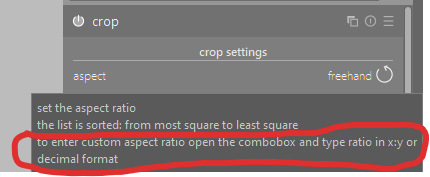
You can add a defined aspect ratio to the drop-down list available in the crop module by adding a line to your darktablerc file. See the instructions under the “aspect” setting in the user manual. IIRC just creating a preset stores other things (like the size and position of the crop) as well as the aspect ratio.
I don’t have a specific outcome in mind as such I am satisfied what popped up. I came to say that I enjoy the look of XPan and wondered whether other people find these somewhat extreme widescreen ratios interesting enough to maybe be part of the preset selection in Darktable.
I do quite appreciate so far what I got, especially that I can add my ratios manually to not have to remember and type the ratio manually. A preset is fine, but since I mostly use crop and rotate I’d have to have it in that module and presets come with some (tiny) inconveniences that adding to the drop box does not have (as such it is great I can add it to my own config, I was not aware of it, thanks @elstoc!).
I use anamorphic 1:2.39 quite often nowadays. I had not heard of XPan before, but it also looks interesting, so thanks for sharing.
What I didn’t understand in your question was whether you only wanted to find a way to easily do a crop with those ratios, or if you were looking to emulate some other aspect of those cameras.
I was also unaware of the extra_aspect_ratios config parameter, so I’d also like to thank @elstoc for pointing that out.
I don’t think there are more aspects besides focal length and aspect ratio I can reasonably emulate (I mean, firlm emulation is always a topic but somewhat independent of XPan). It would be of course somewhat interesting to see what 35mm equivalent 17mm and 25mm lenses would be in terms of lens characteristics compared to the “original” Fuji lenses but this is difficult to measure (e.g. is a 24mm AF-D more similar to the 45mm Fuji XPan lens than the 24mm AF-S or less similar).
I certainly wish I could add custom framelines in my camera while shooting to help with composing, but realistically outside of Magic Lantern which seems to support this (but is not available on mirrorless cameras with an EVF) I think that is unfortunately rather unrealistic.
(While I appreciate the rapid development pace of DT I feel like stuff moving around and me having to look up which of the multiple ways to do a thing is is not great UX, to the point of me not wanting to update while editing. Similarly with white balance in 3.6)
To make this a more productive kind of comment, maybe it would be nice to have modules that are not to be used be marked as legacy with the option to somehow upgrade to the new module(s) preserving the settings? Or possibly such a thing already exists and I am just not aware of it?
Since we never actually remove modules for old edits, there’s not much point in writing a procedure to transfer settings from old modules to new, and there’s not often an easy one-to-one relationship (for example, the settings from crop and rotate are now shared between three modules at different points in the pipeline).
Rest assured that if you’ve used crop and rotate on an image in the past, you can continue to use it for that image (though we will no longer make changes to it). For new edits you are advised to use the replacement functionality.