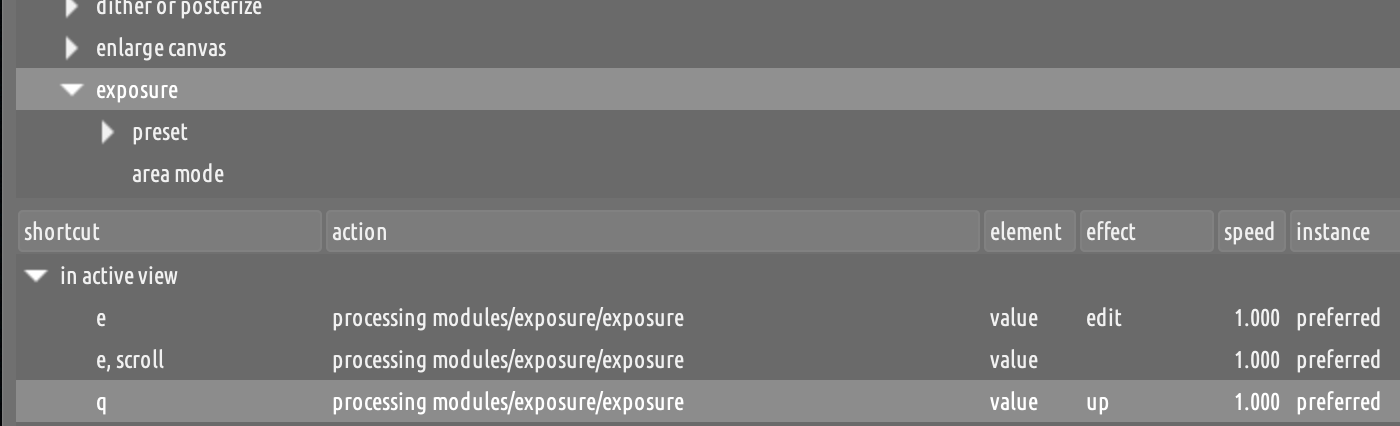
I am revising my Darktable (5.4.0) shortcuts for a more efficient workflow.
I am wondering if it would be possible to have shortcuts that increase/decrease exposure by a given value, eg 0.25 EV. Eg I would assign e and E to this.
Similarly, r/R to rotate left/right by 0.5 degrees, and c/C to to change the color temp by a bit in either direction in color correction.
You cannot do it just using the quick shortcuts, though, as the default action when you assign a key (without mouse movement) to a slider is to trigger the edit effect. You have to open the actual shortcuts editor and change the value of the effect from there.
You can also set the speed to the value that suits you. For exposure, the default is to increment/decrement by 0.05 EV.
Then, if you enable fallbacks you will be able to use the Shift and Ctrl modifiers to change the value 10x faster / 10x slower.
The only caveat is that, if you used E (i.e., shift,e) for the second shortcut the fallback would stop working. So, it works better if you use to completely different keys (e.g., e for increase and e,e or d for decrease, or whatever works for you).
How about holding down a key and then moving the mouse up or down? Alternatively, you can also use the mouse wheel.
The mouse allows you to change the exposure very quickly but also very precisely.
Thanks, that makes a lot of sense, I set up my shorcuts to key + mouse combos and it makes the initial editing much quicker.
That said, I find the Pro layout linked above overly complicated, especially the key + mouse button + mouse move combos, it’s not something I would even remember…
Ah, I had misunderstood your initial request, then. I thought that you wanted to swtich away from key+mouse shortcuts and use key-only shortcuts instead (which resonates with my vi-oriented brain).
No, you understood it just fine. My initial thought was that I would be culling photos without a mouse (eg when I am on the train and have 15 minutes of downtime) and set up shortcuts accordingly.
But it is not practical (at least for me, after trying it for an hour or so). With the up-down of the touchpad I can do this much better. Thanks anyway!
Every day I check in here and learn something about darktable. I was aware of the shortcuts because I have several set up already. But it somehow escaped me that I could use a keypress while moving the mouse (or scrolling) to directly access the slider(s). I connected [hold e+mouse] to exposure, and it’s way easier to use than the module slider. Additionally, it doesn’t pop the exposure panel open, so that I can navigate to the next photo with the arrow key and I don’t have to take my eyes off the photo the entire time. Brilliant!
The shortcuts section of the docs has recently been refreshed by yours truly (with the invaluable help of @dterrahe and @paperdigits). There are some things that I had no idea of, for example that you can also trigger multiple shortcuts at once.
I think it’s worth reading, you may find something else that surprises you:
I knew about the MIDI and game controller options, though I felt no need for them. I guess it was just the simultaneous shortcuts and key/mouse synergy that surprised me. No criticism of the manual implied, but sometimes we human creatures don’t fully grasp all the implications until we feel a feature take form under our fingers.
Also, though I’ve used photo editors for years, it takes a while to absorb the capabilities from each one and apply them. I switched from LR to ON1 to dt (where I will stay) and each time I had to ponder the differences before feeling “at home”. It’s also very heartening to be using an application where the bug fixes and feature enhancements come in days instead of months/years.
Honestly, just realizing it exists and creating my own shortcut made it stick. No manual, even the best, can do that for you.
My “aha!” moment was decades ago when I was learning C from the K&R reference manual. Every answer to a question was in that manual, yet writing a piece of code that used one particular feature and seeing it work reinforced the description immediately. From then on, I trusted the manual implicitly.