When I try a plate solve, Siril 1.4.4 running under Ubuntu 26.0.4.1 the program crashes. This is different from Siril 1.4.4 under Windows.
Any idea?
Thanks
Karl
With no more information… No.
Backtraces are needed
Where do I find backtraces?
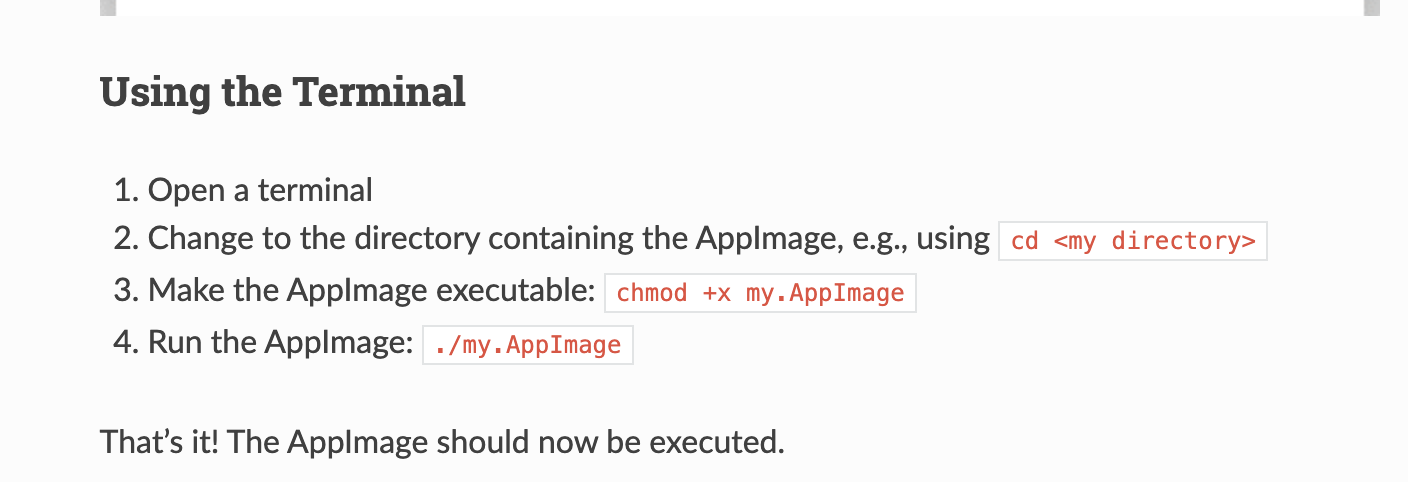
siril > output.log 2>&1 does not work. I downloaded Siril 1.4.4 as an AppImage and start it from the download folder. It is stored there as Siril-1.4.4-x86_64.AppImage. In the file folder the app is started with a doouble click. I have so far not found a way to start it from a terminal and therefore no chance redirecting the output to a file. How do I proceed in this case?
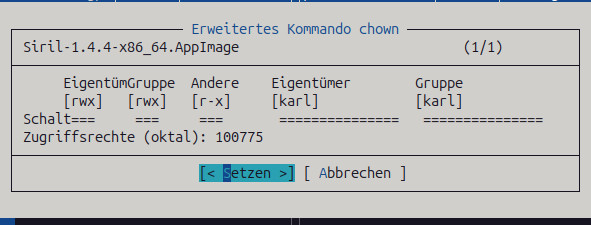
Well, it works like all other binaries in Linux (Quickstart — AppImage documentation)
And why don’t you use the PPA repository? Always better on Ubuntu.
Oops, forgot the ./ to start the application. Now it works. Here come the ouput.log file
/usr/lib/x86_64-linux-gnu/gio/modules/libdconfsettings.so: undefined symbol: g_assertion_message_cmpint
Failed to load module: /usr/lib/x86_64-linux-gnu/gio/modules/libdconfsettings.so
/tmp/.mount_Siril-GFbdCN/lib/x86_64-linux-gnu/libc.so.6: version `GLIBC_2.38' not found (required by /usr/lib/x86_64-linux-gnu/gio/modules/libgvfsdbus.so)
Failed to load module: /usr/lib/x86_64-linux-gnu/gio/modules/libgvfsdbus.so
FFTW-Multithreading-Unterstützung wird initialisiert...
log: Welcome to siril 1.4.4 for linux (x86_64) - GUI
log: Unterstützte Dateitypen: BMP Bilder, PIC Bilder (IRIS), Binäre PGM und PPM Bilder, RAW Bilder, FITS-CFA Bilder, Filme/Videos, SER Sequenzen, TIFF Bilder, XISF Bilder, JPG Bilder, JPEG XL Bilder, PNG Bilder, HEIF Bilder, AVIF Bilder.
log: Lege das aktuelle Arbeitsverzeichnis fest '/home/karl/Bilder/Astronomie/IC4955/19.10.2026_TSApo_CLS_Cam2'
log: Parallel-Verarbeitung aktiviert: benutze 12 logische Prozessoren Prozessoren.
log: Farbmanagement aktiv.
log: JPEG ICC-Farbprofile werden unterstützt.
/usr/lib/x86_64-linux-gnu/gvfs/libgvfscommon.so: undefined symbol: g_task_set_static_name
Failed to load module: /usr/lib/x86_64-linux-gnu/gio/modules/libgioremote-volume-monitor.so
/usr/lib/x86_64-linux-gnu/gvfs/libgvfscommon.so: undefined symbol: g_task_set_static_name
Failed to load module: /usr/lib/x86_64-linux-gnu/gio/modules/libgioremote-volume-monitor.so
/tmp/.mount_Siril-GFbdCN/lib/x86_64-linux-gnu/libc.so.6: version `GLIBC_2.38' not found (required by /usr/lib/x86_64-linux-gnu/gio/modules/libgvfsdbus.so)
Failed to load module: /usr/lib/x86_64-linux-gnu/gio/modules/libgvfsdbus.so
log: Vorbereiten der virtuellen Python-Umgebung: /home/karl/.local/share/siril/venv.
log: Prüfen, ob das Python-Modul aktuell ist...
log: Python-Modul ist aktuell
log: Checking SPCC mirrors...
Failed to execute child process “/home/karl/Downloads/solve-field” (No such file or directory)
log: Die Standard-FITS-Erweiterung ist eingestellt auf .fit
Entering wrapping_idle for function 0x7a90fd0e6c30
scripts: Error opening directory “/tmp/.mount_Siril-hdAOpF/usr/share/siril/scripts”: No such file or directory
scripts: Error opening directory “/home/karl/.siril/scripts”: No such file or directory
scripts: Error opening directory “/home/karl/siril/scripts”: No such file or directory
Entering wrapping_idle for function 0x7a90fd0e6c80
scripts: Error opening directory “/tmp/.mount_Siril-hdAOpF/usr/share/siril/scripts”: No such file or directory
scripts: Error opening directory “/home/karl/.siril/scripts”: No such file or directory
scripts: Error opening directory “/home/karl/siril/scripts”: No such file or directory
log: Lade Script aus dem Repository: DeepSNR.py
log: Lade Script aus dem Repository: GPS_Process.py
log: Lade Script aus dem Repository: GraXpert-AI.py
log: Lade Script aus dem Repository: HDR_Blender.py
log: Lade Script aus dem Repository: HDR_multiscale.py
log: Lade Script aus dem Repository: OSC_Preprocessing_withbackgroundextraction.ssf
log: Lade Script aus dem Repository: OSC_Preprocessing_WithoutDark.ssf
log: Lade Script aus dem Repository: OSC_Preprocessing_WithoutDBF.ssf
log: Lade Script aus dem Repository: OSC_Preprocessing_WithoutFlat.ssf
log: Lade Script aus dem Repository: OSC_Startrail.ssf
log: Lade Script aus dem Repository: StarNet.py
log: Kernskript zum Menü hinzufügen: Siril_Catalog_Installer.py
log: Kernskript zum Menü hinzufügen: GPU_Manager.py
Entering wrapping_idle for function 0x7a90fd0c4a50
Last available version: 1.4.4
log: Lokales SPCC-Datenbank-Repository ist aktuell!
Entering wrapping_idle for function 0x7a90fd0c4a50
log: Lokales Skript-Repository ist aktuell!
log: Primary SPCC catalogue set to: http://siril-spcc-public-lz-man.s3-website.eu-west-lz-mnc-a.cloud.ovh.net (8 working mirrors available)
Entering wrapping_idle for function 0x7a90fd0c1da0
log: Gaia remote SPCC catalogue available, response 119 ms
Entering wrapping_idle for function 0x7a90fd0e6c30
scripts: Error opening directory “/tmp/.mount_Siril-hdAOpF/usr/share/siril/scripts”: No such file or directory
scripts: Error opening directory “/home/karl/.siril/scripts”: No such file or directory
scripts: Error opening directory “/home/karl/siril/scripts”: No such file or directory
HDU 1: type=0, EXTNAME=
log: MTF für den Kanal 0 wird mit den Werte 0.395573, 0.049391, 1.000000 angewendet
log: MTF für den Kanal 1 wird mit den Werte 0.396373, 0.044183, 1.000000 angewendet
log: MTF für den Kanal 2 wird mit den Werte 0.394950, 0.045430, 1.000000 angewendet
The URI points to a local file.
HDU 1: type=0, EXTNAME=
nb_elts_at_start: 0
nb_elts_on_exit: 0
Purging previously saved reference frame data.
HDU 1: type=0, EXTNAME=
HDU 1: type=0, EXTNAME=
log: MTF für den Kanal 0 wird mit den Werte 0.208285, 0.037510, 1.000000 angewendet
log: MTF für den Kanal 1 wird mit den Werte 0.208170, 0.036950, 1.000000 angewendet
log: MTF für den Kanal 2 wird mit den Werte 0.206253, 0.039919, 1.000000 angewendet
log: Lese FITS: Datei bge_pp_IC4955_00017.fit, 3 Ebene(n), 3040x2048 Pixel, 32 Bit
log: Berechne die astrometrische Lösung des Bildes aus Lokal Gaia DR3 Astrometrie für ein Bildfeld von 1.72 Grad, mit einer Grenzgröße von 13.81
log: Findstar: Verarbeitung für Kanal 1...
log: Benutze 850 erkannte Sterne vom Bild.
Error encountered at ../../../subprojects/healpix_cxx/healpix_base.cc, line 753
(function void T_Healpix_Base<I>::Set(int, Healpix_Ordering_Scheme) [with I = int])

bad order

terminate called after throwing an instance of 'PlanckError'
/tmp/.mount_Siril-GFbdCN/usr/bin/siril(+0x159ab2)[0x7a90fcf59ab2]
/tmp/.mount_Siril-GFbdCN/lib/x86_64-linux-gnu/libc.so.6(+0x3c050)[0x7a90f8c5a050]
/tmp/.mount_Siril-GFbdCN/lib/x86_64-linux-gnu/libc.so.6(+0x8aeec)[0x7a90f8ca8eec]
/tmp/.mount_Siril-GFbdCN/lib/x86_64-linux-gnu/libc.so.6(gsignal+0x12)[0x7a90f8c59fb2]
/tmp/.mount_Siril-GFbdCN/lib/x86_64-linux-gnu/libc.so.6(abort+0xd3)[0x7a90f8c44472]
/tmp/.mount_Siril-GFbdCN/usr/lib/libstdc++.so.6(+0x9d919)[0x7a90f9a9d919]
/tmp/.mount_Siril-GFbdCN/usr/lib/libstdc++.so.6(+0xa8e1a)[0x7a90f9aa8e1a]
/tmp/.mount_Siril-GFbdCN/usr/lib/libstdc++.so.6(+0xa8e85)[0x7a90f9aa8e85]
/tmp/.mount_Siril-GFbdCN/usr/lib/libstdc++.so.6(+0xa90d8)[0x7a90f9aa90d8]
/tmp/.mount_Siril-GFbdCN/usr/bin/siril(_ZN14T_Healpix_BaseIiE3SetEi23Healpix_Ordering_Scheme+0xc5)[0x7a90fd185635]
/tmp/.mount_Siril-GFbdCN/usr/bin/siril(get_raw_stars_from_local_gaia_astro_catalogue+0x175)[0x7a90fcff7105]
/tmp/.mount_Siril-GFbdCN/usr/bin/siril(siril_catalog_get_stars_from_local_catalogues+0x107e)[0x7a90fd0333be]
/tmp/.mount_Siril-GFbdCN/usr/bin/siril(+0xa5798)[0x7a90fcea5798]
/tmp/.mount_Siril-GFbdCN/usr/bin/siril(plate_solver+0x3c2)[0x7a90fcea7a02]
/tmp/.mount_Siril-GFbdCN/usr/lib/libglib-2.0.so.0(+0x7ecdd)[0x7a90fcd3acdd]
/tmp/.mount_Siril-GFbdCN/lib/x86_64-linux-gnu/libc.so.6(+0x891f5)[0x7a90f8ca71f5]
/tmp/.mount_Siril-GFbdCN/lib/x86_64-linux-gnu/libc.so.6(+0x1098ec)[0x7a90f8d278ec]
Error, signal 6:
e[1me[31mPlease report this bug to: https://gitlab.com/free-astro/siril/issuese[0me[0m
I do not use the PPA repository because it delivers Vers. 1.4.0.
This is wrong. I’m the maintainer of the PPA package and this is 1.4.4: Packages in “Siril” : Siril : lock042
When i use Ubuntu package manager, I get 1.4.0.
This is not the PPA.
Based on your error log, your local catalog is probably not installed correctly.
Ok, what can I do?
Reinstall the catalog. There’s a script for this task.
In the meantime I found the description of how to install the PPA. The installation ran problemless, but the effect for plate solving the image is the same.
Which is the script for reinstallation of the catalog?