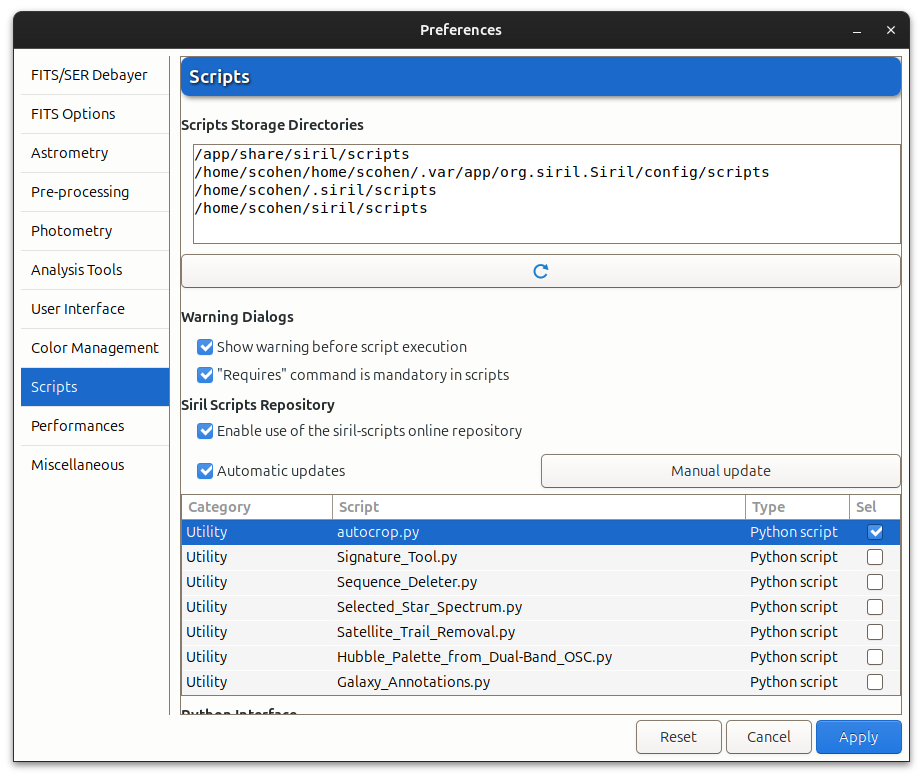
Of the four "Scripts Storage Directories listed, only one, /home/scohen/siril/scripts, actually exists. Also visible is that autocrop.py was downloaded (by me, just as a test, to see where the system would put it).
After doing this,
I ran the following command to see where Siril put this script.
The “siril-scripts” directory is another one, handled by Siril and not by users. This is the one where are automatically downloaded the scripts in the contributor repository.
The directories in the top list are optional: you can set up a directory wherever you like. There are some default ones in there, including a couple of very basic preprocessing scripts that still get installed system-wide along with the Siril installation. If some of these directories don’t exist, you can delete them from the list. With the exception of the /app/share… one, all these are in your home directory and you can put whatever scripts you like in there.
The scripts in the repository list are stored in /home/scohen/.local/share/siril-scripts. I cannot emphasise enough that this is not like the ones in the list at the top. It is entirely Siril-managed. Do not under any circumstances save your own scripts there: at every start it is reset to match the remote repository, and anything you save in there or any changes you make will be deleted without warning or take-back.
If you wish to modify any of the scripts in the repository, double click on them to open them in the editor. Once you have made your local modifications, save the script in one of the folders in the top list (probably with a different name, e.g. save script.py as script-scohen.py or something, so you know which is the local copy). Then it will appear in the script menu and you can use it just as usual.