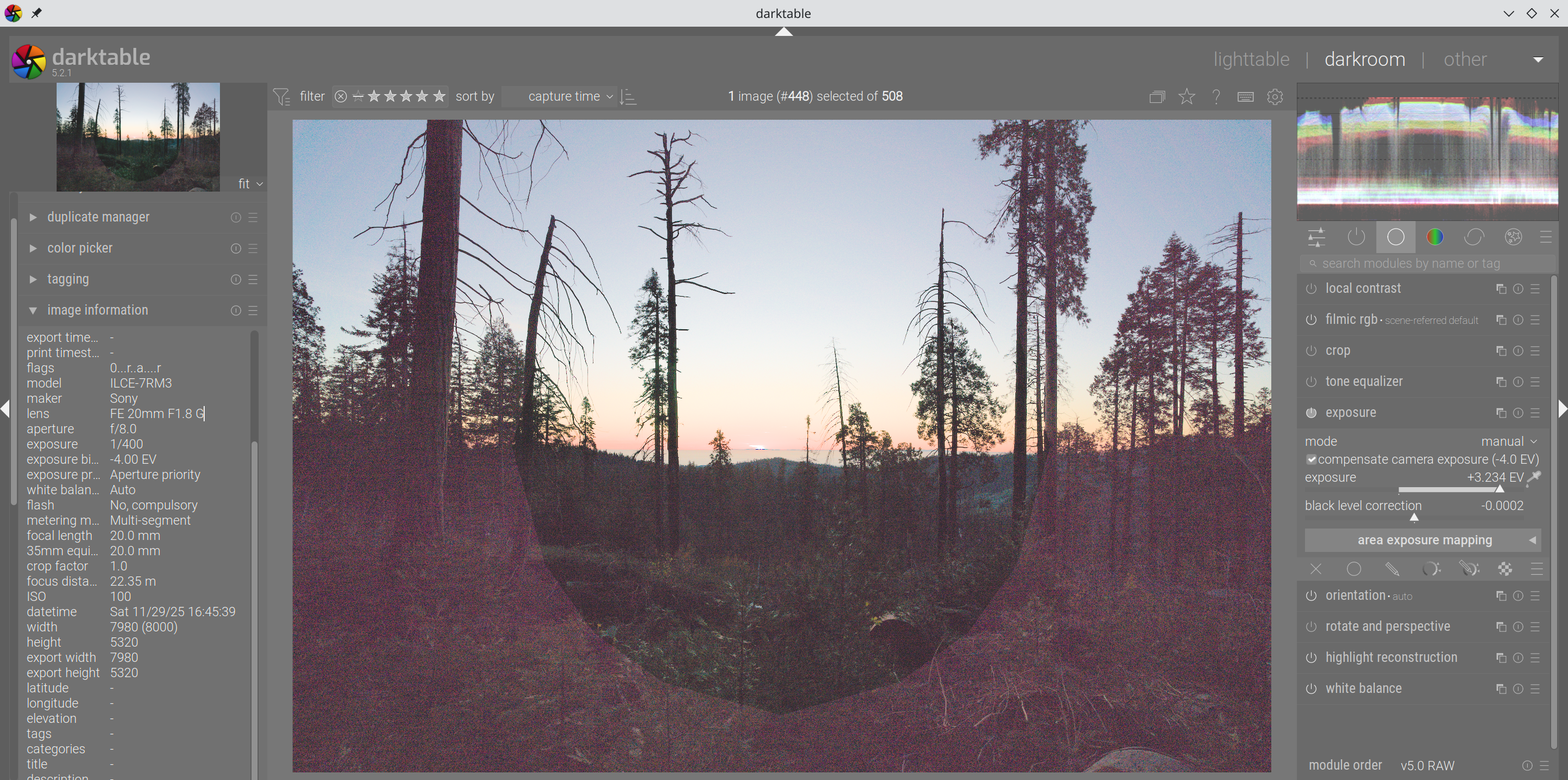
Is taken with Sony A7R3 + Sony FE 20mm f1.8 G lens. I made no edits except cranking the exposure up to see this circular artifacts. The noise is significantly stronger on the outer side of the polygon-ring. Is sony trying to hide the lens defects by secretly applying correction to my RAW?
The artifacts coincide nicely with the tree on the left though - just kidding.
Not nice at all. You might as well in darktable have a not good lens correction module turned on. You might check that. Though I suspect that would not cause such strong effects like these.
And please give us some more information. Which darktable version you use, which operating system. Do other pictures have this as well. Since when do you see this. That sort of things.
I’m using OpenSUSE TW with DT 5.2.1. The patterns occur consistently in severely under-exposed photos, both with and w/o corrections turned on. They don’t pose significant harm but just slightly annoying to know such thing exists. For some sample images:
The pattern looks suspiciously like the lamellae of the aperture. It would match, as the aperture is not fully open…
I would also check the lens correction module - I know that some circular artifacts can occur when the correction is wrong.
And perhaps, yes, it could be the case that this is removed in-camera but you see it in the raw.
Thanks, looked into one of the pictures. It is there already without noise / lens correction. Might be an artifact of your lens when shooting straight into the sun.
[Edit, added…]
It was taken at F8 so nothing really special there.
You might want to check the fora on this lens and find out if it is a known reaction to sunlight entering exactly frontally. Seems like a reflection from your diaphragm on one ore more lens elements back on the sensor.
But maybe more knowledgeable people may shine their lights on this…
In correctly exposed or over-exposed images, I cannot observe such artifacts, but it might be because it is way too subtle to be observed. I currently can’t find a specific camera setting to get rid of it.
So far I feel for @Peter 's explanation. Have you checked the links he provided?
Is there a camera setting in your camera that tries to compensate for lens vignetting?
The thing that makes me doubt this explanation though is the shape of the pattern - looks as if the diaphragm itself is projected onto the sensor. It could be stray light from within the objective that reaches the sensor and is enhanced because of correcting gross underexposure. Then the only thing to help you is screw open the lens and apply anti reflective black paint - which of course you ain’t gonna do.
My hypothesis is that the origin of these circular artifacts is insufficient smoothness of the in-camera vignetting correction that becomes apparent for strongly underexposed shots.
My solution to the problem is to turn off vignetting correction in-camera and apply it in Darktable instead. This also solves the “dark band along the right border” problem, which seems to be simply a bug in Olympus’ in-camera vignetting correction.
The pixls thread linked above features a Lua script that automatically enables vignetting correction in Darktable if the Raw file was not corrected for vignetting in-camera. The script is specific to Olympus/OM camera, but it can be probably adapted to other makers, as long as some Exif tag records whether vignetting correction has been applied.
I don’t have any real answer for this. But I too wonder if the camera is trying to do some sort of lens correction and stuffing up really badly. I look forward to finding out the definitive answer. I too don’t believe it is a lens defect.
Absurd it is, turning off sony’s lens vignetting correction gives me the intended behavior. I also tried a non-Sony (Tamron) lens and Sony still similarly bakes its correction to RAW files.
Doing vignetting correction properly (i.e. without introducing posterization) in-camera is probably difficult. I’m not sure whether the SoCs that are used even have floating point units.
A proper correction would require multiplying the measured RGB values by smoothly varying factors that are somewhat higher than 1 in a way that appears as spatially smooth even if the measured sensor RGB values (these are integers!) are all bunched close to the sensor’s black point (i.e. when a scene is heavily underexposed). This would probably require some sort of dithering that the manufacturers do not implement either because it’s difficult/slow, or because it’s simply not required by 99% of their customers.
Note how the strange circle is visible in the heavily underexposed lower part of the OP’s image, but not in the upper part.
When a RAW file is not a Raw file. I am sure many cameras are guilty of similar. I just wonder what. I only thought of long exposure noise reduction being applied to RAW files to remove hot pixels, but I am probably naïve.
I thought the same and find it interesting that this is applied to the RAW and not just to the jpg. Perhaps, they did not want to pay (?) Adobe to get their correction model into Lightroom just speculating of course…
Very
Canon is known to apply noise reduction to the raw data at all times on many of their newer cameras. Nikon tends to do white balance pre-conditioning, which seems to be a way of correcting for CFA variance. And I believe Olympus/OM Systems also apply shading correction directly to the raw data.
 just speculating of course…