Does using an LUT like this produce a different result than exporting each frame in spektrafilm by hand/a script
1 Like
I don’t know about color but you definitely loose grain, halation etc.
Is MTF built in or does it have to be additionally added?
As mentioned, you do lose grain and halation. But there are also some spatial features that you miss out on that will affect the colour slightly! If your goal is to use this for video, the most faithful implementation is currently VKDT 
That being said, using a LUT can still look excellent!
1 Like
Hi everyone! First time posting here.
I came across SpektraFilm yesterday through a Reddit post, and I was really impressed by the results and the level of detail and research that went into the project. I have no doubt this is going to be a game changer for film simulation, so I went ahead and installed it on my Mac.
I’ve been tweaking some settings, but there are a few things I’d like to ask to make sure I’m taking full advantage of the software:
-
What’s the recommended workflow?
Basic RAW editing in software like Darktable/Lightroom/C1 → SpektraFilm → Photoshop (if needed)? Or do you recommend opening the RAW file directly in SpektraFilm? And if you do use another editor beforehand, do you export in the ProPhoto color space? -
This is probably a dumb mistake on my part, but I can only seem to export low-resolution JPEGs by hitting “Save.” I’m not managing to export a lossless file. What am I missing? Is lossless export only possible through the command line?
1 Like
@Soupy I couldn’t resist…
4 Likes
This is crazy. Two questions: are you doing the matching between film and digital by eye comparison or are you using some script? Also, is that 3D LUT feature only applicable to JPEGS or is that present in the RAW files too?
I’m very much learning myself, but you need to hit the “SCAN” button, after finishing tweaking (as it’s relatively slow) before doing save as you are.
Took me a minute to realise too 
To my understanding, to get the full benefit of the accurate simulation the input needs to be a linear file, so no tone curve applied - in darktable just turn off the tonemapper (Sigmoid/AgX/filmic) but not sure how that works in other software.
3 Likes
- I open the raw file directly in spektrafilm, this saves me the trouble to open the raw in another software and also save me hdd space.
- After you make the adjustments click scan and then save jpeg at full resolution. This project is under development so it will take a while to scan.
- Happy editing

5 Likes
Thanks a lot Cristian!
Thanks a lot Steven!
1 Like
I did the RA4 print first. Scanned it and match the digital within the program using its virtual enlarger settings. I saved it as a preset so I can use it every time, still a WIP tho, it’s not 100% accurate maybe around 70% accurate, still exploring some of the more complex coupler settings.
2 Likes
i partially agree with this, and here is another comment on the problem. upsampling from XYZ inevitably cancel out all the information past the 1931 cmfs. if a real measured spectrum differs from another one in a range where the 1931 cmfs are zero, that information is inevitably lost, because the upsampler will return the same exact spectrum. thus if we want to reduce the roundtrip error of film exposures of real spectra we need to find that prior information somewhere else, and embed it somehow in the upsampling alg.
we just need to hope that typical natural reflectance spectra behave smoothly enough for a few tens of nanometers past the 1931 cmfs (film sensitivities are not that wider) so the information compresses well. if we are confident on the corpus quality and completeness than bandpass+surface is just a way to fit that information in a handful of parameters. the upsampling+bandbass+surface is more like a black-box for XYZ → reasonable RGB film exposures (reasonable as in minimal error given the few parameters).
the upsampling provides a cmfs-zero-error-base for the visible central part, bandpass+surface encodes the exposure morphing on the xy landscape of the prior information that reduces the roundtrip error. (haven’t tried, but i am pretty sure that given a fixed upsampling alg, the bandpass can be encoded as a surface log exposure correction on a set of film sensitivities, mmmm, i will think more on that lead).
i think that adding a smooth bandpass window and reoptimize the the upsampling alg is a great idea! i believe it will give a much better metameric base for the film sensitivities, that will behave much better, especially for the spectra peaking at the blue/red or with side lobes. so less error from the start on film sensitivities whatever we decide to do after.
what window? and how much does it matter the particular shape? good questions.
here a couple of provocatory experiments to give “food for thought”.
i tried a square bandpass with edges at 1 percentile of blue and red LMS sensitivities. in this case we are cutting the upsampled spectra and keeping essentially zero error on the 1931 cmfs. then i fitted a poly surface log exposure correction.
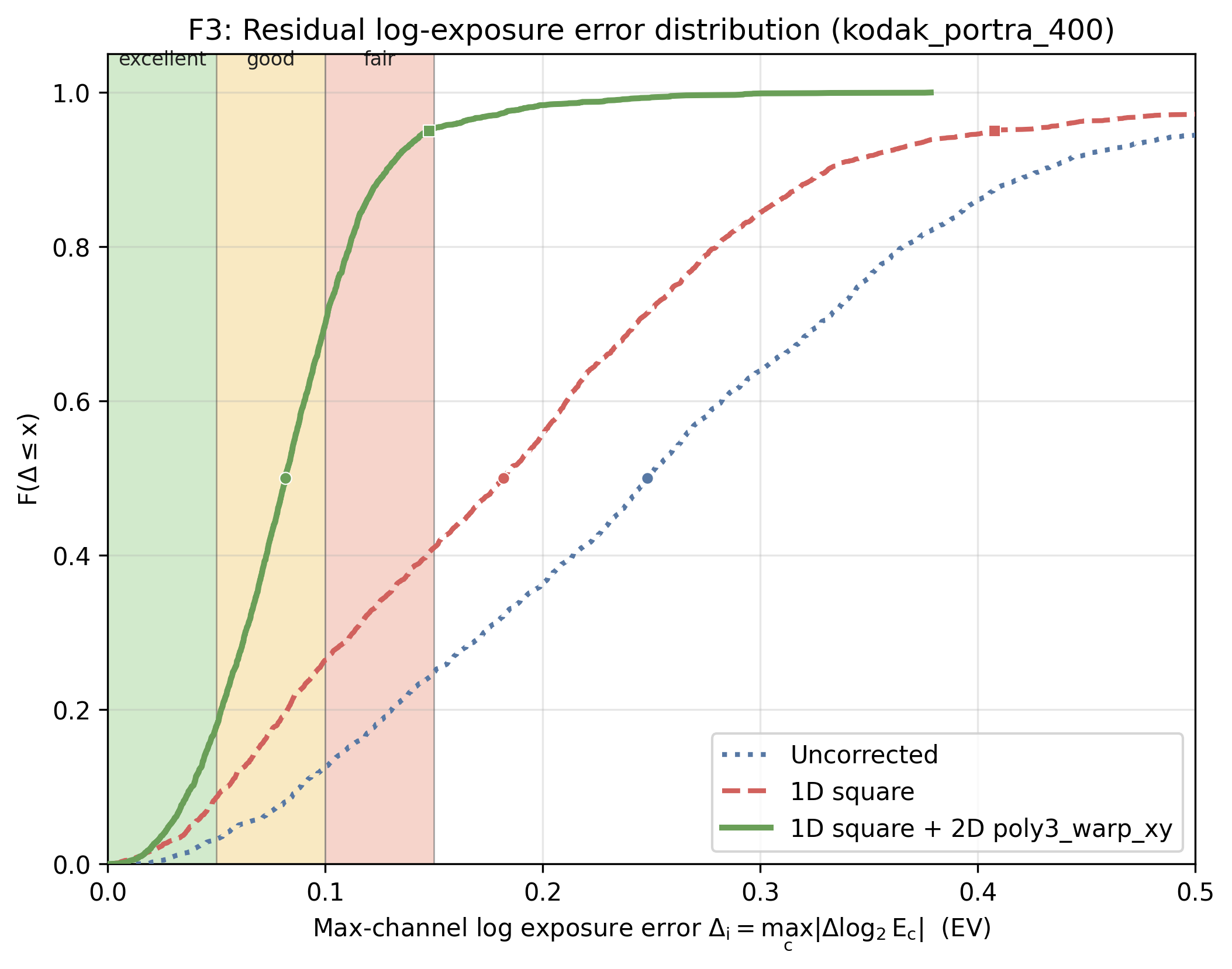
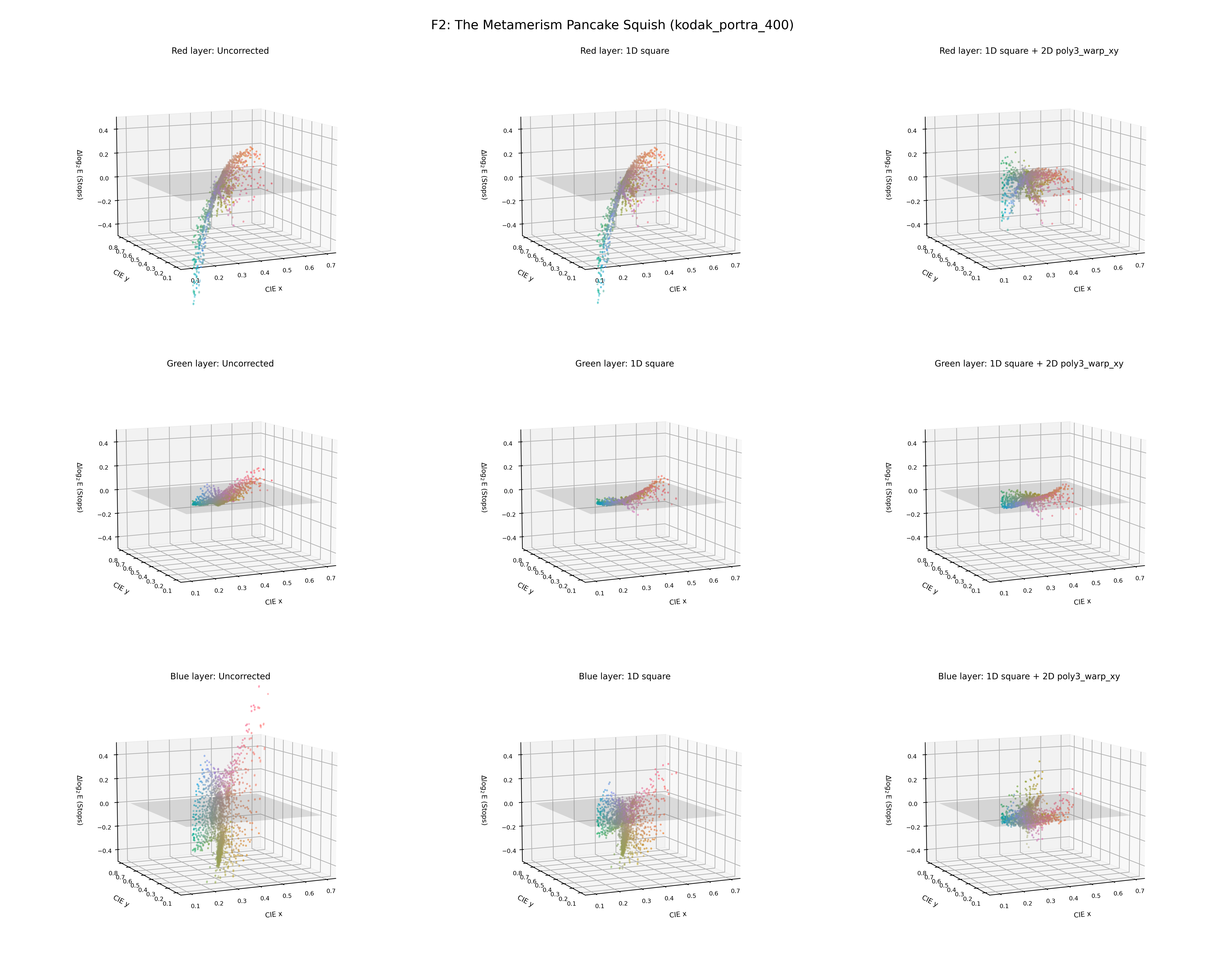
similarly we can use a smooth logistic window shape that have flex points at the same percentile edges. in this case we can fit window and surface at the same time.
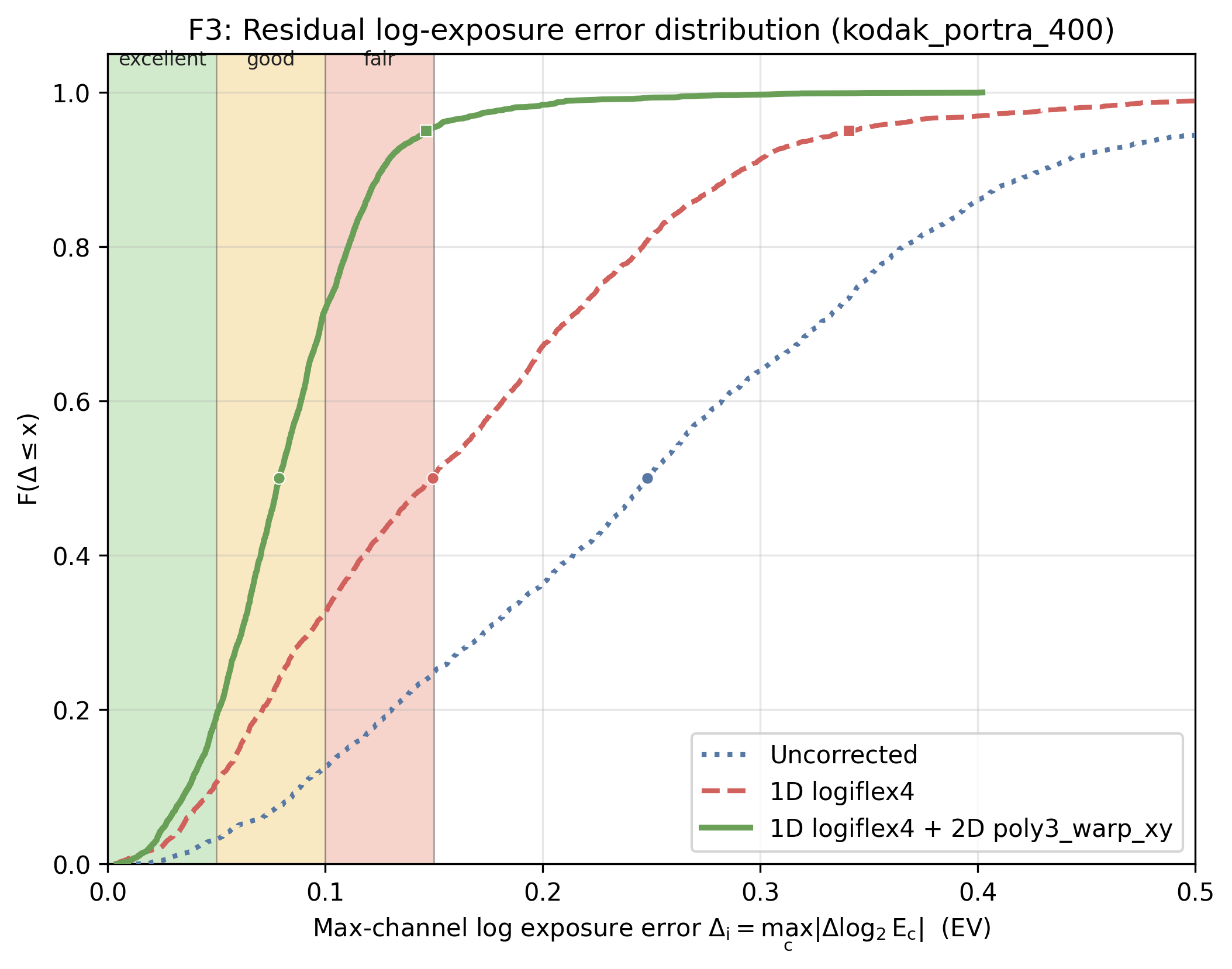
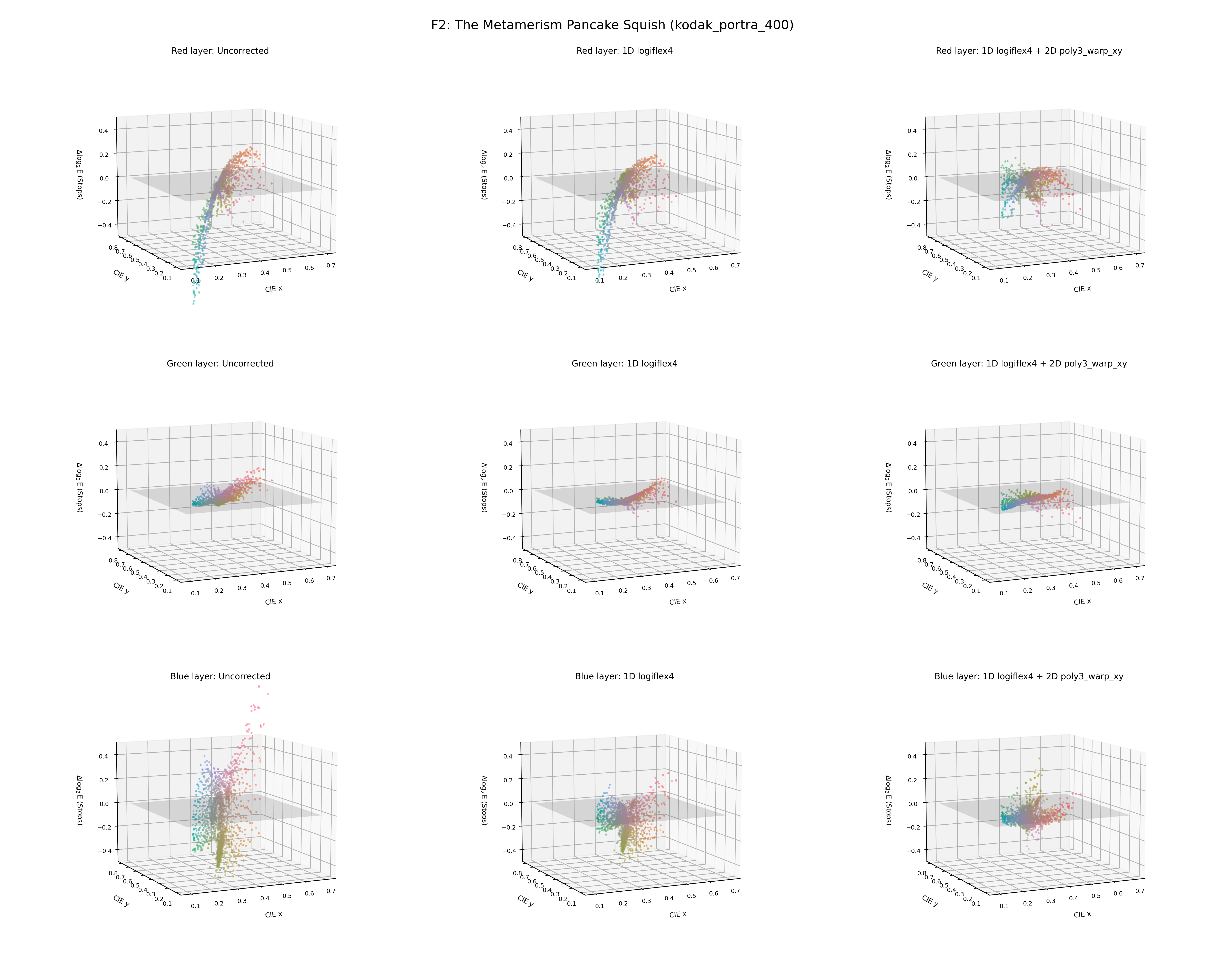
with a smooth window, essentially, we are removing some of the correction duties from the surface. the smooth logistic window is morphing the upsampled spectra in the wavelength domain where we know as prior information that side lobes are bad for film sensitivities, thus it is a great space to act on.
,
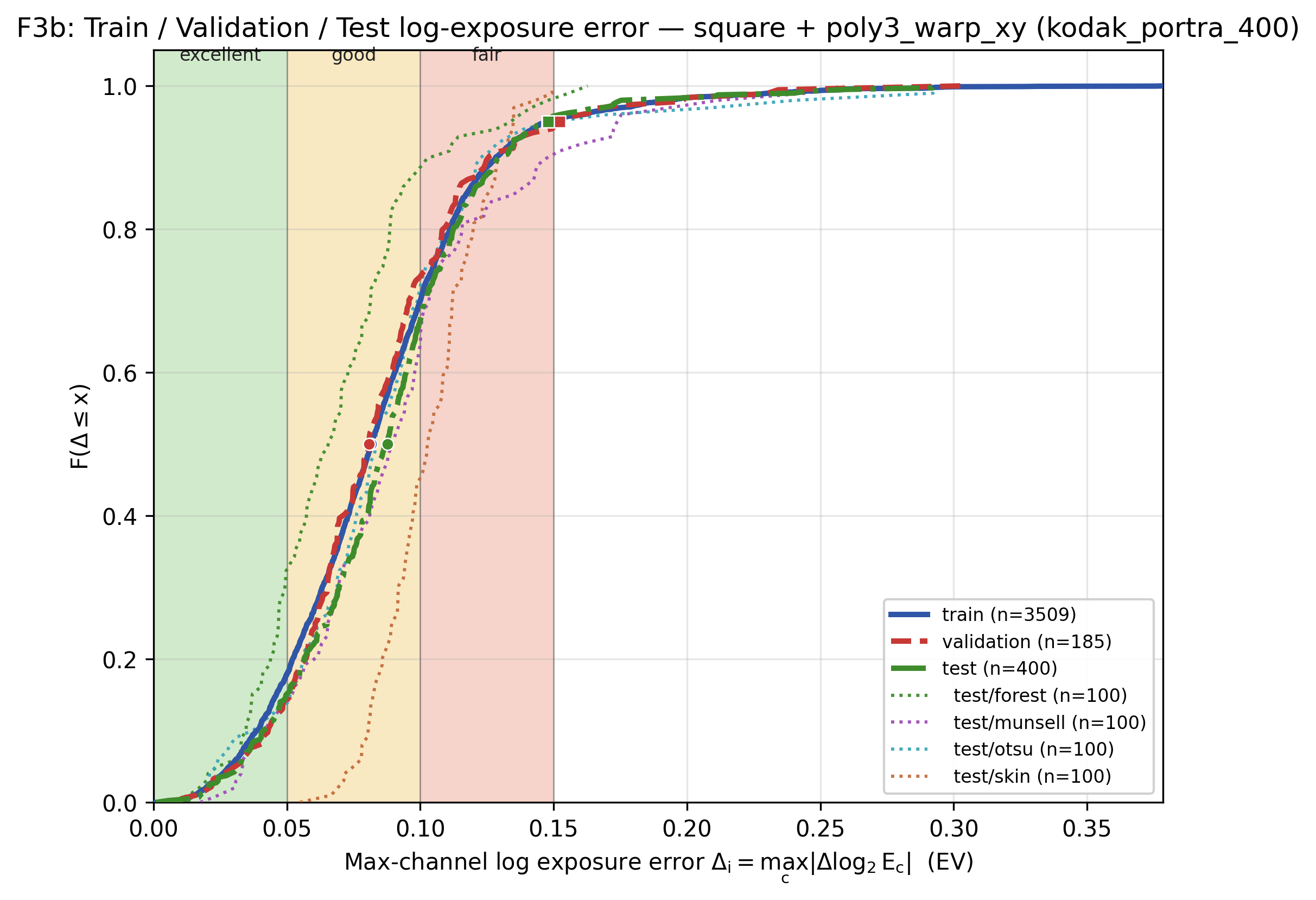
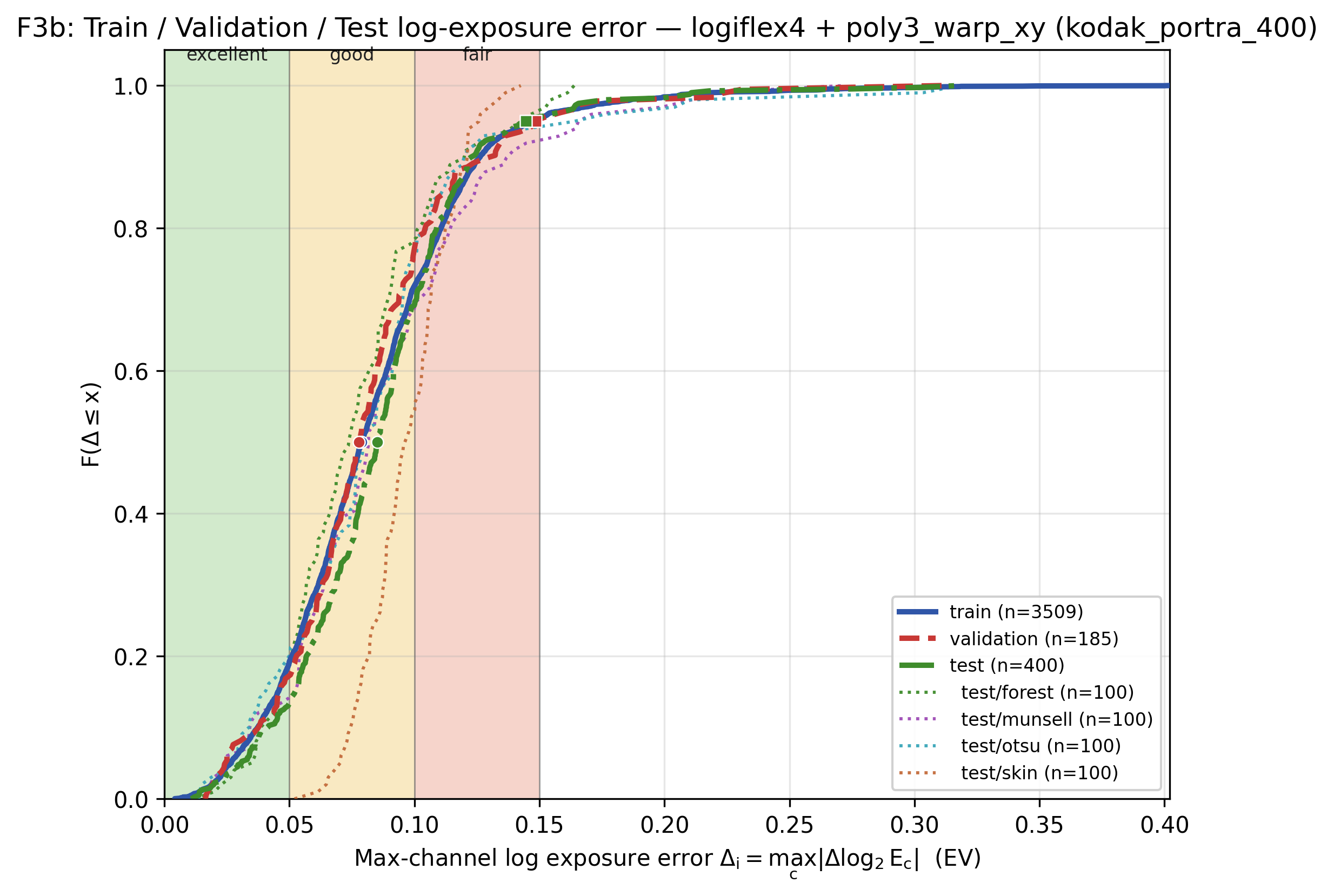
the window do not have a big impact on most roundtrip errors (the loss is a bit lower for the smooth window), but it seems to help to give more capability to the same minimal surface model (11 params per channel in this case) that can generalize better for skin for example (skin are the most difficult spectra if training only on otsu+munsell).
we can have even sligthly better results by letting the window cut more in the visible range. i can try to reoptimize just window (no surface) for a few film stocks and try to see if there is a good average one. do you have a favorite sigmoid shape that you think is sound for spectral containment?
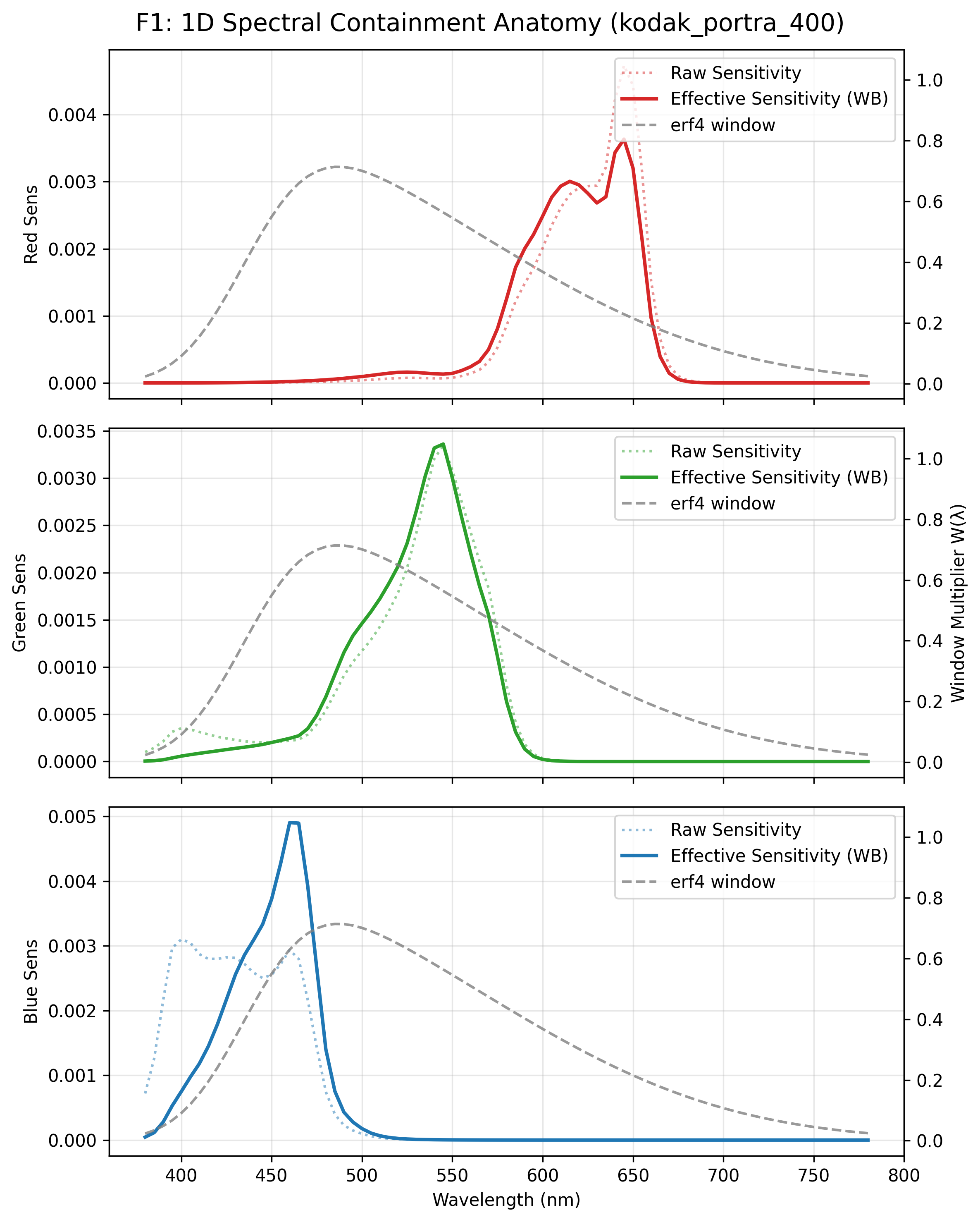
[update] early morning though: what if the window for your optimization would be somewhat shaped after D55 (the typical target of daylight film). let’s say a smooth version of D55 or a more aggressive windowed version with the central part resembling D55. wouldn’t it be a good choice also for the optimization? crazy idea? the though is coming after seeing the smooth shapes of optimized windows using better tail-chasing regularizers.
also would it make sense to have a D55 referenced upsampling for spectral film applications?
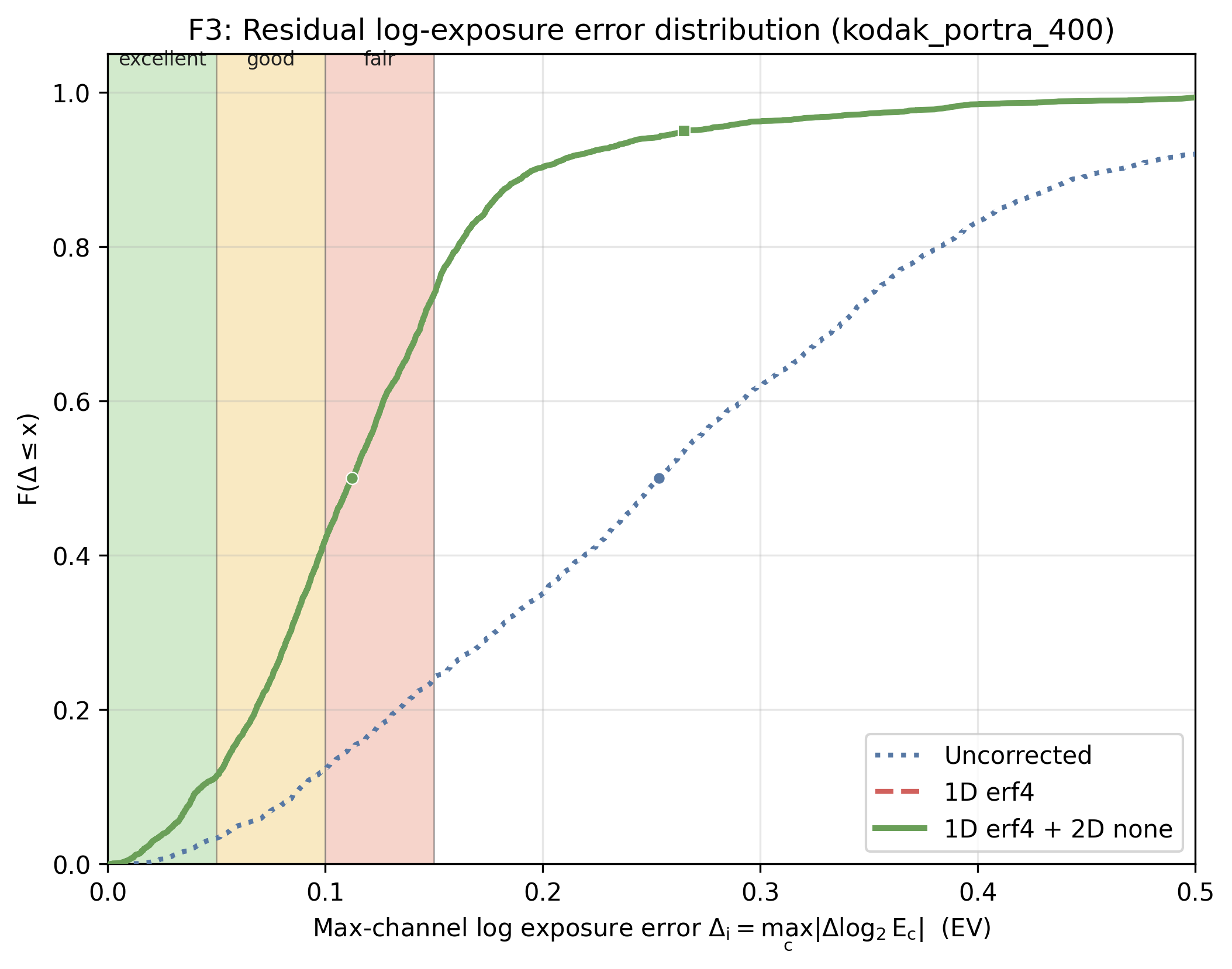
just an example: (still heavily dependent on sigmoid shape and optimization hyperparameters that i will tune)
good initiative, thank you.
i should start also a thread for the nerdy color discussions. 
1 Like
there minimal implantation is in main, but currently i haven’t committed the fine tuning based on the mtf of portra 400, so the mtf might not be as realistic. i will commit it soon.
1 Like
this is beautiful! it shouldn’t be the last
happy spring too!
3 Likes
I am pretty dense. Is that a “yes” to a category? It’d be Software > Spektrafilm
2 Likes
i confused the tag that appeared to the post for a category. i actually think the tag would do for now.
let’s let the project mature a bit and see as we go. thank you for being clear (and thank you also for all the help supporting the forum by the way, it is always good to remind it).
1 Like
i think you’re too modest but actually maybe we should separate out a couple of the more recent colour/techy things into their own topic, category or not?
sounds good! here can be the home for spektrafilm tech discussions