Looks really interesting, unfortunately I haven’t been able to get your LUT generator or VKDT working properly on my mac. It’s probably user error 
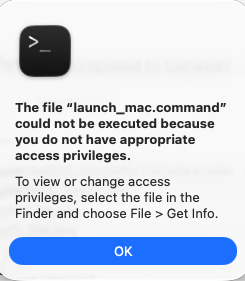
I just get this message despite having the proper permissions, etc.
Looks really interesting, unfortunately I haven’t been able to get your LUT generator or VKDT working properly on my mac. It’s probably user error
very sorry but i don’t know how to do this. i basically never use the terminal unless i have commands to paste into it.
To create a persistent installation:
uv tool install git+https://github.com/andreavolpato/spektrafilm.git@dev
To start it:
spektrafilm
To upgrade it:
uv tool upgrade spektrafilm
Just copy and paste those into your terminal.
Try this in terminal:
cd /path/to/your/downloaded/Spektrafilm-LUT-Generator
chmod +x launch_mac.command
Then try run again 
Alternatively
conda activate spektrafilm
python “/path/to/Spektrafilm-LUT-Generator-main/spektrafilm_state_to_lut_gui.py”
thank you so much! i can’t believe it was just that easy.
how do I export as a high resolution file? when I press the save button all I get are very low resolution files.
did you press scan before to calculate the high resolution image?
That is the order of things I would recommend (if one needs to use Photoshop), yes.
okay, so far this works as expected
no wait. the sensitivities are windowed, both the cmf and the film ones. so by windowing some more, you’re changing the ratio of r/g/b response (the window falls off really soft in the ir range).
fitting this extra error correction to some specific spectral shape seems arbitrary, but you’re using quite a relevant set of spectra here. and your plots with errors mostly in the dip-shape regions are kinda convincing. in the interest of reducing the amount of extra data/correction terms we have floating around here… would it make sense if i tried to introduce some fixed/static windowing and re-optimise the spectral lut with that in the loop? i’m assuming it wouldn’t change the behaviour of the xyz roundtrip much but would provide us with windowed spectral upsampling. this wouldn’t address metamer mismatch, but now i’m curious…
It was said above, but it’s becoming a bit hard to follow the different discussions in this thread.
Perhaps Spektrafilm — and its implementations in ART and vkdt — soon deserves its own category, @paperdigits and @hanatos? People who are not so close to development and Linux seem to be discovering Spektrafilm (which is great!) and a support thread, for solving installation issues and things like that, might be a good idea.
oh sweet I was totally missing that part. Is there a way to save it as 16 bit tif or is JPG the only option right now. when I try to save it I don’t see an option to save as tif only jpg. thanks for your help on the scanning part!
Sure, if @arctic would find it useful.
The TIFF option is gone. If you want lossless, use PNG (8-bit only, I believe) or OpenEXR (more bits, probably).
That’s a great suggestion, thanks! I and probably many others would really appreciate a separate thread on installation issues.
For example, I am currently stuck when upgrading from agx-emulsion (working fine with python 3.11) to spektrafilm (apparently requiring python 3.13, but pip then complaining about
ERROR: Ignored the following versions that require a different python version: 0.4.0 Requires-Python >=3.8,<3.11; 0.4.1 Requires-Python >=3.8,<3.11; 0.4.2 Requires-Python >=3.9,<3.12; 0.4.3 Requires-Python >=3.9,<3.12; 0.4.4 Requires-Python >=3.9,<3.13; etc. etc.
Any hints? Thanks!
(MacOS 15.7)
Ok this is the last video I will post here! (maybe someone should create separate topic dedicated to sharing work created with spektrafilm?)
Lumix S5IIX in V-Log with TTartisan 35mm f1.4. (APS-C Lenses on Full-Frame cameras have some interesting advantages!)
Portra 800 with Fuji Crystal Archive Paper.
Exposure, Contrast and minor saturation and hue tweaks done in DWG colorspace. LUT applied after conversion to rec709/2.4.
Happy Spring Everyone!
Beautiful, especially the opening shot. I this would make a great first post for that spektrafilm showcase thread !
FYI, I just did a calibration on my monitor, and the brightness was reduced, so I obviously had my monitor brightness set a bit too high. Taking a look at that photo again, it definitely seems quite dark. Given the lighting conditions, I feel like the white of the railing should be bright white and close to the white of the photo border, but it’s noticeably darker. However, I can still see all of the faces, and the style is obviously designed to be high contrast but with lower dynamic range, in the style of old film.
The guy with the blue jeans to the right of the front guy in white has only half of his face visible, but none of them are totally obscured.
My suspicion is that most people have their monitors set brighter than a calibrated monitor. It’s like when you set your TV to movie mode, and it’s suddenly dark, warm and muted. It’s designed to accurately show what the director intended, but it’s not what people are used to if they watch regular TV broadcasts.
It will be nice if, what is it called “perceptual quantitizer” transfer curves became more widespread… I dont’ fully understand it but once you have bright, higher bit displays I think these curves use absolute values can replace sdr gamma, so that when you move to a different monitor…even a much brighter one set to some other default level that your image will show diffuse white at whatever it was defined at on your device?? I think ?? SMPTE ST 2084
But here for sure its a high contrast image with deep blacks so its going to likely look different between users with substantially different peak brightness level on SDR monitors… My Acer also has a thing called black boost which I think is a sort of BP compensation the will lighten and provide more detail in the shadows but I have it turned off…others might have things like that enabled further changing the perception of the render… There is no doubt about the colors and atmosphere that you can achieve with these film sims…I feel bad as I haven’t really had time to explore them in any great detail…
The New Topic button is right at the top of first page of the forum and I pressed it.
The module should be called “I can’t believe it’s not film!”