I’m with you, I also want to add some softness and grain to my photos, used creatively it can enhance a photo. I don’t like the tack sharp, clinical digital look.
Sorry to bother you, but I noticed you’re also using Spectral Film LUT. Do you know if there are any posts on our forum about this, similar to the discussions we had regarding AGX-emulsion? I’ve been trying to find some information to read before installing it, but I haven’t had any luck. Could you please share them with me? Also, since you’ve used both, how would you evaluate them?
I’m sorry I can’t help you because Spectral Film LUT give me an error in Windows when I move the sliders in ART. I tried many times to install it but I can’t make it work. I was also curious to see how it compares with AGX. If you can make it work please tell me how it is.
Here are Alberto’s instructions on Spectral Film Simulation in ART. It has more film and paper combinations than AgX.
https://discuss.pixls.us/t/spectral-film-simulations-in-art/48442
I can’t help you much with Windows since I use Linux exclusively. Usually the main hurdle is to find Python virtual environment that installs and works on your system. And then modify the .json file for ART to specify correct command to run Python.
1 Like
FWIW, I managed (finally …) to get AGX film simulation running in ART, following 1:1 the instructions from Alberto in Spectral film simulations in ART | ART raw image processor. However, I did not succeed in installing the Spectral Film Sim the same way - I always get the infamous “invalid LUT” error message.
Edit: on MacOS Sequoia / Intel.
I don’t have Mac and can’t help you with it. On my system both AgX and SFS are installed very similarly: the same Python environment (conda); the same python command in .json files; .json and .py files are located in the same place.
Is there any Windows user who has managed to install Spectral Film Simulation and managed to get past the Invalid LUT parameters error? Any help is appreciated.
I reported to Alberto that since recently, Spectral film LUT fails to work for me on Linux in ART (while the standalone program works). Same error as you guys. I’ve tried 3 different virtual python environments and they all fail.
Could it be that something changed in the original python code that makes it incompatible with ART? I don’t see any change in ART that could relate to this module.
But so far I’ve got no response from Alberto.
Latest SFS works for me using conda environment on Fedora 43. I updated SFS git repo today, it still works fine. I build ART locally from latest source code.
The command in ART_spectral_film.json is this:
"command" : "/home/andrew/.conda/envs/spectral_film_lut/bin/python spectral_film_mklut.py --server",Both files
spectral_film_mklut.py
ART_spectral_film.json
are located in directory that I specified in
Settings/Image Processing/Clut directorySo SFS appears in Film Simulation tool.
I used to have AgX and SFS installed directly without any Python environments. That worked for a while but after an update to Fedora it stopped working. So I redid the whole installation using conda and it still works.
I did the same as you, on Manjaro, using conda as well. Just like you it used to work with the same python version as my system python (3.13) but after the update to 3.14 on Manjaro it stoped working.
I reinstalled a 3.13 (and even a 3.11) environment, and while it allowed AgX-emulsion to start working again, it didn’t for SFS. Same error in ART with virtualenv and with uv.
Correction - I tried to rerun SFS and also got the error: “Invalid LUT parameters for ART_spectral_film.json”. So I guess integration of ART and SFS is broken for now.
1 Like
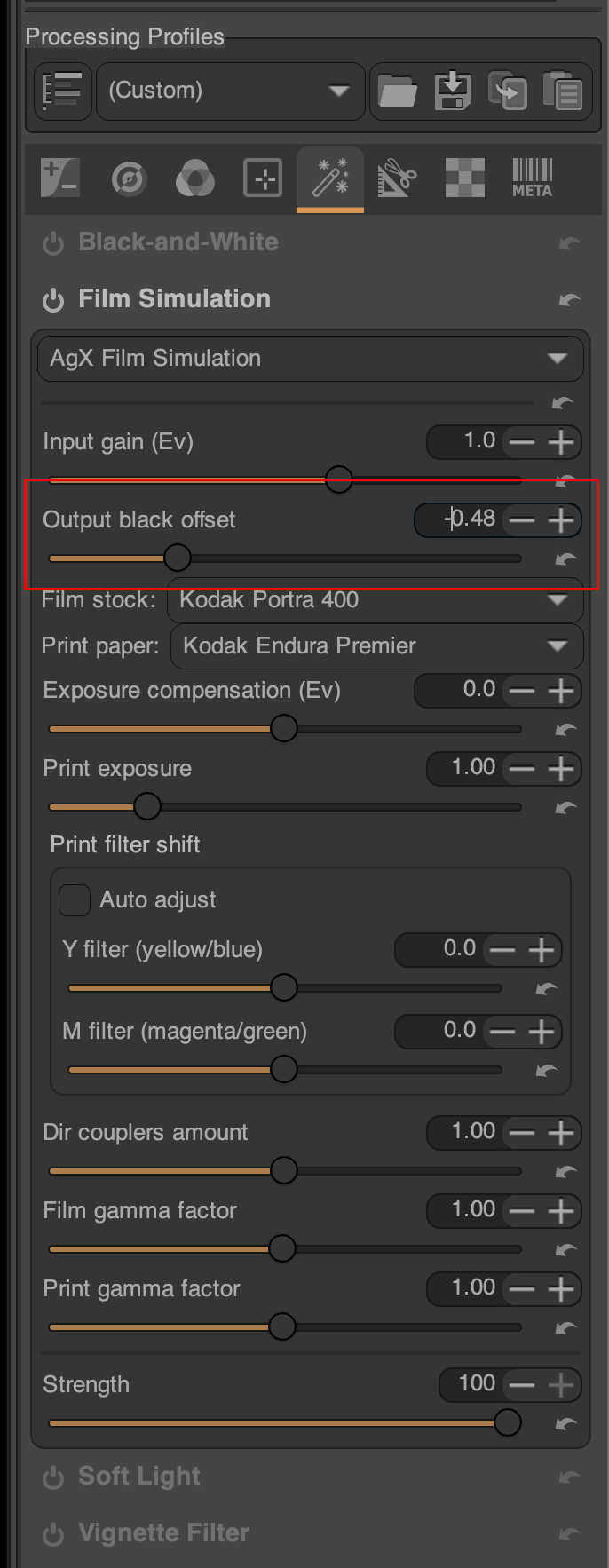
Hi everyone, I was wondering which parameter in the napari version of AGX-emulsion corresponds to the ‘Output black offset’ in ART? I’ve tried various settings but haven’t been able to replicate the same result. Also, I’m still getting used to ART because the conversions often come out very dark and require much more adjustment than in napari.
Hi all.
I setup both AgX and SFS in a Windows 11 Pro environment, immediately after Alberto explained how to install them.
Together to @sguyader we also wrote an howto for installing these two “extensions” on Windows, Mac and Linux and it was published by Alberto in his site:
https://artraweditor.github.io/SpectralFilmSimHowto
At difference of what I reported for Windows installation there, I presently do not use a python virtual environment; I’m using a systemwide python environment because I don’t use python for any other reason on my PC.
Anyway, IMHO, what could be really important is not Python venv vs env but the version of Python.
Since the beginning I used Python 3.11.9 for Windows. See URL:
https://www.python.org/downloads/release/python-3119/
where I chose the version highlighted in the image below.
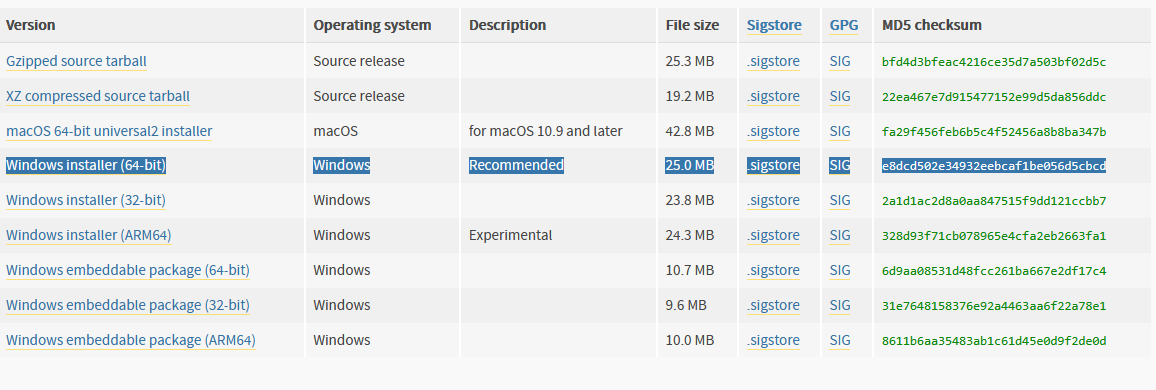
In these conditions I did not have any problem.
To enforce this theory, I remember that when I made my first tests, I tried to use the most recent stable version of python (at that time, it was 3.13.x) and I was not successfull.
Hoping this can help.
Regards,
Topoldo
It doesn’t seem to be as simple as using the right python version. I’ve been using 3.13 en a virtual environment for a while without any issue. It stop working with the Linux Manjaro system update to version Python 3.14, and going back to 3.13 and even 3.11 failed for SFS but worked for AgX-emulsion.
The python version might play a role here. I understood from Alberto that 3.11 would be required for Agx - so that’s what I use. Agx works, but SFS does not yet.
Actually, I need to correct myself: now Agx also does not work anymore 
What I did: play with the “command” line in the json file, to be sure that the right paths would be chosen.
I originally had:
“command” : “/Users/myuser/Github/envs/ART-filmsim/bin/python3 agx_emulsion_mklut.py --server”,
→ worked.
I changed to fully qualified for the .py script, just to make sure that no outdated version would be used:
“command” : “/Users/myuser/Github/envs/ART-filmsim/bin/python3 /Users/myuser/ART_CLUT/agx_emulsion_mklut.py --server”,
→ does not work anymore, throws the “invalid LUT” error.
Changed back to
“command” : “/Users/myuser/Github/envs/ART-filmsim/bin/python3 agx_emulsion_mklut.py --server”,
→ still does not work anymore, despite being ok before.
The calling of external lut generators seems to be brittle or depend on the prehistory, are there cached parameters or files (pyc?) somehow involved?
I debugged ART and SFS together and found out that recent changes in the latter broke the interface:
commit 6025af559f2c4f5a53aa982142bca1bf09703304 (tag: v0.1.17)
Author: JanLohse <janlohse@mail.uni-paderborn.de>
Date:   Sun Feb 1 20:03:34 2026 +0100

    show splash screen before loading spectral_film_lut modules
Namely the symbol FILMSTOCKS which is used in spectral_film_mklut.py was removed in SFS
src/spectral_film_lut/__init__.pyfor some reason. So I reverted SFS code back to:
commit 2984242a94813a94331c5f4edac6a56c8334d9ff
Author: JanLohse <janlohse@mail.uni-paderborn.de>
Date:   Sun Jan 11 12:47:02 2026 +0100
rebuilt it and now it works:
git checkout 2984242a94813a94331c5f4edac6a56c8334d9ff
conda create -n spectral_film_lut python=3.11
conda activate spectral_film_lut
pip install -e .
Disclaimer: I don’t know Python that much. Maybe spectral_film_mklut.py can be changed to work with the latest SFS code.
2 Likes
Thanks! So maybe I’m not crazy after all!
Could you post an issue on ART’s github repo? Maybe @agriggio can fix that from the ART side of things.
2 Likes
Done. I also created an issue in SFS git repo. Maybe together they will find an acceptable solution.
2 Likes
Alberto submitted a fix to .json and .py files for SFS. My first test failed with the same error. But second was fine. Maybe somebody else can confirm.
2 Likes