Open an image, press P to open the presets quick access, press F to apply the filmsim preset :-).
1 Like
@hanatos Any desire to rename the ‘filmsim’ module in vkdt to ‘spektrafilm’ now @arctic has settled on a name?
Huzzah.
I obviously need to slow down. There was even a button right there with a photo opened labeled “filmsim”, and I missed the obvious.
Thank you for your help.
1 Like
fair point. filmsim is the internal uint64_t identifier that happens to be human readable. might introduce long/translatable names at some point to keep old history stacks functional (with internal id in the .cfg).
also reminds me to bring in b/w stock, enlarger diffusors, and the licence.
glad you figured it out  and no, you don’t need to run the python/wb opt/lut copy stuff, that is to internalise new film stock from upstream spektrafilm.
2 Likes
Question regarding filmsim in vkdt: I find that the positive film simulations appear strongly overexposed and undersaturated compared to negative film + paper. I have to reduce exposure by about -2 EV in either colour or filmsim module, and increase saturation in colour module substantially to get a decent looking image.
Is this to be expected or something wrong with my installation? I am on macOS, and the behavior is the same with the newly installed nightly from yesterday, my own build, and nightly from weeks ago.
I suspected some incompatibility in ~/config/vkdt from earlier installations, but the behavior is the same with a blank config directory.
that sounds wrong. maybe you have a test image + cfg so i can double check on my side? one source of error would be an old filmsim.lut maybe in your home directory, but you seem to have ruled that out already.
Thanks for the quick answer - here an example:
M3000956.ORF (17.5 MB)
M3000956.ORF.cfg (3.0 KB)
And this is what it looks like for me:
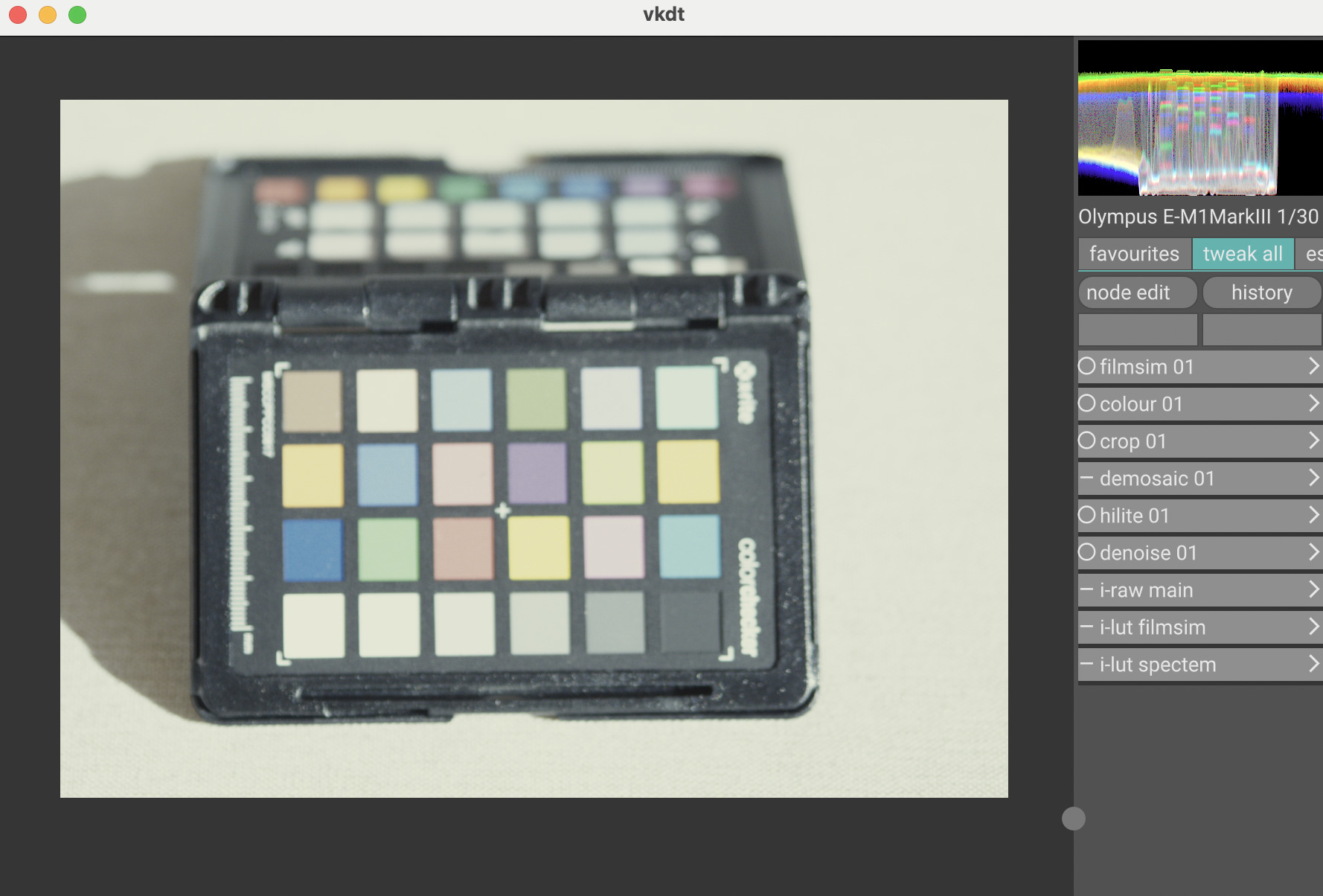
I was just experimenting with the latest nightly myself and saw the same thing. Green cast, also? macOS here, too.
Btw, for both negative and positive film sims, is it expected to set white balance to camera (instead of D65) and increase saturation? I find I need to do that to get the results I want. D65 looks way off, but I guess saturation is in part a matter of taste, and I’m not sure what settings are considered sane and normal, or how they relate to the defaults.
Spectacular results either way, I’m so thankful for the work you are putting in here.
ah good catch! this looks the same here. possible that the more experimental positive films aren’t calibrated so well. so first, they don’t white balance since they don’t go through the enlarger. so yes, if you want to wb you’d have to do in the colour module up front. also it seems the output doesn’t fill the full range up to 1.0 (or close to) and instead requires a -2 or -3 ev exposure compensation. this also brings back the saturation, else you’d be in the flat region of the film response curve. i think both should be addressed by changes in the code, i’ll have a look.
saturation is affected a lot by exposure/where are you in the film response curve (see above). for negative film i don’t think you should have the same issues though. D65 would require shooting conditions with daylight. strictly speaking doing white balance before spektrafilm is not what light would do though… but especially for positive film i’m not sure i see a better alternative.
Thank you
As a remark, Andrea‘s original spektrafilm does fine with the positive films, and white balance is also different (a yellowish tint in the highlights in vkdt, neutral in spektrafilm). But there is also some automatic exposure compensation involved in spektrafilm, and may be also some white balancing?
Not a critism of course, thank you for vkdt and filmsim in there!
The error in your screen shot says you’ve run out of memory.
What program are you running Spektrafilm in? If this is the standalone program that Aedan is creating it might be worth asking on the Discord?
Please help, I want to test spektrafilm and did the following without success:
- exported a linear REC709 TIF image 16 bit with darktable (no tonecurve, AgX etc. applied)
- tried to open it with vkdt appimage, I can see the image in the folder, but after opening image doesn’t appear in vkdt (other raws and jpg do!)
- tried to open it in spektrafilm appimage but there is no “file open” option visible and drag and drop doesn’t work either
- tried any other jpg or ARW file (drag & drop to) spektrafilm window - no reaction
I’m on Ubuntu 24.04
- vkdt appimage works fine btw
- spektrafilm appimage also runs and shows gui, but then no option to open an image
What am I doing wrong?
Thanks for your help,
Roland
If you start the appimage from the terminal, you should get some output, please share it.
Sorry, my complete mistake! I installed SpectralFilmLUT instead of spektrafilm. Therefore I didn‘t understand the gui dialog saying „Reference image - Browse“.
I will install spektrafilm now…
@hanatos , do you have an idea why that happened?
another question about filmsim in vkdt:
I’m new to vkdt, using filmsim preset (by R-click) doesn’t give me an option to change shadows or highlights later on. Did I miss something?
Please start vkdt from the command line and share the output. Hard to tell from your description.
If you’re trying out vkdt, is there a reason you don’t just open the raw there directly? (Or did I miss it?)
Spektrafilm can also open raws, but if you want to work on the photo in darktable first, the github page still recommends linear rec2020 or linear pro-photo. (Is there a linear rec709?)
I don’t remember there being an appimage for Spektrafilm.
Hi Mica, I started vkdt appimage from commandline and get this output:
[gui] vkdt 1.0.99-457-gd166d053 (c) 2020–2026 johannes hanika
[gui] glfwGetVersionString() : 3.4.0 Wayland X11 GLX Null EGL OSMesa monotonic
[gui] vk extension required by GLFW:
[gui] VK_KHR_surface
[gui] VK_KHR_wayland_surface
[gui] no gamepad found
[gui] no display profile file display.DP-1, using sRGB!
[gui] no display profile file display.DP-3, using sRGB!
[gui] [menu] loaded 2 entries for ‘lighttable’
[gui] [menu] loaded 70 entries for ‘darkroom’
[gui] [menu] loaded 2 entries for ‘nodes’
[gui] [menu] loaded 0 entries for ‘files’
the TIF image I am unable to open in vkdt was exported as 16 bit TIF from darktable with profile “linear REC2020 RGB”
But even if i put the TIF in a new directory and open it with vkdt the output on the command line looks the same. Seems that vkdt for some reason doesn’t like the TIF
I opened the RAW files in vkdt and results are nice. But in some cases I wanted to be able to edit the image a little more than what is possible just with filmsim.
For example I was not fully satisified with the options to control shadows and highlights in vkdt after activating filmsim (found no more options to manipulate shadows after activating filmsim). That’s why I thought it might make sense to prepare the image in darktable, before working on it in vkdt/filmsim. Maybe I’m wrong to do so.