Surely the ‘edit’ button in the styles module? while you’re in lighttable view it uses the highlighted image as a source for module settings
Thats what I thought, too but it didn’t update to the changed settings of the module I tried it on.
Well…yeah:
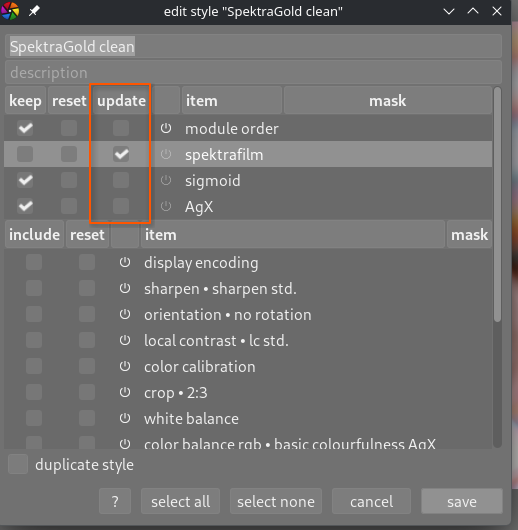
To be fair to myself: The documentation wasnt super clear on that point as well  - updated it now.
1 Like
Going from there: Can someone explain to me the purpose of the “reset” checkbox for individual modules within the styles editing prompt?
Checking it also checks “update” - but that one can then be unchecked which will lead to “keep” being checked - which then can be unchecked too, so that only “reset” is checked.
- Combination of reset & update leads to: The module being removed from the style (???)
- Combination of keep & update leads to: The module being removed from the style (??? x 2)
- Only checking “reset” leads to: The module being removed from the style (??? x 3)
What am I missing?
1 Like
Not a stupid question, but s stupid thing I did …
Put in a days work editing over 30 pics from one concert. Was quite pleased with my results too.
Just one stupid wrong command later, I had no raws, no xmps, and no exported jpegs. Gone. Linux can be unforgiving. Because I had misused a script there was nothing in trash.
Took a couple of deep breaths and thought hard.
- Darktable doesn’t yet know that the raws+xmps are not still there. I’m looking at the thumbnails in the lighttable. The xmps are gone but the edits are still in dt’s library.
- I can easily restore the raws. They are still on the camera, let alone my staging-post directory on the computer.
- I can tell darktable to write the xmps.
- And then export all the pics.
- done.
Did I panic? Well yes, justa bit. Because I hate doing work twice. Second time is boring. But there was no need.
All was well that ended well. So then I went to bed.
5 Likes
A horror story with a happy end, how nice!
Also, a good software design of darktable.
1 Like
Phew, good to hear you were able to recover. I had a similar snafu recently and was glad I had hourly scheduled btrfs snapshots after deleting the wrong files…
1 Like
That’s a nice system. I haven’t progressed beyond ext4 fs with manual backup to external drive. I only do that after specific staging points: upload of pics from camera; after initial cull (this one is a 2-way sync, deleting unwanted pics from the backup device); after import into dt; after edit session is complete or at end of day if that comes first.
What I could do is run a script which would do:
- if dt is running
- sync files to scratch disk are.
- repeat every couple of minutes
The difficult part would be determining which files to copy.
Anyway, I’ve only done this snafu once, and the fix was not hard. so I’ll keep that idea on the getting a Round Tuit list. And I don’t have any Zeiss lenses at all, so you can imagine that there is a huge amount of stuff that I never get done.
Manual backups are not backups IMHO ;-).
For your usecase why don’t you give backrest a try? Its pretty lean and elegant, has proper deduplication and hourly snapshots with a proper retention scheme are easily set up.
I think it is also possible to convert from ext4 to btrfs.
???
based on a joke which is a pun on “getting around to it.” I have seen round tuits on sale in gift shops.
But I mis-spelt Touit, the Zeiss lens.
Thanks for the idea of Backrest (itself a nice pun I guess). Probably overkill for me at this time.
1 Like