new intel mac build:
darktable-5.7.x_x86_64_14.4_slang.dmg (macOS >= 14.4)
usage see Testers wanted: experimental Slang GPU path for darktable (Metal/Vulkan) - #20 by MStraeten
new intel mac build:
darktable-5.7.x_x86_64_14.4_slang.dmg (macOS >= 14.4)
usage see Testers wanted: experimental Slang GPU path for darktable (Metal/Vulkan) - #20 by MStraeten
@Macchiato17 thanks for testing! Clean run on the Iris Xe: everything on the GPU, no fallbacks, and the output matches OpenCL (max dE 1.22). Slang takes 562 ms per export against 1111 ms for OpenCL, about half, which matches what we saw on Iris Xe under Windows.
Thanks to everyone who has tested so far. Here’s where things stand.
Steady-state export time per image (median of exports 2-5), Slang vs OpenCL on the same machine. Lower ratio is better for Slang.
mire1.cr2 (10 MP), the standard benchmark
| GPU | OS | Slang | OpenCL | Slang / OpenCL |
|---|---|---|---|---|
| Apple M4 Max | macOS | 86 ms | 175 ms | 0.49 |
| Apple M5 Pro | macOS | 124 ms | 205 ms | 0.60 |
| AMD Radeon Pro 5700 XT (iMac) | macOS | 145 ms | 199 ms | 0.73 |
| AMD Radeon Pro 5500M (MacBook Pro) | macOS | 298 ms | 367 ms | 0.81 |
| AMD Radeon Pro 5300 (iMac) | macOS | 341 ms | 407 ms | 0.84 |
| NVIDIA RTX 3060 Ti | Linux | 133 ms | 220 ms | 0.60 |
| NVIDIA RTX 4060 Laptop | Linux | 156 ms | 255 ms | 0.61 |
| NVIDIA RTX 3050 Ti Laptop | Linux | 235 ms | 324 ms | 0.72 |
| Intel Iris Xe (i7-1165G7) | Linux | 562 ms | 1111 ms | 0.51 |
| Intel Iris Xe (i7-1365U) | Windows | 913 ms | 1833 ms | 0.50 |
| Intel UHD 620 | Linux | 1597 ms | 2223 ms | 0.72 |
61 MP Sony raw (larger image, so the denoise module runs in tiles)
| GPU | OS | Slang | OpenCL (ROCm) | Slang / OpenCL |
|---|---|---|---|---|
| AMD Radeon RX 9060 XT | Linux | 0.91 s | 1.37 s | 0.67 |
| AMD Radeon 780M (integrated) | Linux | 3.74 s | 5.03 s | 0.74 |
Slang is faster than OpenCL on every machine tested so far, and its output matches OpenCL within the usual tolerance (max dE about 1.2-1.5, average below 0.001). The Radeon 780M started at 1.8x slower than OpenCL; @da-phil’s patches and logs got it to where it is now.
Still being worked on
Want to test? The nightly builds (Linux AppImage, Windows, Apple silicon macOS) are at Release Darktable nightly build 20261108 · nicknezis/darktable · GitHub. The benchmark instructions are in tools/slang-bench/README.md on the slang-benchmark branch. Please post your summary.md, and mention your driver version. Machines not covered yet would be especially useful: AMD discrete cards on Windows, Intel Arc, and older NVIDIA cards.
I don’t think this add any more useful data, but I tested on my M2 laptop.
Using darktable feel much better, amazing work!
# full-pipe benchmark, 2026-11-08 15:34

- os: Darwin 25.6.0 arm64
- cpu: Apple M2
- commit: f1ac9536c56
- image: mire1.cr2
- slang device: Metal device Apple M2 (unified memory)
- opencl devices: 'Apple M2'
- export size: full resolution, resourcelevel: default
- tiled on cpu: none
- tiled on opencl: none
- tiled on slang: none

pipe totals in ms, one process per path, 5 exports each

| path | per export | steady state | first export overhead |
|---|---|---|---|
| cpu | 3125 / 2948 / 2345 / 2233 / 2259 | 2302 | 823 |
| opencl | 1923 / 660 / 742 / 717 / 599 | 689 | 1234 |
| slang | 4590 / 444 / 427 / 413 / 435 | 431 | 4159 |

- slang device and kernel preparation at startup: 7.464 s

module runs over all 5 exports:

- opencl: 75 on GPU; on CPU:
- slang: 75 on GPU; on CPU:
- slang fallbacks/failures: 0

slang per-module time, last export (ms; GPU work is async, so trust the pipe total):

- rawprepare (GPU): 6
- temperature (GPU): 0
- highlights (GPU): 18
- demosaic (GPU): 5
- denoiseprofile (GPU): 8
- lens (GPU): 2
- exposure (GPU): 0
- toneequal (GPU): 1
- colorin (GPU): 0
- channelmixerrgb (GPU): 0
- sharpen (GPU): 0
- colorequal (GPU): 14
- agx (GPU): 1
- colorout (GPU): 8
- finalscale (GPU): 4

max / avg dE on the first export:

- cpu vs opencl: 2.04698 0.00088
- cpu vs slang: 2.04698 0.00088
- opencl vs slang: 1.21815 0.00019
@Kazuo it does add useful data, thanks! The M2 is a chip we hadn’t covered. Once warmed up, Slang takes 431 ms per export against 689 ms for OpenCL (about 0.6x), all on the GPU, and the output matches OpenCL.
Your run also shows something we hadn’t seen on Apple silicon: the first launch spent 7.5 s preparing GPU kernels, and the first export took another 4 s. That’s the one-off cost of a fresh install or an empty shader cache. We’ll look at making it lazy on Apple GPUs too, as we just did for Intel Macs.
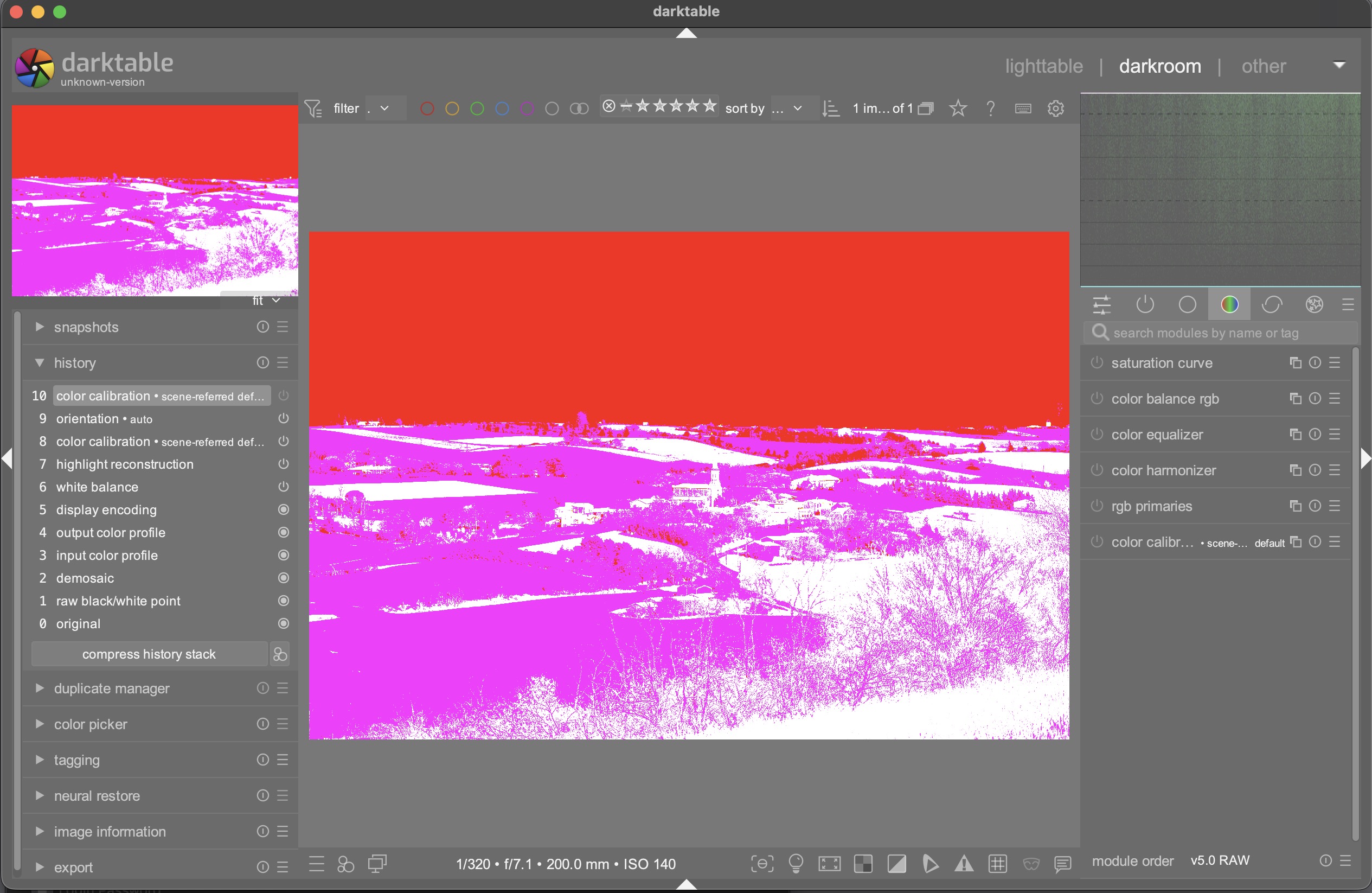
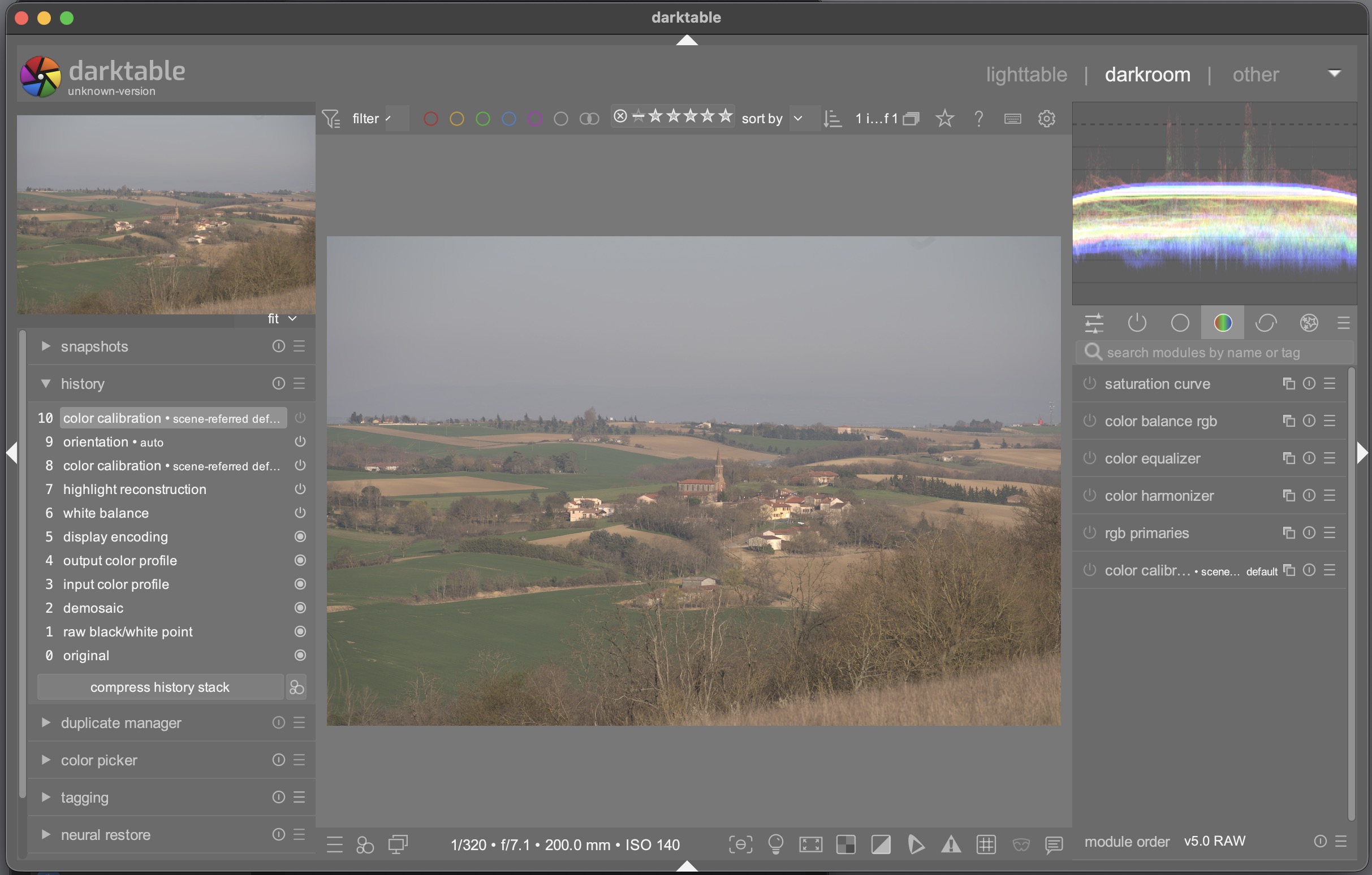
Using on the iMac with theRadeon pro5700, I had the following issue with the latest build from @MStraeten
slang activated
slang inactivated
This behaviour is new to the last build the previous one from 6 days ago behaves as expected (both images looks identical)
Anything I can do to help understanding the issue?
will do a new build - maybe something wasn’t properly updated …
new intel mac build:
darktable-5.7.x_x86_64_14.4_slang.dmg (macOS >= 14.4)
usage see Testers wanted: experimental Slang GPU path for darktable (Metal/Vulkan) - #20 by MStraeten
@zurdo thanks for the screenshots, they pin it down. The colors are the input color profile output being read in the wrong color space: upstream darktable switched that module to output RGB directly on Nov 4, and the Slang path had to follow. The fix is on the slang-benchmark branch since Nov 8, so @MStraeten’s new build from post 48 should have it. Could you try that one and confirm the darkroom matches Slang off again?
Your edits are not affected, only how the image was rendered. If it still looks wrong with the new build, please start darktable from Terminal with -d slang -d pipe (e.g. /Applications/darktable.app/Contents/MacOS/darktable -d slang -d pipe > ~/slang.log 2>&1), open the image, and attach slang.log.
@MStraeten for the record: the bad combination is upstream master from Nov 4 or later with slang-benchmark from before Nov 8. Building slang-benchmark as it is now gets both.
Just try the build from 2h ago and is working as expected ! I switched using the regular intel builds for the slang version, thus I will keep testing future versions.
new intel mac build:
darktable-5.7.x_x86_64_14.4_slang.dmg (macOS >= 14.4)
usage see Testers wanted: experimental Slang GPU path for darktable (Metal/Vulkan) - #20 by MStraeten