Are you aware of this article?
There were some minor typos in it, but that doesn’t stop it being an excellent resource, in need of more exposure and placement somewhere easily found.
Are you aware of this article?
There were some minor typos in it, but that doesn’t stop it being an excellent resource, in need of more exposure and placement somewhere easily found.
Or, maybe, as a quick fix:
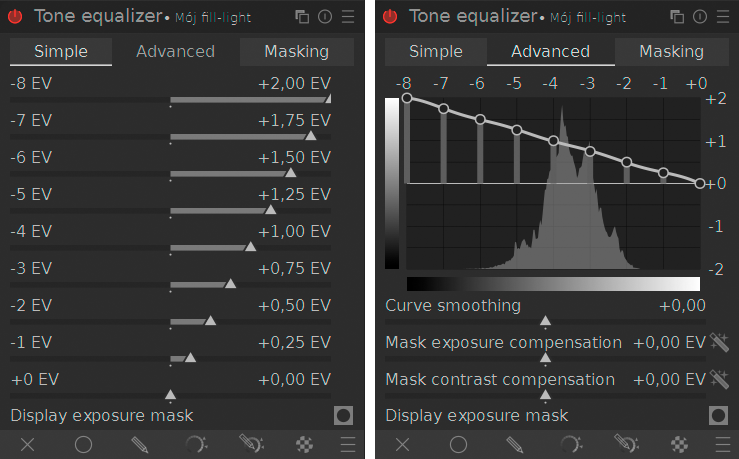
You would only need to manipulate the “Mask exposure compensation slider”.
Yes I am, because it is also blog on the .org site. (darktable 5.4 - A Simple Beginner Workflow and Interactive Walkthrough | darktable), but of course is a recent article, this was not available a year ago. But I will read it and see if I am missing anything.
I think one could also raise only the bottom few sliders (so mid-tones and highlights are not affected), and/or tune the mask contrast + exposure so that the shadows cover the range visible in the tool, with mid-tones and highlights being above (there will be a warning, but that’s not important).
In order to avoid inversions (an area initially brighter than some other area becoming darker that the other), the slope should descend slowly.
For example, if an area is at -7 EV initially, and gets pushed by +2 EV, it ends up at -5 EV. If an area at -6 EV is raised by +1 EV, it also ends up at -5 EV, making them equally bright; if it’s pushed by less than +1 EV, it will be less bright than the other, initially darker area. I think if the contrast is boosted, this is even more of an issue:
I do not know if there’s internal scaling to the adjustment (though I would think there isn’t) to reduce the effect based on the stretching (contrast boost) of the mask. We could adjust the areas as follows:
This would also lead to an inversion, because
I think there are a few issues that are confounded here.
As a newer user myself, I wish to share my approach.
Recently, user @Donatzsky has created “Planet Darktable,” aggregating known sources of information from the web. You may find his post on this forum.
I agree that documentation could be improved, but I appreciate that dt is not a huge FOSS project and that resources are limited. I hope to be able to help in the future.
I use the Tone Equalizer often, and I learned something new in this thread. I had never even noticed the pickers to auto-adjust mask exposure compensation and mask contrast compensation. I have always adjusted them with the sliders. I will be trying out the pickers, soon.
I am not sure that I follow this. I am not arguing this at all. This is apparently what you read into my messages. So please check first before making assumptions.
What I have argued, we should not be surprised that if a group of new comers to dt feel neglected and mistreated that at some point they start something themselves.
I know, I have bookmarked it, I check it regularly and like it. Actually I have been in contact with the creator to see if it was possible to organise it by language.
But it is stream of what is going now regarding dt. And it is serving that purpose very well.
It is not a source you could point a new comer to and argue: here is a good source of information on how to learn dt. It not curated. It is not organised other than by time.
Incidentally, what are the downsides to this? Is there a reason that Tone EQ is not underneath Exposure by default?
I guess if the image isn’t exposed well out of camera, then it could make it a bit harder to use Tone EQ, but is there another more technical reason why we should avoid using Tone EQ below Exposure all the time?
This is a good point, the image should be well exposed before we do anything with it. Also, it is generally good practice to make the broadest adjustments first. Exposure is the broadest and most basic adjustment we have.
What I often do in stead of moving the tone equalizer down is to place a new instance of exposure above tone eq if I need additional exposure adustments after I have used tone eq.
But the order of operations in the pixelpipe is independent of the order of changes to it. This is important, often repeated, and in videos often demonstrated.
There will likely be reasons for the default, but I doubt it was the priority of exposure adjustment in the editing process.
Ok, your point is noted.
My experience here is different and very positive. That is not to say that learning dt is easy, nor to say that beginner resources could not be improved. But considering the nature of the project; I feel fortunate to have some resources, including this forum.
I’m sorry you feel differently.
I will again request that you flag such posts. Go back and flag posts. I took about 20 minutes reading thru threads you’ve been on, and I can not see it. If I don’t see it and you don’t flag it, then nothing can change. Thank you.
Oh, of course! Thanks for reminding me 
I’ve asked myself the same. Output of tone equalizer is ”quasi-linear”, when the exposure module expects “linear” input. If that’s the reason, you’d have to ask someone else. 
I always adjust my compensation sliders, I did that even before I started putting tone equalizer below exposure. That said, TIL some people do things differently.
An image with correct exposure will have more contrast than an underexposed image, and so the input to the tone eq will be better if exposure comes first.
I don’t have any matemathical evidence for this, it’s just how I think it is. Others may know more about it.
There’s always the option to have a course exposure adjustment done initially and a second copy further up the pipeline for a later fine adjustment.
If there are no drawbacks to putting the tone equalizer before exposure, I’d rather do that move than use double exposure modules.
Perhaps also a section 1.5 which explains why you would use that module over other options.
Yes, that’s what I often do.
What are some of the situation / cases for which auto-adjust pickers will not work for you?