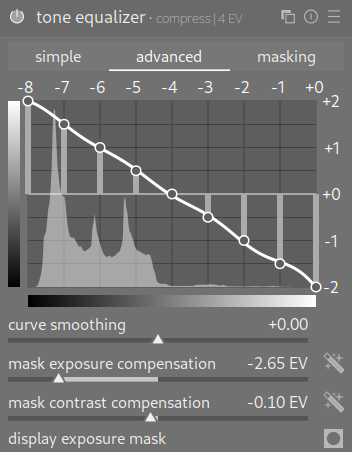
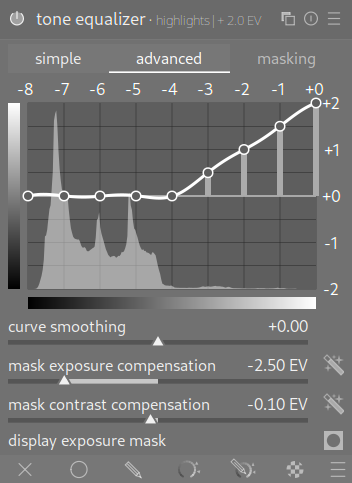
Someone posted a set of (french) tone equalizer presets on there.
Since they come up regularily, I think are used in some of @s7habo s videos and I wanted to have them nicely integrated for myself I translated them to english and german and cleaned up the naming/setup.
I unfortunately cannot manage to find the original post/creator to reference them here. If you know tell me .
Edit: Credit to the original Creator @Christian-B who came up with the presets inspired by Luc Viatour and @s7habo .
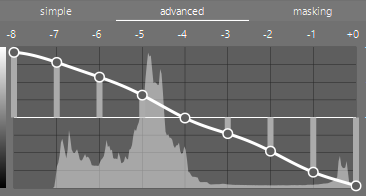
I make these settings by setting the mask exposure and mask contrast compensations settings. I don’t use a preset but I use this type of instance of tone equalizer to tame wide dynamic range shots. I then restore lost contrast by using the AgX modules. I don’t have a preset as such
I’m glad you posted and translated my presets. I don’t remember when I originally posted them on the forum.
These presets are the result of several ideas from the forum and videos. Indeed, many contributors to this forum work with straight lines, but the main focus of these different presets is the masks used to preserve as much local contrast as possible. And to give credit where credit is due, this method of determining them comes from a Belgian professional photographer, “Luc Viatour,” and from this video at the 21-minute mark (in French), as well as Boris’s invaluable videos.
These presets were designed for scene workflow (with a 0.7 EV exposure boost).
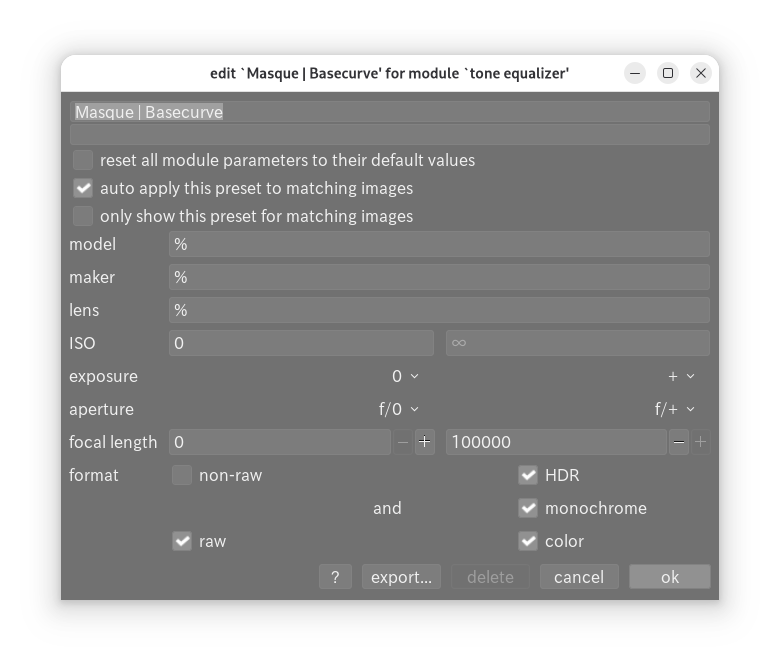
It’s a great idea to gather all the presets on a GitHub page; I see you’re missing the masks. toneequal_Masque.zip (2.1 KB)
And why not do the same for other modules?
greetings from the Luberon
Christian
As explained in Luc Viatour’s video, I always start by adjusting the exposure and use the histogram as a guide. Then, if necessary, I use the curve to fine-tune the exposure or apply one or more presets.
Thanks I recall having a quick look at them an on the surface it just looked like it selected what mask blending option was used but maybe there was another difference I didn’t notice…
Do you have a reference for that? And a reason for that advice?
Keeping the extremes at 0 basically removes the option of modifying the dynamic range of the image. (And note that some of the default presets do not follow that advice…)
I don’t think you really need to make sure those are in neutral position. If you want to reduce an extreme tonal range, like -12 EV to +8 EV, and you leave blacks and whites in place, you’ll only shift the ranges up and down, you won’t compress the global tonal range. E.g. you may bring a +5 EV bright region down to +4 EV, but that +8 EV remains where it was. (In the tone EQ, compression of the mask will map the -12…+8 EV range to -8…0 EV, but the darkest/brightest regions will still be unaffected).
I think I remember him saying something about the end points but the videos are no longer there to confirm…I suspect it might have been for the case where you are shifting the 8EV window to give you control over the most important range of your image, say the highlights in a largely overexposed image, in that case the way the module works several stops at the lower end of the dnr might be impacted by the border node at that one side …its unlikely that or it might be that you want to apply some equal bump to all of that part of the image as it could break it…but I may be speculating on what he said and what he may have been referring to.
I use the 8EV window as a sliding window along a ruler, The ruler (dnr) might be 16 EV and without any compression so I slide it to target what I want…and usually you do use some compression to expand or compress the ruler to again maximize how the 8 nodes can be used to tweak the image…There are further controls to tweak the blending of the zones in the mask and different estimators that can be used for the luminance normalization of the scene referred data but I don’t often play with them all that much
I like the French-name presets, because they make me feel really fancy while editing.
(Jokes aside, it’s really cool that you’ve translated and recompiled them)
I also remember that advice, and I think that it’s because anything outside of the mask boundary could be unevenly affected by a change on the edge nodes. But if all image data is inside the mask boundary, then it should be okay.
I personally decide what to do with these extreme points based solely on the look of the result. If my blacks look a muddy grey and the whites look a shade of grey then returning these extreme values towards zero may be a better way of setting tone equalizer. But not all images have extreme black or whites so in that case the zero values may prove less important.
Here is an example of a scene without pure whites or blacks that benefited from straight line approach to tame the dynamic range. I depend upon AgX white and black relative exposure settings to restore contrast back into the image.
I think this still aligns and I think having the adjustment slope to zero near the extremes of the mask when you are using a mask compressed and centered to define the whole image “light energy” as I think AP called it is likely sound so that you are not in advertantly lifting or dropping adjacent zones that might be at those extremes… in the case where you are dodging and buring or trying to handle some tricky shadows or highlights I don’t think then you need to worry about that… indeed I think this is the key paragraph and it is carried over unaltered in AP’s Ansel fork…
" It is important that the mask separates the image into regions of similar brightness, and that a suitable amount of blur is applied within those regions. This means that all of the pixels in each region will have their exposure adjusted similarly, without adversely affecting local contrast. Examine your image beforehand to identify which regions you wish to dodge and burn, and use the controls on the masking tab to ensure that those areas are reasonably separated in tone within the final mask. This will allow those regions to be adjusted independently."
So he gave that advice in the context of a particular image. Iirc, there have been changes to the tone equalliser since (EIGF was added). But I sometimes have images where I really need to increase the dynamic range (a bit faking it, of course, as the original has very low contrast). Filmic alone doesn’t handle that very well.
I noticed he also changed the grey reference value to 24.68% (instead of the default 18.45%), something he later discouraged (see the filmic FAQ). Keep in mind that at that time the whole scene-referred editing was still “under development”.
This topic triggered me to look back at a few things and one of them is that fact that there is not much mentioned in the documentation about the luminance estimators only that they are optional ways to use the rgb values in camera space to calculate the luminance for the creation of the mask…
Looking at them they all have a bias based on the way they use the channels to determine that value and in some cases ways that can influence saturated colors, or shadows more than other parts of the image etc…
I was using AI to pick them apart a little but it is interesting that you can actually have a reason if you analyse the dynamic range and hue and saturation of certain elements in your image that you are trying to impact with the toneeq and then one of the options will likely perform better…
If I can get to where I understand it and can validate the answers I might submit it as an addition to the manual…
I had mainly wanted to share the source since a few people had brought it up. Strange how I could pull this out of my head but I can’t remember where I left my keys…
I’ve wondered if AP still thinks the tip applies, but I’ve tried doing that and it didn’t seem to make much difference to my eyes.
 .
.