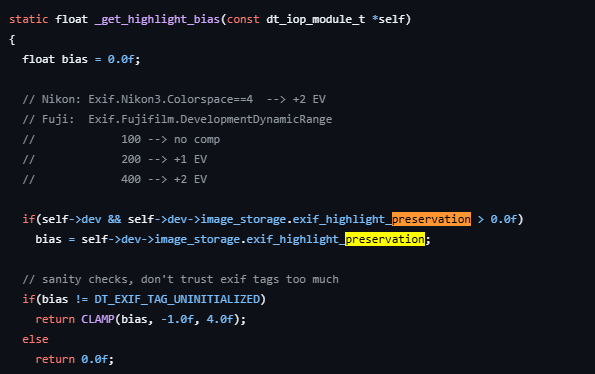
With the Exposure Module in manual mode there is a feature listed as “highlight preservation mode” that appears to be automatically enabled (i.e., default to active). I am using Version 5.4.1 of Darktable, which I think is the most up to date, but the documentation that gets displayed when turning on the help (i.e., ?) feature makes no mention of it.
When you hover the mouse over it what gets displayed includes the following:
“when enabled on an image with nonzero bias, tone mapping (e.g., sigmoid) is required to avoid blown-out highlights.”
First, I think tone mapping is a term that is also used to refer to the filmic and Agx modules, which I’m more inclined to use. Do they also count?
Second, exposure is one of the modules that gets adjusted early in the development process. Is this something that must be adjusted here or maybe is best to adjust here and why?
Third the term bias appears in the documentation for the exposure module as “camera bias” which I’m thinking could refer to what is commonly called “expose to the right (ettr)” in camera terminology. That is something I do have setup in my cameras. Therefore, I’m thinking nonzero bias could refer to ettr. Correct?
This feature is intended for people who expose to the right using the exposure compensation of their camera. The idea being that the compensation is not dialed in creatively but on a technical basis. E.g. you underexpose your shot by 1EV to preserve the sky, then dt will compensate for that automatically in the exposure module.
In personally think it would be more sound to have that box un-ticked by default because I suspect the amount of people who use the feature as intended is rather small. But if you want you can create an auto applied preset without the box ticked.
I shoot bracketed exposures a lot… The default behaviour of exposure module is to make all three bracketed shots look identical by counterbalancing the EV compensation applied in the camera. I can untick this box or use a style where this box is unticked and then I get three pictures of varying brightness.
Sometimes but not all times I get an extra option appearing which is to do with highlight preservation mode. I presume this box only appears if the camera has enabled this mode. Very few of my pictures have this box showing but I know occasionally it is there and ticked.
As for tone mapping you are right that filmic, sigmoid or AgX are all tone mappers and therefore would count.
I am confused by your second question’s wording. But exposure is normally adjusted to give good midtones before adjusting the tone mapper to map your highlights and shadows. So I am unsure what this is but if you are referring to the highlight preservation box I presume that is just being added to the exposure slider and if the exposure module looks too bright or dark just adjust the slider until it looks good. The position of the slider would vary depending on if the boxes for camera compensation (if applied in camera) and highlights preservation are ticked or not ticked.
The third question I have already answered in that it refers to exposure value compensation as applied in the camera. This is not necessarily ETTR. With my brackets shots they may be -1EV, 0EV and +1EV or or other values as set in the camera.
If you achieve ETTR by applying a + EV value in the camera the default behaviour is to undo this compensation. That may or may not be appropriate for your images. You can decide if having the camera compensation ticked or unticked is more appropriate for you. Only DT to my knowledge counter balances the camera’s EV compensation setting. I found this unusual behaviour at first but it works well because I bracket my shots. However, if I used to the cameras EV compensation to get a single exposure correctly exposed in the camera I would want that box unticked.
I think this is a feature that reflects a certain mode of some camera’s like fuji that use some DNR settings…I don’t think you see if for every camera??
I did not realize that “highlight preservation mode” might not appear. So far it appears on all of the pictures I’ve worked on with the new, to me, Version 5 software.
It was only about how important is it to do that before using the tone mapper. The idea of good midtones makes good sense to me. I’ve noticed that typically they improve when you activate the tone mapper.
I do have different cameras I use for different purposes and the one in question which is for landscapes (i.e., wide angle still subjects) is set to expose 2 stops to the right.