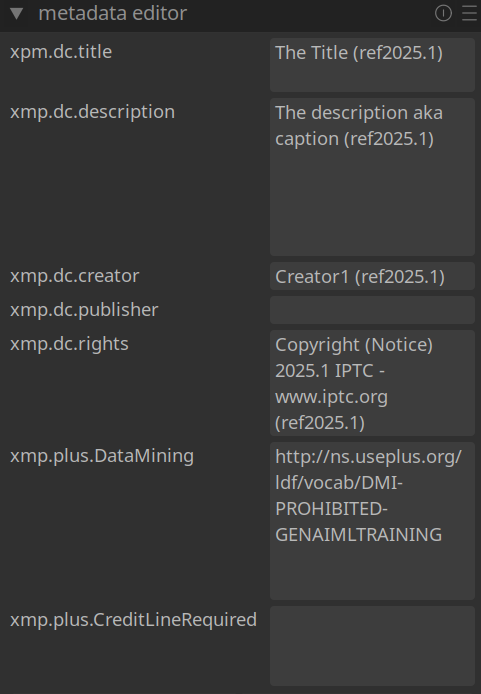
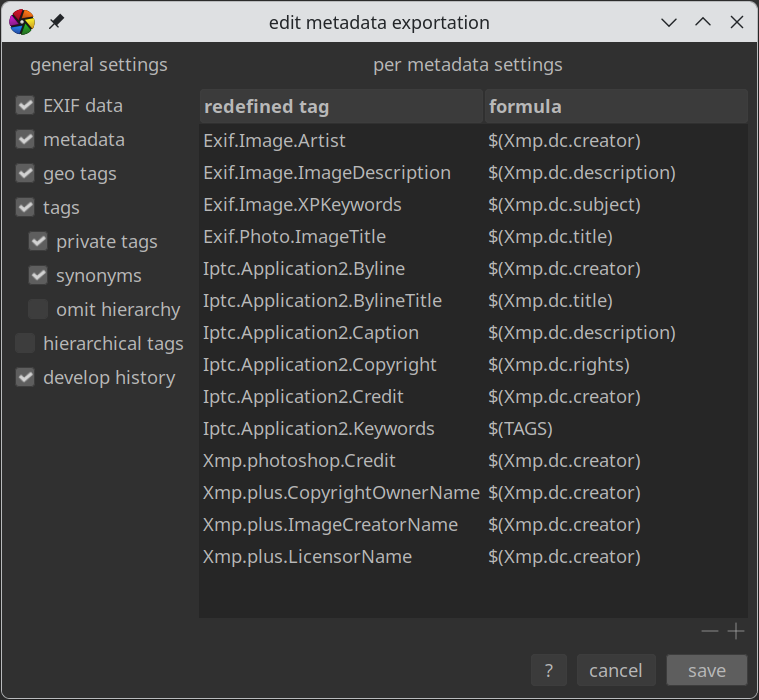
I am trying to view and edit IPTC image metadata using Darktable. I have downloaded the 2025.1 reference image from https://iptc.org/standards/photo-metadata/iptc-standard/.
Exiftool shows the values of the IPTC fields:
File Name                       : IPTC-PhotometadataRef-Std2025.1.jpg
Image Description               : The description aka caption (ref2025.1)
Artist                          : Creator1 (ref2025.1)
Copyright                       : Copyright (Notice) 2025.1 IPTC - www.iptc.org  (ref2025.1)
Date/Time Original              : 2025:11:03 00:25:01
Object Name                     : The Title (ref2025.1)
Keywords                        : Keyword1ref2025.1, Keyword2ref2025.1, Keyword3ref2025.1
Special Instructions            : An Instruction (ref2025.1)
By-line                         : Creator1 (ref2025.1)
By-line Title                   : Creator's Job Title  (ref2025.1)
Sub-location                    : Sublocation (Core) (ref2025.1)
Province-State                  : Province/State(Core)(ref2025.1)
Country-Primary Location Name   : Country (Core) (ref2025.1)
Original Transmission Reference : Job Id (ref2025.1)
Copyright Notice                : Copyright (Notice) 2025.1 IPTC - www.iptc.org  (ref2025.1)
Caption-Abstract                : The description aka caption (ref2025.1)
Writer-Editor                   : Description Writer (ref2025.1)
Alt Text Accessibility          : This is the Alt Text description to support accessibility in 2025.1
Alt Text Accessibility (en)     : This is the Alt Text description to support accessibility in 2025.1
Creator City                    : Creator's CI: City (ref2025.1)
Creator Country                 : Creator's CI: Country (ref2025.1)
Creator Address                 : Creator's CI: Address, line 1 (ref2025.1)
Creator Postal Code             : Creator's CI: Postcode (ref2025.1)
Creator Region                  : Creator's CI: State/Province (ref2025.1)
Creator Work Email              : Creator's CI: Email@1, Email@2 (ref2025.1)
Creator Work Telephone          : Creator's CI: Phone # 1, Phone # 2 (ref2025.1)
Creator Work URL                : http://www.Creators.CI/WebAddress/ref2025.1
Ext Descr Accessibility         : This is the Extended Description to support accessibility in 2025.1
Ext Descr Accessibility (en)    : This is the Extended Description to support accessibility in 2025.1
Location                        : Sublocation (Core) (ref2025.1)
AI Prompt Information           : IPTC Reference image for version 2025.1 of the standard
AI Prompt Writer Name           : IPTC PMD Working Group (ref 2025.1)
AI System Version Used          : 2025.1
About Cv Term Cv Id             : http://example.com/cv/about/ref2025.1
About Cv Term Id                : http://example.com/cv/about/ref2025.1/code987
About Cv Term Name              : CV-Term Name 1 (ref2025.1)
About Cv Term Refined About     : http://example.com/cv/refinements2/ref2025.1/codeX145
Additional Model Information    : Additional Model Info (ref2025.1)
Artwork Circa Date Created      : AO Circa Date: between 1550 and 1600 (ref2025.1)
Artwork Content Description     : AO Content Description 1 (ref2025.1)
Artwork Contribution Description: AO Contribution Description 1 (ref2025.1)
Artwork Copyright Notice        : AO Copyright Notice 1 (ref2025.1)
Artwork Creator                 : AO Creator Name 1a (ref2025.1), AO Creator Name 1b (ref2025.1)
Artwork Creator ID              : AO Creator Id 1a (ref2025.1), AO Creator Id 1b (ref2025.1)
Artwork Copyright Owner ID      : AO Current Copyright Owner ID 1 (ref2025.1)
Artwork Copyright Owner Name    : AO Current Copyright Owner Name 1 (ref2025.1)
Artwork Licensor ID             : AO Current Licensor ID 1 (ref2025.1)
Artwork Licensor Name           : AO Current Licensor Name 1 (ref2025.1)
Artwork Physical Description    : AO Physical Description 1 (ref2025.1)
Artwork Source                  : AO Source 1 (ref2025.1)
Artwork Source Inventory No     : AO Source Inventory No 1 (ref2025.1)
Artwork Source Inv URL          : AO Source Inventory URL (ref2025.1)
Artwork Style Period            : AO Style Baroque (ref2025.1), AO Style Italian Baroque (ref2025.1)
Artwork Title                   : AO Title 1 (ref2025.1)
Contributor Name                : Contributor Name 1 (ref2025.1), Contributor Name 2 (ref2025.1)
Contributor Role                : https://example.com/contributor-role-cv/ref2025.1-1), https://example.com/contributor-role-cv/ref2025.1-2)
Contributor Identifier          : Contributor Id 1 (ref2025.1), Contributor Id 2 (ref2025.1)
Digital Image GUID              : http://example.com/imageGUIDs/TestGUID12345/ref2025.1
Embedded Encoded Rights Expr    : The Encoded Rights Expression (ERE) (ref2025.1)
Embedded Encoded Rights Expr Type: IANA Media Type of ERE (ref2025.1)
Embedded Encoded Rights Expr Lang ID: http://example.org/RELids/id4711/ref2025.1
Event                           : Event Name (ref2025.1)
Event ID                        : https://example.com/events/ref2025.1-a, https://example.com/events/ref2025.1-b
Genre Cv Id                     : http://example.com/cv/genre/ref2025.1
Genre Cv Term Id                : http://example.com/cv/genre/ref2025.1/code1369
Genre Cv Term Name              : Genre CV-Term Name 1 (ref2025.1)
Genre Cv Term Refined About     : http://example.com/cv/genrerefinements2/ref2025.1/codeY864
Image Region Organisation In Image Name: Organisation name no 1 in region persltr1 (ref2025.1), Organisation name no 1 in region persltr2 (ref2025.1), Organisation name no 1 in region persspkr1 (ref2025.1)
Image Region Person In Image    : Person name no 1 in region persltr1 (ref2025.1), Person name no 1 in region persltr2 (ref2025.1), Person name no 1 in region persspkr1 (ref2025.1)
Image Region Ctype Name         : Region Boundary Content Type Name (ref2025.1), Region Boundary Content Type Name (ref2025.1), Region Boundary Content Type Name (ref2025.1)
Image Region Ctype Identifier   : https://example.org/rctype/type_ref2025.1-a, https://example.org/rctype/type_ref2025.1-b, https://example.org/rctype/type_ref2025.1-a, https://example.org/rctype/type_ref2025.1-b, https://example.org/rctype/type_ref2025.1-a, https://example.org/rctype/type_ref2025.1-b
Image Region Role Name          : Region Boundary Content Role Name (ref2025.1), Region Boundary Content Role Name (ref2025.1), Region Boundary Content Role Name (ref2025.1)
Image Region Role Identifier    : https://example.org/rrole/role_ref2025.1-a, https://example.org/rrole/role_ref2025.1-b, https://example.org/rrole/role_ref2025.1-a, https://example.org/rrole/role_ref2025.1-b, https://example.org/rrole/role_ref2025.1-a, https://example.org/rrole/role_ref2025.1-b
Linked Encoded Rights Expr      : http://example.org/linkedrightsexpression/id986/ref2025.1
Linked Encoded Rights Expr Type : IANA Media Type of ERE (ref2025.1)
Linked Encoded Rights Expr Lang ID: http://example.org/RELids/id4712/ref2025.1
Location Created City           : City (Location created1) (ref2025.1)
Location Created Country Name   : CountryName (Location created1) (ref2025.1)
Location Created Location Id    : Location Id (Location created1) (ref2025.1)
Location Created Location Name  : Location Name (Location created1) (ref2025.1)
Location Created Province State : Province/State (Location created1) (ref2025.1)
Location Created Sublocation    : Sublocation (Location created1) (ref2025.1)
Location Created World Region   : Worldregion (Location created1) (ref2025.1)
Location Shown City             : City (Location shown1) (ref2025.1), City (Location shown2) (ref2025.1)
Location Shown Country Name     : CountryName (Location shown1) (ref2025.1), CountryName (Location shown2) (ref2025.1)
Location Shown Location Id      : Location Id 1a(Location shown1) (ref2025.1), Location Id 1b(Location shown1) (ref2025.1), Location Id 2a(Location shown2) (ref2025.1), Location Id 2b(Location shown2) (ref2025.1)
Location Shown Location Name    : Location Name (Location shown1) (ref2025.1), Location Name (Location shown2) (ref2025.1)
Location Shown Province State   : Province/State (Location shown1) (ref2025.1), Province/State (Location shown2) (ref2025.1)
Location Shown Sublocation      : Sublocation (Location shown1) (ref2025.1), Sublocation (Location shown2) (ref2025.1)
Location Shown World Region     : Worldregion (Location shown1) (ref2025.1), Worldregion (Location shown2) (ref2025.1)
Organisation In Image Code      : Organisation Code 1 (ref2025.1), Organisation Code 2 (ref2025.1), Organisation Code 3 (ref2025.1)
Organisation In Image Name      : Organisation Name 1 (ref2025.1), Organisation Name 2 (ref2025.1), Organisation Name 3 (ref2025.1)
Person In Image                 : Person Shown 1 (ref2025.1), Person Shown 2 (ref2025.1)
Person In Image Cv Term Cv Id   : http://example.com/cv/test99/ref2025.1
Person In Image Cv Term Id      : http://example.com/cv/test99/code987/ref2025.1
Person In Image Cv Term Name    : Person Characteristic Name 1 (ref2025.1)
Person In Image Cv Term Refined About: http://example.com/cv/refinements987/codeY765/ref2025.1
Person In Image Description     : Person Description 1 (ref2025.1)
Person In Image Id              : http://wikidata.org/item/Q123456789/ref2025.1, http://freebase.com/m/987654321/ref2025.1
Person In Image Name            : Person Name 1 (ref2025.1)
Product In Image Description    : Product Description 1 (ref2025.1)
Product In Image GTIN           : 123456782025.1
Product In Image Product Id     : Product ID 1 (ref2025.1)
Product In Image Name           : Product Name 1 (ref2025.1)
Registry Entry Role             : Registry Entry Role ID 1 (ref2025.1), Registry Entry Role ID 2 (ref2025.1)
Registry Item ID                : Registry Image ID 1 (ref2025.1), Registry Image ID 2 (ref2025.1)
Registry Organisation ID        : Registry Organisation ID 1 (ref2025.1), Registry Organisation ID 2 (ref2025.1)
Creator                         : Creator1 (ref2025.1)
Description                     : The description aka caption (ref2025.1)
Rights                          : Copyright (Notice) 2025.1 IPTC - www.iptc.org  (ref2025.1)
Subject                         : Keyword1ref2025.1, Keyword2ref2025.1, Keyword3ref2025.1
Title                           : The Title (ref2025.1)
Authors Position                : Creator's Job Title  (ref2025.1)
Caption Writer                  : Description Writer (ref2025.1)
City                            : City (Core) (ref2025.1)
Country                         : Country (Core) (ref2025.1)
Credit                          : Credit Line (ref2025.1)
Date Created                    : 2025:11:03 00:25:01+00:00
Headline                        : The Headline (ref2025.1)
Instructions                    : An Instruction (ref2025.1)
Source                          : Source (ref2025.1)
State                           : Province/State(Core)(ref2025.1)
Transmission Reference          : Job Id (ref2025.1)
Copyright Owner ID              : Copyright Owner Id 1 (ref2025.1), Copyright Owner Id 2 (ref2025.1)
Copyright Owner Name            : Copyright Owner Name 1 (ref2025.1), Copyright Owner Name 2 (ref2025.1)
Image Creator ID                : Image Creator Id 1 (ref2025.1)
Image Creator Name              : Image Creator Name 1 (ref2025.1)
Image Creator Image ID          : Image Creator Image ID (ref2025.1)
Image Supplier ID               : Image Supplier Id (ref2025.1)
Image Supplier Name             : Image Supplier Name (ref2025.1)
Image Supplier Image ID         : Image Supplier Image ID (ref2025.1)
Licensor City                   : Licensor City 1 (ref2025.1), Licensor City 2 (ref2025.1)
Licensor Country                : Licensor Country 1 (ref2025.1), Licensor Country 2 (ref2025.1)
Licensor Email                  : Licensor Email 1 (ref2025.1), Licensor Email 2 (ref2025.1)
Licensor Extended Address       : Licensor Ext Addr 1 (ref2025.1), Licensor Ext Addr 2 (ref2025.1)
Licensor ID                     : Licensor ID 1 (ref2025.1), Licensor ID 2 (ref2025.1)
Licensor Name                   : Licensor Name 1 (ref2025.1), Licensor Name 2 (ref2025.1)
Licensor Postal Code            : Licensor Postcode 1 (ref2025.1), Licensor Postcode 2 (ref2025.1)
Licensor Region                 : Licensor Region 1 (ref2025.1), Licensor Region 2 (ref2025.1)
Licensor Street Address         : Licensor Street Addr 1 (ref2025.1), Licensor Street Addr 2 (ref2025.1)
Licensor Telephone 1            : Licensor Phone1 1 (ref2025.1), Licensor Phone1 2 (ref2025.1)
Licensor Telephone 2            : Licensor Phone2 1 (ref2025.1), Licensor Phone2 2 (ref2025.1)
Licensor URL                    : https://example.com/LicensorURL_1_ref2025.1, https://example.com/LicensorURL_2_ref2025.1
Model Release ID                : Model Release ID 1 (ref2025.1), Model Release ID 2 (ref2025.1)
Property Release ID             : Property Release ID 1 (ref2025.1), Property Release ID 2 (ref2025.1)
Usage Terms                     : Rights Usage Terms (ref2025.1)
Web Statement                   : https://example.com/WebStatementOfRights/ref2025.1
Comment                         : IPTC Photo Metadata Standard 2025.1 reference image file - initial release 0, as of 2025-11-03
Date/Time Original              : 2025:11:03 00:25:01+00:00
Date/Time Created               : 2025:11:03 00:25:01+00:00
Is it possible to get this information to show in the metadata editor? I’ve adjusted the metadata settings in an attempt to show at least some of it:
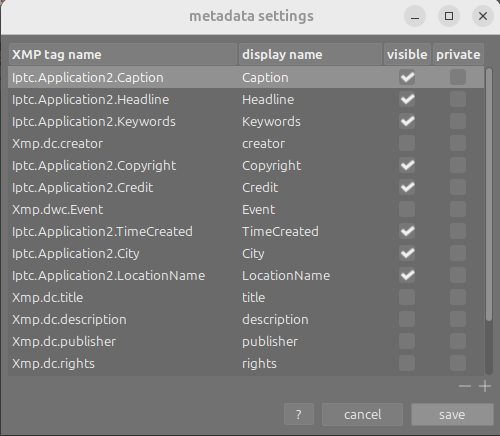
but the metadata editor doesn’t contain any information:
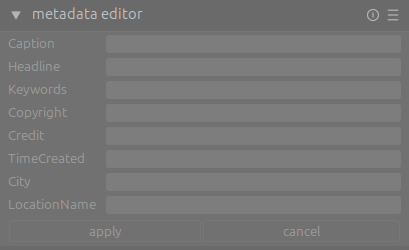
Any advice appreciated.