Hi All,
I’ve been using Darktable for quite some time and really enjoy it, especially the colour management.
Now I’m facing a new issue. I have two images in the frame buffer. One snapshot and the “working” image to match to the snapshot as reference.
In VFX (from where I come from) the standard procedure for the fine tunning to see the individual channels and match separately.
I can not find the easy way to do this (in most of the VFX softwares usually this the R/G/B/A shortcuts), but I can’t see even a toggle to do this.
Is it possible? (Adding moduls to both images seems are way too complicated and time consuming for me)
Appreciate your answers.
Welcome to pixls!
Do you mean an RGB Parade? If so, you can change to that view using your scopes. You can see more info in the manual
I think OP means displaying individual channels as monochrome - kind of like Color Calibration lets you convert to monochrome using the Gray tab. While not exactly convenient, I think setting each channel to 1.000 should do the job
Ah. I didnt know that is how they do things in vfx! Your recommendation is how I would go about it.
Now I am curious about that way of doing things…
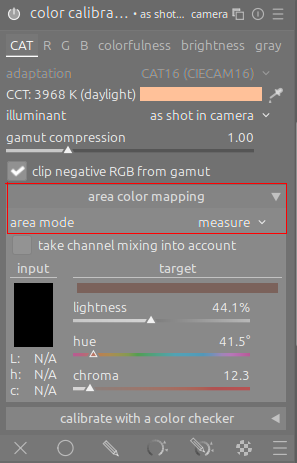
I’m not sure if this already helps: as far as I understood the OP, it may be mainly about color calibration. So if the goal is to align the color (cast) from the reference with the current image under processing, I would go for this method using color calibration:
- go to the reference image
- expand the area color mapping section of the color calibration module
- fetch the reference color (e.g. a region of color you have in both the reference and the target image) by first changing the area mode to measure, then clicking the pipette tool and finally selecting the color area by marking a rectangle with the mouse while being in this mode
- now switch to the target image; proceed the same way, but set the area mode first to correction before clicking the pipette tool and selecting an area of same color as in the reference. This will adopt the current color calibration settings to the measured value.
1 Like
Thank you for the answer Guys! I also found only this ways as well. It’s really not so convenient I’m afraid, because in this way I need to add a module (color calibration) to the original and the reference (destination) image as well, and if I’m ok with one color, need to change both images respectively and set a new snapshot.
I was curious if there is any way to see the individual channels only in the viewer buffer without applying any modifications.
It would be a big plus I guess - if we have a wishlist… 
This way: GitHub · Where software is built
1 Like