Welcome to the forum @R11 - doing market research are we ?
I copy and rename my files using digikam (because that covers videos as well), cull and edit in darktable and after that manually move raws+xmps+jpegs to my NAS. I hate culling, especially if I shot too many similar frames of the same subject. The rest I enjoy/tolerate.
My workflow is constantly evolving, but I cull from my SD card and move the keepers to my hard drive that’s organized by location and date.
If I am focus stacking then I move the file set to a single location so the program knows where to look and then move the resultant merged TIFF file to its proper location. I then delete the original raw files.
Haha, fair call Yes, a little — I’m building a local-first image workflow prototype and I’m trying to understand where the annoying manual parts actually are before assuming what people need.
The culling part is interesting. When you have lots of similar frames, what makes it annoying for you most — comparing them side by side, deciding which one to keep, marking/rejecting them, or just the sheer number you have to go through?
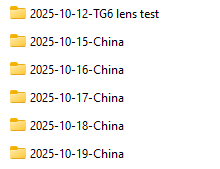
I don’t understand why there has to be much reptition at all. I just copy files into a filesystem of year/yyy-mm-dd-name-of-event and leave them there, mirroring this filesystem across a couple of drives and the cloud. No moving around required.
Culling is done in darktable but culling shouldn’t be the less interesting part of photography at all. It should be really being mindful about why one photo is better than another. Photo editing shouldn’t just be the “fun of moving around sliders” but of carefully choosing one’s work.
If culling is boring then there is a problem somewhere in your routine: either you blindly take too many photos or you’re overly stimulating by technology to want to see immediate results. To be repetitive, if organizing your photos is tiresome then you’re probably taking too many photos instead of just keeping your best, which shouldn’t be that many to begin with because taking a photo is hard.
You know what? I think there’s a tendency amongst many to hoard endless amounts of photos and become a collector of them, which is not really healthy nor conducive to one’s growth as a photographer.
Thanks — that’s a useful perspective.
It sounds like your workflow avoids most of the problem by keeping the storage structure simple and being selective much earlier in the process. That’s helpful to hear too.
That makes sense — especially when there isn’t one obviously “best” frame.
How do you usually compare those similar shots now? Just flip between them in darktable, or do you use any kind of side-by-side/grouping workflow?
Fair point — I was thinking less about delegating the decision, and more about reducing the mechanics around it: grouping similar shots, quick A/B comparison, synchronized zoom, that sort of thing.
Does darktable already make that part easy enough for you, and the only hard part is the actual judgment?
I copy and import my images into DT and in the process use jobcode to describe picture location or similar info and folders are organised by the date. I shoot bracketed raw +JPG usually and this means most shots get culled in the end. I cull by working through a days shoot and picking the best of the raw bracket to edit. The other raws and jpgs are usually marked for deletion and deleted. I usually don’t rename images or use tags or labels. I do all of this in the darkroom view because I like the raw over exposure indicator to help decide the best image to edit. If I need to compare images I use snapshots. I might even take a snapshot of the JPG to compare my RAW edit to the cameras edit.
So for my workflow no additional software needed. My system works well for me.
Got it, sounds like darktable already covers pretty much everything you need. The snapshot trick for comparing the JPG with the RAW edit is neat too. Thanks for sharing!
The ability to put snapshots side by side is great for this, but I also find the ability to use snapshots as an overlay which can be swiped back and forth is great for comparing detail and noise. I often use the snapshot to compare different sharpening or denoising options during an edit.
 ?
? Yes, a little — I’m building a local-first image workflow prototype and I’m trying to understand where the annoying manual parts actually are before assuming what people need.