I have an original Canon EF 70-200mm f4L USM zoom, not the later IS / Mk II versions. I have the Adobe DNG converter 15.3.1.1455 installed and I’ve used its LCP files in ART for other lenses. According to Adobe this lens is supported:
However, I can’t find the correct LCP file for it in the DNG converter installation. These are the only Canon EF 70-200mm f4L profiles it (now?) includes:
Canon (Canon EF 70-200mm f4L IS II USM) - RAW.lcp
Canon EOS 5D Mark II (Canon EF 70-200mm f4L IS USM) - RAW.lcp
Canon EOS 5D Mark II (Canon EF 70-200mm f4L USM) - RAW.lcp
I don’t have a 5D Mk II, so the last one isn’t right and the other two are for the later IS versions. I tried these LCPs available hoping maybe the optical characteristics might be same / similar but they mis-correct vignetting and who knows what else.*
My lens is in lensfun (at least what ART bundles) but when selected manually it corrects geometric distortion only. When set to “Automatic from database”, it shows all three parameters (geometric distortion, vignetting and chromatic aberration) as being available but I can’t tell if indeed it’s actually selecting the right lens. There’s nothing obviously “wrong” with what I see in the image using automatic correction but I’d like to try the Adobe LCP file for comparison. For example, turning on CA correction via lensfun for my Sigma 17-70 makes it significantly worse. so lensfun isn’t perfect.
Anyway does anyone know of another source (maybe from Adobe) for LCP files? I’ve Googled but got nowhere beyond what I already know.
Thanks!
* This started after shooting two OOF images (at different focal lengths) of a clear sky to expose sensor dust spots. The good news is, I have no spots. The bad news is, correction is off. I tried all three options (auto, manual and LCP) both with normal and firewalled contrast. Nothing is very consistent, so I’m now investigating…
Do you think it is just the way they are named… does the body dictate the lens profile?? Maybe but maybe the 5D one is fine?? I know sometimes people just have to tweak entries to get what they need…
I kinda doubt it, at least in this case and certainly with my … shall we say, “less than comprehensive” … knowledge of how they work! My guess is, the 5D can talk back to the lens in a way my lowly 850D can’t. RHIP and all that…
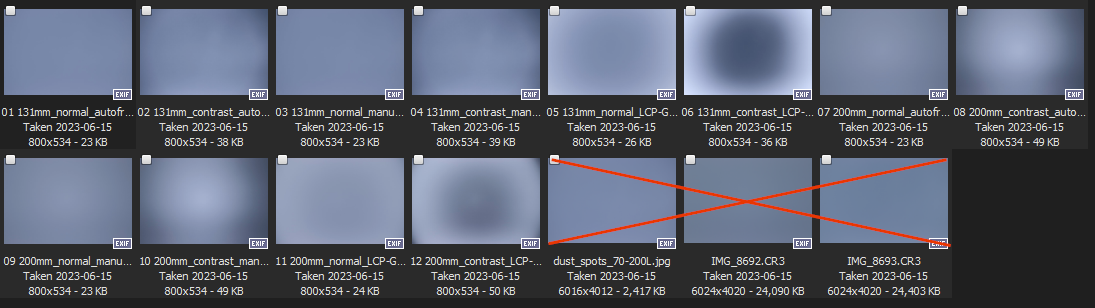
Here’s a screen capture of the test shot thumbnails:
Ignore the last three, they’re the raw files and an unrelated version. For each of two focal lengths, I shot six versions:
Automatic from DB
Manual from DB
LCP file
Then I pushed the L*a*b* contrast to 100% and repeated those three, just to accentuate any variations. Now, of course that’s well outside anything you’d do in normal practice but at a minimum I wouldn’t have expected to see as much variation as what’s there. And that was with the ‘generic’ f/4 IS LCP. The effects of the 5D version (which I didn’t save) were just as, if not more, pronounced.
An interesting point was (as you can see) the correction was both too much and too little at different focal lengths. Given the wrong lens was being expected, I guess that’s not surprising.
At any rate, I’ve set it to Auto from DB for now. At least that enables all three corrections.
Yeah, I started down that path and then ran into problems finding suitable subject matter for the TCA images and never went any further.
I don’t live in a heavily urban area (total metro / hinterland is only about 150k) so there are very few hi-rise / windowed / skyscraper style buildings. Most structures you’d expect to have suitable facades are single story and in the current sociopolitical environment the owners generally don’t look kindly upon dudes with cameras checking them out (especially since 9/11 and later, COVID, etc.). Setting up a camera and tripod in front of a commercial / public structure is a fairly effective technique to get prompt interest and personal involvement from a representative of the local constabulary…
With ART, Lensfun’s vignetting correction does not work with Canon’s photos, like it does not with the exiv2 branch of RT. While the data is there and it works in RT dev and darktable.
At least on windos.
Well, since lensfun already corrects distorion (only, nothing else) for my two lenses, I shot vignetting and TCA calibration images per the referenced article and Torsten Bronger’s documentaion. I uploaded my 1.43 GB zipfile and … whammo – CR3s are not supported (despite being out for five years now). The error message said their process uses dcraw and exiv2. Since I know exiv2 reads my CR3s I presume the issue is with dcraw.
Nice. (not)
Probably would be good to put a note on the appropriate articles to not waste your time if you’re shooting newer raw formats.

 I tried all three options (auto, manual and LCP) both with normal and firewalled contrast. Nothing is very consistent, so I’m now investigating…