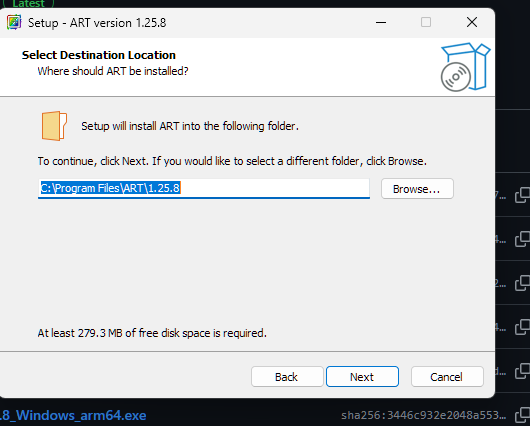
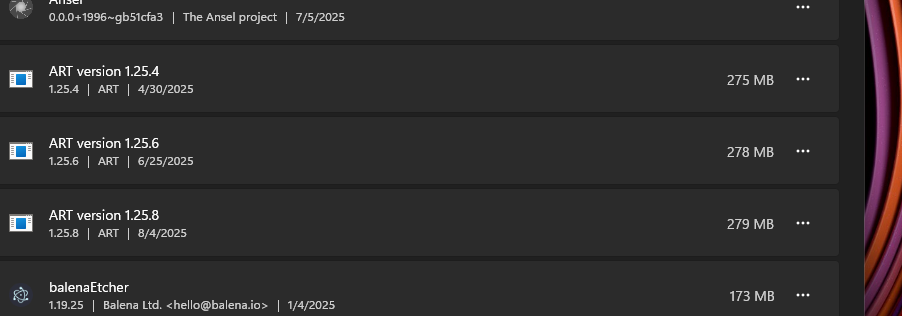
Something that has become a bother, especially since ART releases are becoming more frequent, is the fact that the new version does not overwrite a previous version. The end result of this is that there winds up being a multitude of ART versions after a period of time.
When looking on your Drive C, you will see installed each individual version of the program. This can drive you nuts when having to go back in and uninstall all previous versions. There is another well used software called Regards Viewer, that up until recently, also did this - but they finally fixed this issue with new code. At one time - with regard to Regards Viewer, my uninstaller showed 30 different versions that I had downloaded over the past few years - ridiculous. I can see ART doing the same thing.
Please make it so that with each successive version, you are either given a chance to uninstall the previous version, or the newer version automatically overwrites the previous version.
I think I was misunderstood. It doesn’t make a difference which directory you install it in. Let’s say that I want to install ART version 1.25.6 on to drive C. And then with the next version - 1.25.7 - I go to install it also on drive C, well, it creates two separate programs, and if you continue this, the process continues.
So it doesn’t matter which directory you install it into, future versions will create an entire new program. If left unchecked, after a year you may have more than a dozen versions of ART on your PC, when all one needs is the “latest version.”
Now to get around this, the developers could add code that:
During the install process, the user can op to uninstall the previous version (which many programs do), or…
During the install process, the new version of ART completely overwrites the previous version so when visiting an installer, all you will see is one version of ART (not a dozen or more).
EDIT but removing one of the old ones will remove the latest one as well so I guess I have never done that… so i guess my suggestion is not a good one…
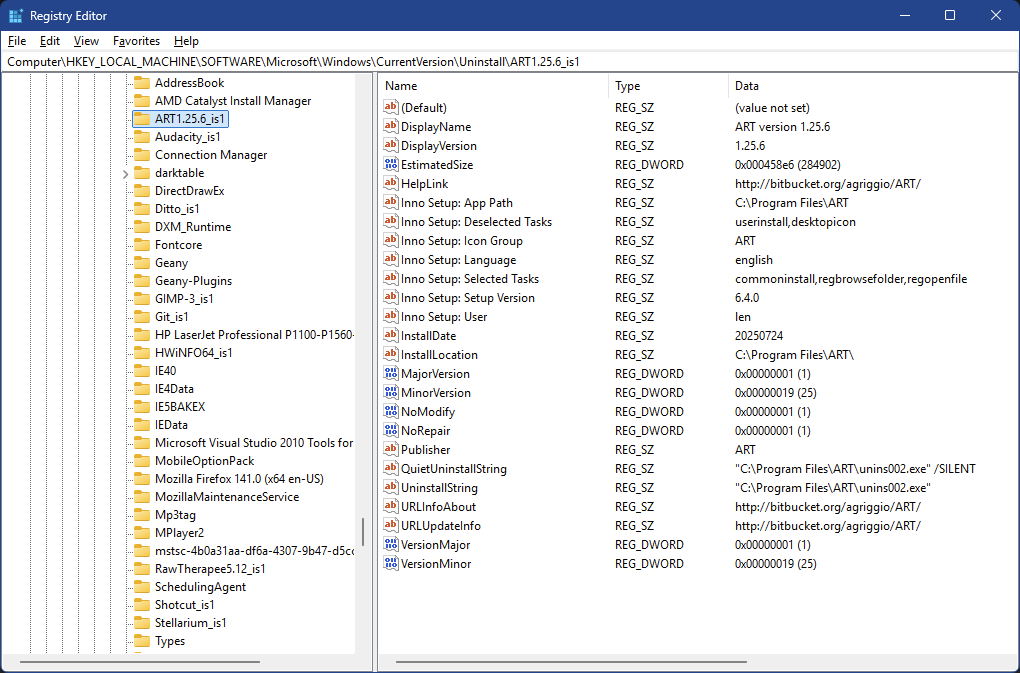
That’s what I do – install into just C:\Program Files\ART, with no version info. However, it’ll still leave uninstall data in the registry from the previous version,* so you’ll have to clean that out manually from Computer\HKEY_LOCAL_MACHINE\SOFTWARE\Microsoft\Windows\CurrentVersion\Uninstall\
* Which means it’ll show up in Settings | Apps, but can’t be uninstalled (because it’s not actually installed).
That’s what I usually do, I always thought that allowing multiple versions was actually a feature
On the other hand, I’m not really a windows user, all I have is a VM for testing purposes, so I’m ok with changing the behaviour if someone knows how to implement it and wants to submit a patch (just describing how to do it is not enough, sorry!).
On Windows computers (I have no idea about Apple) using installers always leads to more work and more detritus left on the computer and in the Registry if programs are regularly added, subtracted, updated, whatever. Over time this can lead to slowdowns and mysterious glitches that can only be effectively resolved with a total Windows reinstall. No fun.
The easiest way I’ve found to minimize this hassle is to use, when possible, a “portable” version where the entire program and its subdirectories are all self-contained and run from within a single directory. This way there is no need for Registry entries or links to other executables or .dll files or whatever that can be scattered around in all kinds of obscure places. This may not be practical for big complex programs but for smaller ones it’s a great way to keep things simple; for the things I do on the computer there are absolutely no downsides to this method.
For RT and ART I create two directories named Raw Therapee and Raw Therapee-ART, respectively, and put each of them under a main directory named Photography. To make an update all you do is delete the directory, create a new directory (with the same name as the one deleted) under the Photography main directory, and extract the new .zip or .7z file into that directory… installation clean and done! All shortcuts are still intact, previous edits and custom presets are still intact in C:\Users\your account name\AppData\Local\ART.
For quite a while @gaaned92 was posting portable versions of ART optimized for different flavors of Intel processors on Google Drive but unfortunately the latest one available is 1.25.3.1-30. It sure would be nice if @agriggio could post a portable version along with the install versions he puts on his GitHub release page (hint hint).
Just be aware (if it’s important to you) IME with a portable program you’ll lose system integration: Browse with…, Send to…, etc. and as any app interaction.
In Windows, portable programs can easily be made the default for opening file types that you can specify. If you need the other functions you mention at least some of them can be done through registry edits but those are functions I don’t personally care about or use.
Yeah, there’s nothing wrong with portable versions. Before I retired (from IT) I kept thumb drives with more than a few portable apps on them.
But after working in an AD environment for years there was no practical need to avoid local integration, and advantages to having it. Regardless we were still in regedit all the time. It was a real zoo at times – Windows, Solaris, Linux, Mac, Cisco, Oracle, MySQL, SQLserver, Citrix, Varonis … and fortunately I wasn’t directly involved with SAP.
Or maybe a solution is to integrate an “Remove currently installed version” option in the Windows installer, that would cleanly uninstall the program and remove any reg keys?
That’s how darktable handles it, which is the de facto standard on Windows, IME. In fact, many (most?) installers will assume an in-situ upgrade if invoked against an existing installation. At most they’ll confirm the upgrade before it happens.