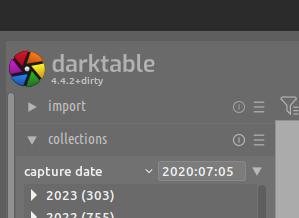
This a result of my own attempt at compilation - 99% of the success of which results from help I get from people here. So what did I do that compelled the compilation process to annoint my version of darktable with this unique version number?
The only time I see and expect this, dirty added to the version number, is when one edits one or more of the cloned/pulled/unpacked files before compiling instead of compiling a clean, as in untampered with, set.
I don’t know, hence me mentioning cloned/pulled/unpacked.
But it doesn’t matter which one is being used: Both create a local directory which holds all the files that are needed to configure/build/compile. Only difference being that the git version has a handful of git related files present, which aren’t of influence while building.
I would always get this when I was experimenting with the code for the vectorscope…essentially I was only trying to make it brighter so editings a constant. I just did it locally in the source code… until I reset that then my builds would always include the dirty tag on the description… Something must be out of step with the DT git master…
@Jade_NL , @priort : That’s more or less what I suspected. It would imply that OP downloaded something else than the “stable” source code from the “install” page, or changed something in that code (or related files).
Given his self-declared knowledge about linux, compiling etc., I’d say that neither option is the best way to get a reliable build quickly. It also makes answering his questions harder than it needs to be. (I’m using a “home build” of the version from the install page, and it’s not marked “dirty”, as expected).
Aside from the fact that the instructions in the read.md file on github direct me to use gitclone which copies the source code to my PC (so why do I need to download the darktable.org .tar.gz files too?), I made ZERO changes in any of the files which gitclone downloaded.
Out of interest I compared the source files from darktable.org tar;gz files with those from the gitclone action: leaving aside the ‘handful of git related files present, which aren’t of influence while building’, the differences amount to ONE additional file - ‘version_gen.c’ - which is present in the darktable.org tar/gz. The other 3447 files are the same.
Use git to get darktable-4.4.2 as described here. Also get the submodules!
Assuming that all the dependencies are already met:
Enter the created directory if you’re not already inside it (darktable-4.4.2 for the first, darktable for the latter) and do the compile steps as mentioned here, be it the easy or manual way.
You should end up with a clean non-dirty build.
If, for whatever reason, you need to do the compile part a second (third…) time make sure you delete the build directory that is created by the previous attempt first! If you do not weird stuff might happen due to leftovers from the previous attempt.
You get this when there are uncommitted changes when compiling.
It could be a new file you made, or a modification to something. I have a ‘build-dt.sh’ script in the folder that I use to do the building steps. Just the existence of that file makes the git status ‘dirty’.
How funny…
I had to re-build yesterday, after I reinstalled my system because hazardous experiments.
Using the same steps as before, and no dirty Harry there, dt up and running fine again.
These are the steps I always follow :