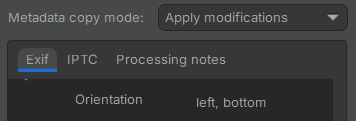
I’ve not run into this before. FTR, I have a new computer, but with my existing ART config copied over. Everything else is normal. No changes to my camera, config, process …nothing.
I shot a handful of images, a few landscape and a short series of portrait images for a horizontal pano. Everything is normal except the processed portrait images are all rotated when exported (I processed one then copied the edits to the others in the series).
It’s something in my processing, because they’re not rotated if I clear processing and export. But what? They’re not rotated in ART, only after export – whether via the queue to TIFF or directly to JPG. It’s only lightly processed (tones, resize) because I’ll edit after they’re stitched.
Where / how have I triggered rotation only for the exported version?
Raw and sidecar attached. Does this happen for anyone else?
Never say never, but I have other portrait images shot the exact same way (same 270 CW tag, which is correct) and they export correctly. And as I indicated if I clear the processing it does, too. So it’s something I’ve done or inadvertently set, apparently.
I don’t doubt you’re right but the point is I never had to do that in the past (and with my edits removed, it’s correct). Plus, I want my metadata modifications applied (remove geo, add user comment, etc.). Also, my understanding is the “rotate” tag just says what was done, not what I want done…?
Bottom line, I need to know what “edit” I inadvertently applied to trigger this – Since it’s apparently invisible in the ART GUI, best I can find.
The exported jpeg has an (unneeded) orientation tag, inherited from the raw file. It tells image viewers to rotate an image that needs no rotation. (It has already been rotated by the raw editor.)
Some of the exif data in a raw file are format specific and not meant to be copied to the exported files; I would - and do - hand-pick some additional tags, while, as it looks to me, you have selected all of them and then removed some. In other words, I think that your list of included data is way too long.
(But you only have to uncheck orientation - left, bottom to remove the rotation issue.)
I vaguely remember a discussion about this here, but I might be wrong.
Sorry, if this is not helpful, I do not know much about these things and anything I say might be problematic. Luckily, many engineers reside here.