Just tested and it works fine ( Version 3.3.0 (pre-release #23083009) )!
So now we only need to press A once and then cycle background colors/checkerboard with K.
And with a few more options for checkerboard thrown in!
Thank you 
Just tested and it works fine ( Version 3.3.0 (pre-release #23083009) )!
So now we only need to press A once and then cycle background colors/checkerboard with K.
And with a few more options for checkerboard thrown in!
Thank you
Also, please keep in mind that the display is quite configurable, as you can set global variables (such as _display_background) before calling display.
So, define a command like:
my_display:
  _display_alpha_mode=1
  _display_background=4
  display
to make your own default options for display  !
!
(it’s how display0 is done actually).
Life has just become easier 
Is the list of vars visible somewhere ( in the code )?
Yes, just at the beginning:
  # 'setting_normalization' can be { -1:auto | 0:off | 1:cut | 2:stretch channelwise | 3:stretch global }.
  setting_normalization:=narg($_display_normalization)?cut(int(0$_display_normalization),-1,3):-1
  # 'setting_alpha' can be { 0:off | 1:on | 2:over black | 3:over gray | 4:over white }.
  setting_alpha:=narg($_display_alpha)?cut(int(0$_display_alpha),0,4):0
  # 'setting_cursor' can be { 0:off | 1:on (2D only) | 2:on (+3D volumetric images) }.
  setting_cursor:=narg($_display_cursor)?cut(int(0$_display_cursor),0,2):1
  # 'setting_is_grid' can be { 0:off | 1:on }.
  setting_is_grid:=narg($_display_is_grid)?cut(int(0$_display_is_grid),0,1):1
  # 'setting_is_info' can be { 0:off | 1:on }.
  setting_is_info:=narg($_display_is_info)?cut(int(0$_display_is_info),0,1):1
  # 'setting_background' can be in range [ 0,9 ].
  setting_background:=narg($_display_background)?cut(int(0$_display_background),0,9):3

  # 'setting_3d_is_rendered' can be { 0:off | 1:on }.
  setting_3d_is_rendered:=narg($_display_3d_is_rendered)?cut(int(0$_display_3d_is_rendered),0,1):1
  # 'setting_3d_rendering_mode' can be { 0:dots | 1:wireframe | 2:flat | 3:flat-shaded |
  # 4:gouraud-shaded | 5=phong-shaded }.
  setting_3d_rendering_mode:=narg($_display_3d_rendering_mode)?cut(int(0$_display_3d_rendering_mode),0,5):4
  # 'setting_3d_motion_rendering_mode' can be { -1:bounding-box | 0:dots | 1:wireframe | 2:flat | 3:flat-shaded |
  # 4:gouraud-shaded | 5=phong-shaded }.
  setting_3d_motion_rendering_mode:=narg($_display_3d_motion_rendering_mode)?\
                                    cut(int(0$_display_3d_motion_rendering_mode),-1,5):3
  # 'setting_3d_motion_time_limit' is specified in ms. Above this time, motion rendering toggle to 'bounding-box' mode.
  setting_3d_motion_time_limit:=narg($_display_3d_motion_time_limit)?max(0$_display_3d_motion_time_limit,0):300
  # 'setting_3d_side_mode' can be { 0:single-sided | 1:double-sided | 2:single-sided (flipped) }.
  setting_3d_side_mode:=narg($_display_3d_side_mode)?cut(int(0$_display_3d_side_mode),0,2):0
  # 'setting_3d_is_zbuffer' can be { 0:off | 1:on }.
  setting_3d_is_zbuffer:=narg($_display_3d_is_zbuffer)?cut(int(0$_display_3d_is_zbuffer),0,1):1
  # 'setting_3d_focale' can be { <0: perspecive projection w/o sprite zooming, 0: parallel projection |
  # >0: perspective projection }.
  setting_3d_focale:=narg($_display_3d_focale)?0$_display_3d_focale:1.5
  # 'setting_3d_is_axes' can be { 0:off | 1:on }.
  setting_3d_is_axes:=narg($_display_3d_is_axes)?cut(int(0$_display_3d_is_axes),0,1):1
  # 'setting_3d_is_bounding_box' can be { 0:off | 1:on }.
  setting_3d_is_bounding_box:=narg($_display_3d_is_bounding_box)?cut(int(0$_display_3d_is_bounding_box),0,1):0
  # 'setting_3d_background' is an unsigned integer in range [0,12].
  setting_3d_background:=narg($_display_3d_background)?cut(int(0$_display_3d_background),0,12):11
  # 'setting_3d_is_animated' can be { 0:off | 1:on }
  setting_3d_is_animated:=narg($_display_3d_is_animated)?cut(int(0$_display_3d_is_animated),0,1):0
  # 'setting_3d_animation_mode' can be { 0-3:X-axis | 4-7:Y-axis | 8-11:Z-axis | 12-15:XYZ-axes }.
  setting_3d_animation_mode:=narg($_display_3d_animation_mode)?cut(int(0$_display_3d_animation_mode),0,15):4
Oh thanks, I was just looking for the link.
Bookmarked
It should appear in the documentation someday anyway
_display_alpha_mode=1 didn’t work, so i toyed around and found out it’s actually _display_alpha=1.
Looks like I just have to replace setting with _display to set the vars.
So setting_normalization=1 becomes _display_normalization=1, etc.
You’re right, alpha_mode was actually the “old” name. It changed yesterday
Progress report #9:
To cut a long story short: I’m done, with implementing all the stuffs I had in mind, for the new G’MIC unified viewer. It took me roughly 3 weeks and just under 2000 lines of code. I’m a little tired, but also very proud of the result. I’m sure that this viewer will be a decisive feature that I’ll be able to use to promote G’MIC (in addition to its very practical aspect for scripting of course ).
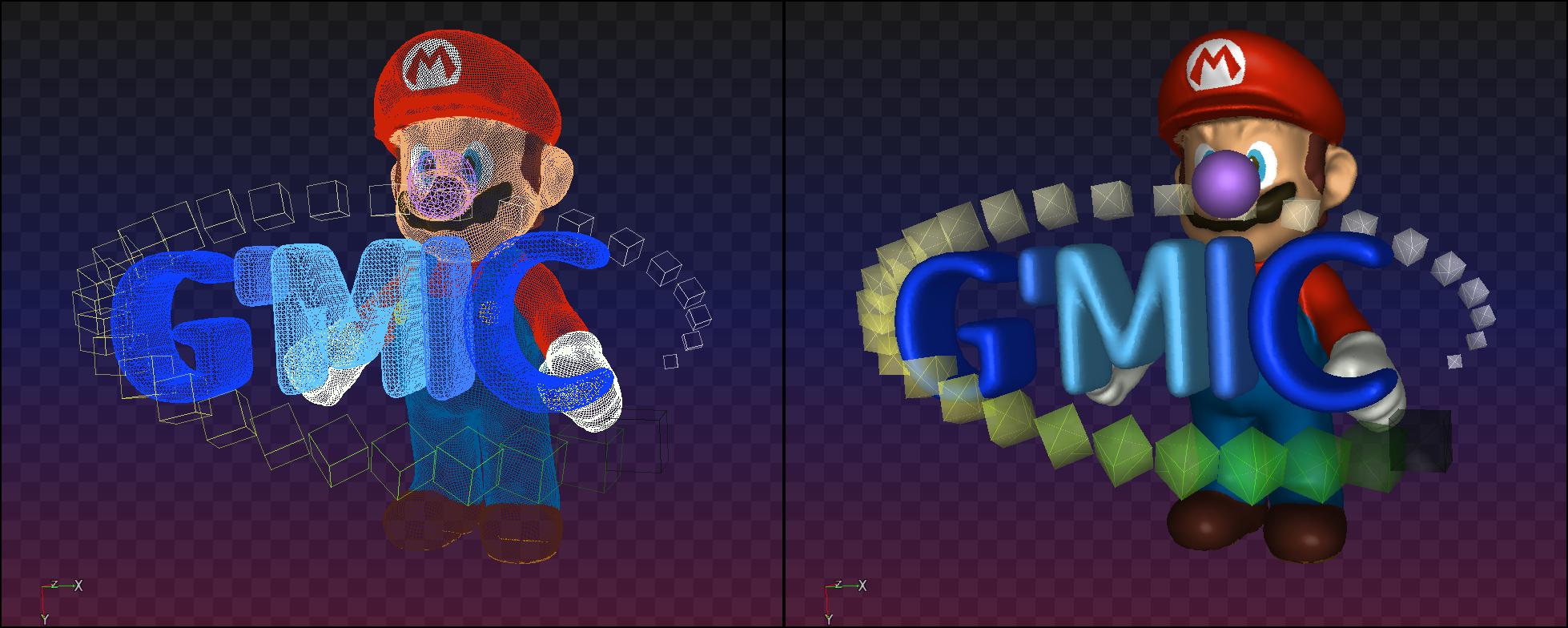
These last days, I’ve focused on 3D mesh visualization and animation (so to replace the “old” command display3d). The same code allows to visualize regular 3D meshs, as the one below.
But it is also used to display a 3D representation of volumetric images (you know, those with voxels rather than pixels! ).
There is now also a ‘frame recording’ feature that you can use to record .mp4 videos (when G’MIC is compiled with opencv support), or .jpg frames (when opencv has not been used). That’s what I’ve done for the video above.
To sum up, G’MIC 3.3 will have an integrated image viewer able to display:
And all these images can be imported and displayed with a single call to the viewer, thanks to the top navigation bar, like you can see in the example below:
The thumbnail bar makes it indeed easy to switch between the different images.
gmic, just for the purpose of displaying images (for people who don’t want to start programming in the G’MIC language for doing image processing). Just typing:$ gmic images*.png mesh3d.obj
3.3_pre#something), and tell me if you find something strange. Also I’m now open for feature requests. I won’t promise anything though. Basically, as the viewer has been entirely coded in the G’MIC language, it will be easier to improve it or add new features in the future (it won’t need any recompilation).That’s it for now. That was hopefully the last progress report I wrote on this
Cheers,
David.
 Cannot tell you the number of times I have to tell people where to find the information.
Here it is:
$ gmic h display

  display:

    Display selected images in an interactive window.
    (equivalent to shortcut command 'd').

    When invoked with a '+' prefix (i.e. '+display'), the command outputs its log messages on 'stdout' rather than on 'stderr'.
    Display window #0 is used as the default window for the display, if already opened.

    Available controls are shown below (where 'LMB' = Left mouse button, 'RMB' = Right mouse button, 'MMB' = Middle mouse button and 'MW' = Mouse wheel).

     * Thumbnail navigation bar:
    'TAB': Show/hide thumbnails - 'LMB': Select thumbnail or shift thumbnail bar - '0'-'9','ARROWS' (opt. '+SHIFT'),'B','BACKSPACE','C','E','END','H','HOME',
    'SPACE': Navigate and select thumbnails (add 'CTRL' if mouse pointer is outside thumbnail bar).

     * Image view:
    'LMB' or 'MMB': Image pan - 'RMB' or 'MW': Image zoom - 'ARROWS' (opt. '+SHIFT'),'HOME','END': Shift view - 'A': Switch alpha rendering - 'C': Center view
    - 'E': Go to lower-right corner - 'ENTER': Reset view - 'G': Toggle grid - 'H': Go to upper-left corner - 'K': Switch background - 'M': Toggle 3D view -
    'N': Switch normalization - 'P': Print info about current image pixel on 'stdout' - 'PAGEUP' or 'PAGEDOWN': Raise/lower base channel - 'R': Rotate image -
    'Z': Switch zoom factor - '0'-'9': Set zoom factor.

     * 3D mesh view:
    'LMB': Mesh rotation - 'CTRL+LMB' or 'MMB': Mesh pan - 'RMB': Mesh zoom -  'A': Toggle axes - 'D': Switch face side mode - 'F': Change focale - 'J':
    Start/stop animation - 'K': Switch background - 'R': Switch rendering mode - 'T': Switch motion rendering mode - 'X': Show/hide bounding-box - 'U': Switch
    animation mode - 'Z': Toggle z-buffer.

     * 2D images specific:
    'CTRL+LMB': Image crop.

     * 3D volumetric images specific:
    'CTRL+MW': Pan along orthogonal axis - 'X': Reset area layout.

     * Window size, decoration and data I/O:
    'CTRL+C': Decrease window size - 'CTRL+D': Increase window size - 'CTRL+F': Toggle fullscreen - 'CTRL+I': Toggle info label - 'CTRL+O': Save copy of image
    as a '.gmz' file - 'CTRL+L': Save copy of image list as '.gmz' file - 'CTRL+S': Save screenshot as a '.png' file - 'CTRL+W': Start/stop window recording -
    'CTRL+X': Toggle cursor.

     * Configuration variables:
    The viewer configuration can be tuned by assigning these variables:
       -  '_display_alpha' can be { 0:off | 1:on | 2:over black | 3:over gray | 4:over white } (default value: '0').
       -  '_display_background', an integer in range [ 0,9 ] (default value: '3').
       -  '_display_cursor' can be { 0:off | 1:on (2D only) | 2:on (+3D volumetric images) } (default value: '1').
       -  '_display_is_grid' can be { 0:off | 1:on } (default value: '1').
       -  '_display_is_info' can be { 0:off | 1:on } (default value: '1').
       -  '_display_normalization' can be { -1:auto | 0:off | 1:cut | 2:stretch channelwise | 3:stretch global } (default value: '-1').
       -  '_display_3d_is_rendered' can be { 0:off | 1:on } (default value: '1').
       -  '_display_3d_rendering_mode' can be { 0:dots | 1:wireframe | 2:flat | 3:flat-shaded | 4:gouraud-shaded | 5=phong-shaded } (default value: '4').
       -  '_display_3d_motion_rendering_mode' can be { -1:bounding-box | 0:dots | 1:wireframe | 2:flat | 3:flat-shaded | 4:gouraud-shaded | 5=phong-shaded
    } (default value: '3').
       -  '_display_3d_motion_time_limit' is specified in ms. Above this time, motion rendering toggle to 'bounding-box' mode (default value: '300').
       -  '_display_3d_side_mode' can be { 0:single-sided | 1:double-sided | 2:single-sided (flipped) } (default value: '0').
       -  '_display_3d_is_zbuffer' can be { 0:off | 1:on } (default value: '1').
       -  '_display_3d_focale' can be { <0: perspecive projection w/o sprite zooming, 0: parallel projection | >0: perspective projection } (default
    value: 1.5).
       -  '_display_3d_is_axes' can be { 0:off | 1:on } (default value: '1').
       -  '_display_3d_is_bounding_box' can be { 0:off | 1:on } (default value: '0').
       -  '_display_3d_background' is an unsigned integer in range [0,11] (default value: '11').
       -  '_display_3d_is_animated' can be { 0:off | 1:on } (default value: '0').
       -  '_display_3d_animation_mode' can be { 0-3:X-axis | 4-7:Y-axis | 8-11:Z-axis | 12-15:XYZ-axes } (default value: '4').
I have just seen that “ctrl L” stores the list of images with artificial names _display<number>or without names. Is it possible to store the list with there filenames, if there are any, as they appear in the “original” display window? E.g. it would allow sorting by name. Perhaps cimgz format selectable?
Congrats!
Request N°1 : take a rest.
You are right, that is actually a bug that I’ll fix tonight. Thanks !
@Karo,fixed with
stdlib update is on its way.
You already know it’s not an item I can add to my TODO in the near future 
Been using display2d for weird sized image, and it seems that it only displays one image at a time? I’m using it to fit images to viewer size and can zoom in/out with ease and get values anywhere within window rather than portion of window.
Hi,
not sure if this is a bug but i saw this in my log. I’ve reduced the command to this:
gmic v 3 800,200,1,3
[gmic]./d/_display/*for/*if/*substitute/is_mesh3d/ Set status to ‘1’.
[gmic]./d/_display/*for/*if/*substitute/is_mesh3d/*local/ *** Error *** Command ‘check3d’: Invalid 3D object [0], in image [0] (CImg3d has invalid dimensions (800,200,1,3)).
[gmic]./d/_display/*for/*if/*substitute/is_mesh3d/*local/ Set status to ‘0’.
[gmic]./d/_display/*for/*if/ Set value 0 in image [5], at coordinates (0,0,0,0).
[gmic]./d/_display/*for/*if/ Remove image [7] (7 images left).
[gmic]./d/_display/*for/*if/ End ‘if…endif’ block.
The command still works but I was jst wondering where this came from.
For each image, the viewer check if the image does represent a 3D mesh or not. For this, it calls command is_mesh3d, which is simply defined as:
is_mesh3d :
  u 1 l { check3d 1 onfail u 0 }
So when you set the verbosity to a high level, you actually see the error thrown by check3d and caught by the onfail part of this command.
Nothing to worry about
Looks like it’s gone now, after a gmic up , or maybe I don’t have enought backlog in the terminal.