Maybe the first style you could make is a basic denoising and sharpening style so when you want these repeated steps applied during an edit just click on style. Soon you will come to appreciate the usefulness of styles for repetitive actions.
1 Like
it’s always helpful to learn about the capabilities of different tools to be able to select the proper one. But usually ‚good enough‘ is sufficient…
Thanks Terry, it’s because of this discussion I made a ‘test’ style yesterday. It contains ‘denoise’, ‘lens correction’ and three instances of ‘diffuse or sharpen’. Was easy to do and is easy to use.
So far I have only one gripe because of this and that is that diffuse or sharpen slows my PC. But maybe that’s because for some reason OpenCL doesn’t function anymore. Have to find out why and see if that brings the speed I hope for. When that’s the case I will apply this style on import and see what I can add to it.
Regards, Jetze
I populated a “favourites” (is that the right dt term?) with everything I usually use, including multiple module instances. For example, Graduated Density, left, right and bottom. Many of these instances are turned off initially. But ready to go.
I guess, anyway, one can include turned-off instances in a style.
1 Like
Guess you mean a ‘style’ …
Did not think about this possibility, that’s a very helpful suggestion as long as I haven’t improved the performance.
Back to the original thread… wonder if @Photoniker is able to move forward with styles and masks, how are you doing?
Kind regards, Jetze
No, I mean a separate tab in the right hand window, of regularly used modules, in their full form, not in abbreviated form like the quick-access tab. I do 99% of my editing from this favourites tab.
1 Like
Nice, but how to get multiple instances of a module in that list? I looked for that but missed that option… It seems to me that once you have a module in that list it is not possible to select it once more… I still miss what you mean I guess.
You can just right click the little icon upper right and get a new instance…
Thanks Todd, you mean the third icon from the right?

That I now and use very often.
I was under the impression that @Thad_E_Ginathom meantsomething different.
1 Like
I meant using a style to have stuff set up, ready and waiting, like this…
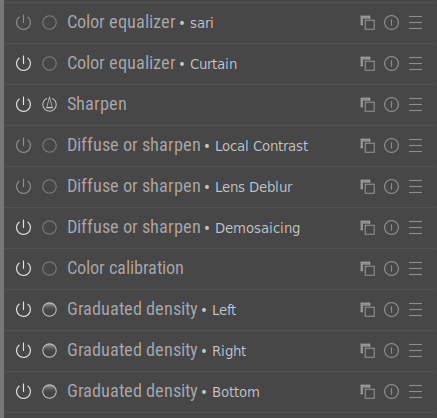
They are each only presets, so it only saves a click or two, but I like it.
1 Like
Some styles may need modules to be included so that they are turned off. In a Style shown here I activate base curve and turn of Sigmoid.
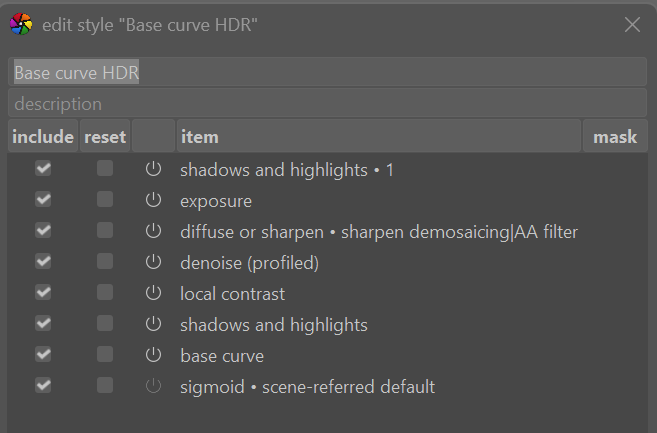
Without OpenCl this module is very slow to use and may be best applied as late as possible in your processing steps. Some users here sharpen with the D or S module as a last step in editing while I have OpenCL and am not fazed by using this module in my style and applying in the first stage of editing.
The old school sharpen module still does a nice job sharpening and is less resource hungry. With some noisy images I prefer it for sharpening with the threshold values set to avoid sharpening the noise.
2 Likes
@Thad_E_Ginathom,
Thanks for clarifying, all clear to me now!
Regards Jetze
1 Like
Yeah, that’s presently my situation for as long as I do not have OpenCL running again.
I will look into this module as well, thanks for the tip!
@Photoniker welcome!
I hope in time you get everything you’d like to get from darktable.
2 Likes