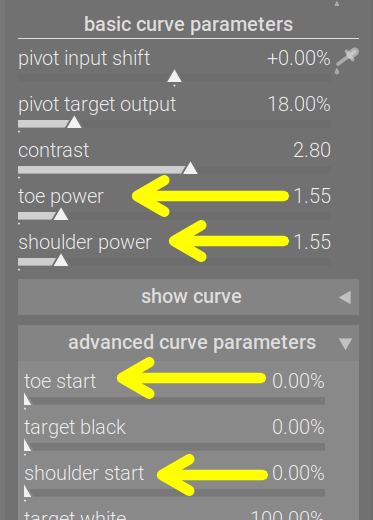
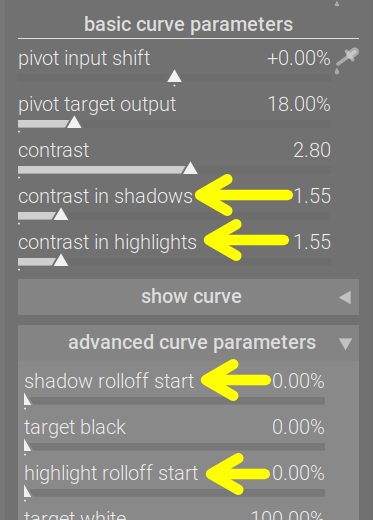
Now that the code is on master, more people are trying it; with Boris’s video also out (thanks!), the word has started to spread.
Quite a few people have suggested that we simplify terms. We still have a bit of time until the ‘string freeze’ (after which the terms on the UI must remain stable, so translators have something to work with), so let’s see if it’s really needed.
In this thread, I plan to continue the original approach, and post polls where you can vote.
Besides participating in these polls, feel free to suggest terms you would like to change, with alternative wordings, and the reasoning behind them, but do not start polls of your own; let me manage those. And please don’t be offended if I don’t accept your wording. It may simply be wrong: a simpler UI label, tooltip etc. is only worth it, if it is not misleading. Also, the available space on the UI is limited, so avoid very nice, easy to understand, but long labels. Tooltips can be longer, that’s not an issue.
I was one of the persons that make a suggestion. After seeing Boris’ video, my suggestion was to use ‘contrast in highlights’ and ‘contrast in shadows’ as is shown on the tooltips for the shoulder power and toe power.
This one has been raised several times: toe / shoulder power → contrast in shadows / highlights. I will add: for consistency, we should also rename toe / shoulder start, and my suggestion for those is shadow / highlight rolloff start.
toe / shoulder length, shadow / highlight range and shadow / highlight falloff range wouldn’t be bad options, but would need changes to how the UI slider values are converted into processing parameters (instead of concentrating on the part the curve remains linear, and then starts to lose contrast, these terms concentrate on the curved part, before the linear section starts), which I would like to avoid. And we’re already in feature freeze with the module, anyway.
Pros and cons for the change, as I see them: Pros: they are too technical, mathematical, not intuitive. They do not describe the effect, but the solution behind it, which is irrelevant for most users. We can change these and rename Cons: they are exact; ‘toe’ and ‘shoulder’ are common terms used with curves.
I’ll close the poll in a week, on 10 October 2025, not before 20:00 CEST.
Note: if someone comes up with (in my opinion) better but equivalent terms, I will use those, and won’t open a new poll. You have been warned.
Alternative suggestions received:
“highlights contrast” and “shadows contrast”: having the differentiating word, highlights/shadows in the 1st position, also more consistent with highlight / shadow rolloff start
It’s a number. contrast isn’t exactly simple, either: it’s based on the original midtone contrast of the Blender AgX curve, but is scaled as dynamic range changes and also with gamma, to maintain constant midtone slope, in terms of % output change per input EV change.
Looking at your screenshots I am turned off by the two items starting with “contrast” as my eyes have to do quite a bit of reading to get to the differentiating word. I would prefer “highlights contrast” and “shadows contrast” to “contrast in…”.
My feeling is that learning a new module like this means I will read the documentation and I will hover the mouse over the slider for the description. I don’t expect the terminology to be self explanatory without reading the tips and documentation. I have not struggled with understanding the sliders despite some of the terms being unfamiliar to me. Hovering the mouse solved the issue for me.
I am happy with toe power and shoulder power terminology. If anyone is confused after hovering the mouse over the slider then they shouldn’t be using an advanced tone mapper like AgX and may be best using Sigmoid or base curve. Certainly AgX is less confusing than Filmic with all its different versions.
No offence meant to anyone here with a different viewpoint.
I’m also pro leaving as is. When I first used the module, just moving each slider and looking at the curve visualisation made clear to me very quickly what they do. Once this is understood, the labels also make sense.
(Disclaimer: I’m a computer scientist, so I somewhat understand the math behind it. The experience might be different for someone with a different background)
None taken. I think this is different for different people. There are many more people that struggle more with reading documentation than you would think. They learn by watching YouTube and trail and error.
Personally, I can’t see an argument why terminology should NOT be self explanatory unless it is technically wrong. Why would we force user to use the documentation is we can provide self explanatory names?
If anyone is confused after hovering the mouse over the slider then they shouldn’t be using an advanced tone mapper like AgX and may be best using Sigmoid or base curve.
I am sure you use many technologies that you don’t technically understand. Or that if the technical terminology was used is confusing. Do you understand in every details how your camera works?
I have written software in very technical domains. If we would present our users with the technical terminology they would not able to use it. But by good UI design (and this includes the name on the labels) it possible to make complex and advanced technology accessible.
For the record, if the labels stay what they are I will not be angry. I am very grateful for darktable and I very very excited when I say Boris’ video
For me I am the total opposite. I struggle with learning from videos and learn best from text. I also would not be angry or disappointed if the terminology is changed. I do feel that both Agx and Filmic are more suited to advance users of darktable. Sigmoid works nicely out of the box and often requires no user input to give good results. What sliders are in sigmoid are also easily mastered for a beginner. I recommend sigmoid for DT newbies so they are not overwhelmed.
Sure that’s why we’re lucky enough to have a few people in the community who put out well researched, high quality, in-depth videos for more or less all the features.
I don’t have better terminology but I think toe / shoulder and toe / shoulder start are appropriate. Those controls affect the curve and the changes in the curve may affect highlights or shadows but they aren’t bound by what we conventionally consider highlights and shadows.
e.g. presumably you could adjust the controls such that the toe of the curve covers an area of the curve that affects the majority of the histogram, not just shadows.
It kind of feels pedantic typing that out but I guess where I’ve settled on those controls in my mind is that you can control how the curve affects different areas of the histogram. Those controls are not bound to specific parts of the histogram.
I applaud your efforts to continually improve this module @kofa, and especially your patience with trying to please lots of different people.
The trouble with these polls is that they are obviously heavily skewed to Darktable’s “power users” on this forum. People here are generally very knowledgeable about the software and technical terminology. That’s a strength, of course, but it won’t stop complaints because when AgX is released into the wild, all the non-Pixls users will suddenly have very strong opinions, and probably different to the majority sentiment here.
So, maybe you just want to stick with what YOU yourself want. It has always been your module/project, and there are no right answers for the slider labels. If we’re going to have a variety of opinions, we might as well default to yours.
To me, it’s pretty clear what ‘toe’ and ‘shoulder’ are, and the labels are clearly distinct from ‘contrast’ which is important when operating at a glance, so I vote to keep them as is.
If it were to change, I feel like you would have either ‘roll off’ or ‘start’, not both. ‘Roll off’ may actually be more informative since it’s a familiar term. Otherwise, ‘beginning’.
The labels I dont understand are ‘pivot input shift’ and ‘pivot target output’. And since I don’t understand them, I can’t suggest anything better, but I wonder if thats worth discussing? I guess they are two different ways to adjust the pivot. Pivot x, pivot y?
Please read these, and let me know if you need more info. I’m trying to improve the docs.
pivot input shift: Shifts the input value of the pivot point. Since contrast is highest around the pivot, this slider allows you to choose at which part of the input tonal range you want to have the most contrast.
pivot target output: Sets the target output luminance for the tone selected by the pivot’s input. This adjusts the brightness of the pivot point.
In filmic, among the advanced settings, you can enable use custom mid-gray values, and then you get a slider on the scene tab that allows you to move the pivot point that gets mapped to mid-grey (in the output) lower or higher on the (input) exposure scale.
In agx, you can also adjust to what value that point is mapped (so the associated output value is not necessarily mid-grey). You have complete freedom is selecting the point of highest contrast, and can make brightness adjustments without modifying the black and white points.
(Compare and contrast: Filmic RGB vs AgX - #2 by kofa)