Agx terminology (UI)

To ensure a smooth transition, the 1st instance would have to have the same pivot (in and out) as the 2nd, and the effective contrast must also be the same (determined by the contrast slider, the exposure range and the gamma) must also be the same. That means you could replace the pair with a single curve. If the pivots don’t match, or the contrasts are different, the transition won’t be smooth.

If you want to add contrast to highlights of shadows, and so on, use an editing module like the tone equalizer. Do no abuse the tone mapper to do all your editing.

2 Likes

Thanks. As much as anything I was trying to understand the module better and understanding the edge cases is good for that, even if it’s not the ideal use case.

3 Likes

I did duplicated the AgX. 1st instance has an elliptic mask. 2nd is just additional default instance with no mask. To my eyes do not see any issues.


_DSC5855.ARW.xmp (30.9 KB)

2 Likes

That’s not the quite the same as what @Toast asked before: the curve of the 2nd instance does not have to match the 1st one, as it’s applied globally. In this case you need to make sure the 1st curve, together with the mask, already gives you a smooth transition, which you can probably achieve with feathering and smooth parameter roll-offs in the mask.

I still think it’s better to manipulate the scene with scene-referred tools (e.g. compress highlights, if that’s what you want to do), then tone-map, and add extra display-referred curves if needed.

1 Like

In that case, might it be useful (and still possible) to disallow blending and masking for AgX (and perhaps filmic, sigmoid, and basecurve)? (removal of the flag IOP_FLAGS_SUPPORTS_BLENDING)

1 Like

There was a conversation in a playraw thread, in which I asked,

Paraphrasing the replies, and allowing for any misunderstanding on my part, replies suggested that, yes you can, because anything masked out on a first instance is simply passed through

Now I am scratching my head!

Technically, yes, some pixels will be processed, others passed through, according to the mask. Whether you can get that to work smoothly is the question.

1 Like

Those answers assume exactly complementary masks. That means that any pixels not treated by the first instance are dealt with by the second. End result: each pixel is modified exactly once by the tone mapper…

Technically, the math allows masking and blending for any module. But think of the issues you could get with e.g. demosaicing…

1 Like

I think sometimes and I could be wrong if you use feathering the inverted mask is sometimes not just those pixels remaining that were not initially masked so there could be artifacts introduced… For example I feel like in the past I have masked a bird and then inverted for the background and if the feathering was strong the mask was actually pulled back substantially from the bird. I’d have to go and try it to confirm.

I guess the end result are all that matters in the end…

1 Like

I feel some experimentation lust rising…

just to see what happens.

1 Like

Hmm, yes. OK: thanks! :slight_smile:

Whilst I’ve never ticked them off, pixel by pixel :wink: , I too certainly experience that problem with inverted masks.

Feathering makes masking a subject so easy in dt, without AI or a million microclicks. But I guess there is no such thing as a free biscuit.

OK, I think I’ve got it. I think that allowing at least a bit of N6 is an integral part of the AgX effect, and is the reason why highlights are shifted more than midtones. Let me demonstrate.

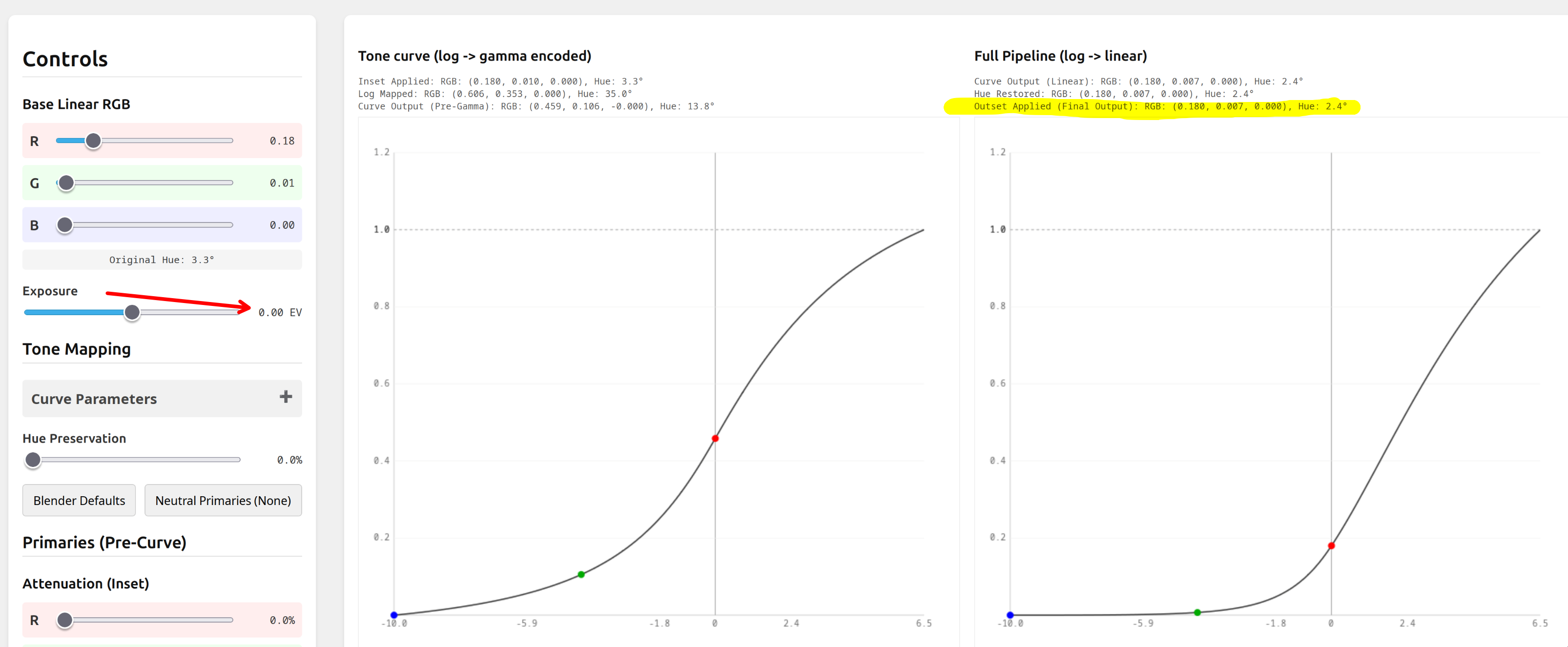
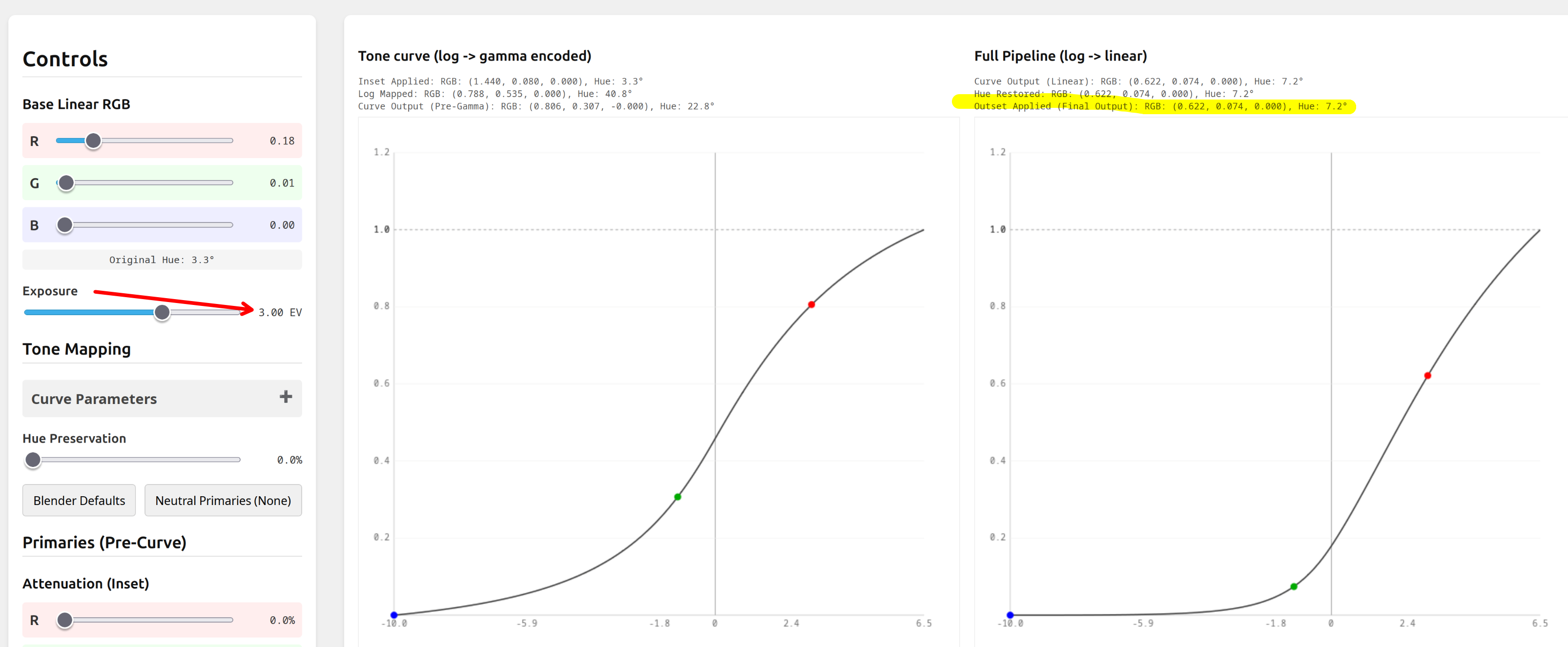
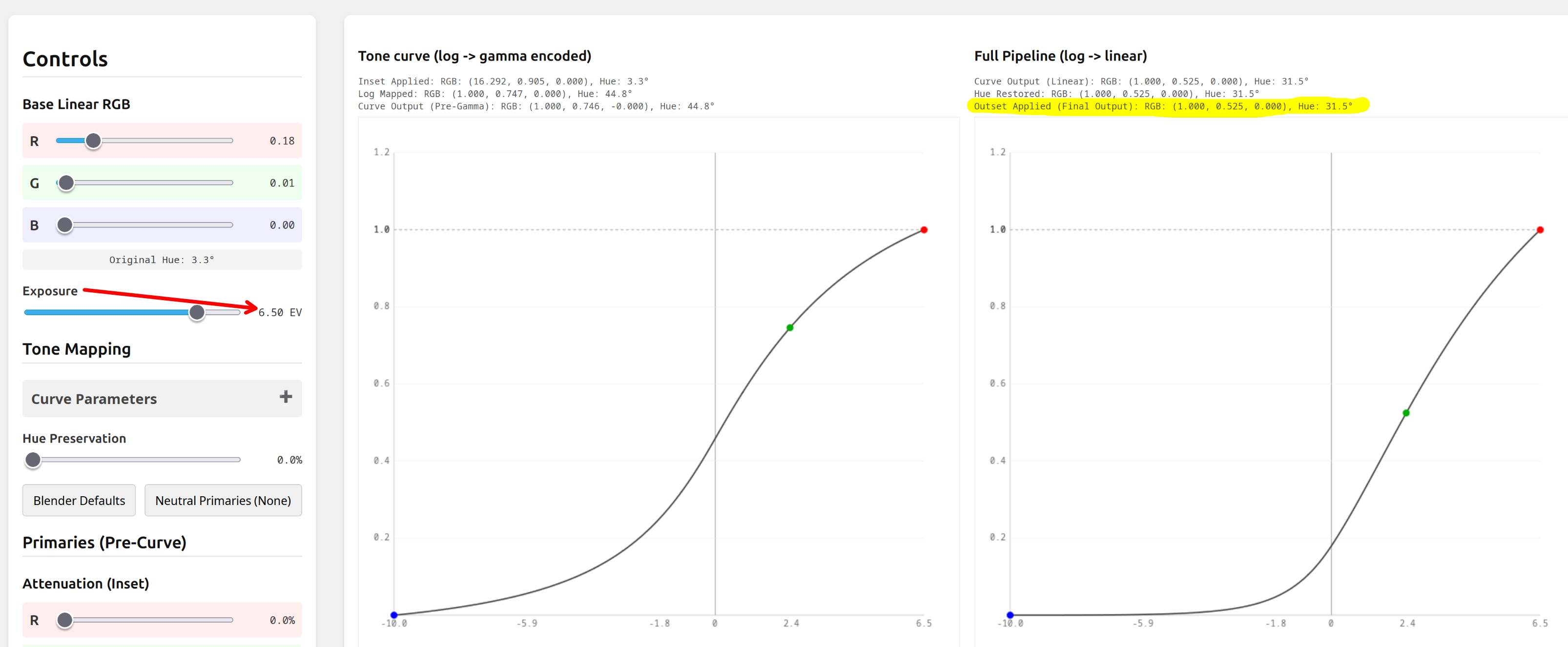
We already know that pure primaries are not subject to N6, but all other colours are, and that N6 affects bright tones more, as by increasing exposure by e.g. 1 EV will push all components along the x-axis, but, as the curve tapers off at the shoulder, high-valued components are not pushed much higher in y, while low-valued components are still at the part of the curve where the slope is high, and increase rapidly:
Midtones:


Brighter:

Here, we were starting from a red with just a bit of green added. But we want to see what happens to the red primary. Well, if we attenuate it, green and blue get some energy, red loses some energy, but it’s all balanced (the hue is still pure red, just a bit desaturated), and it simply goes to white.

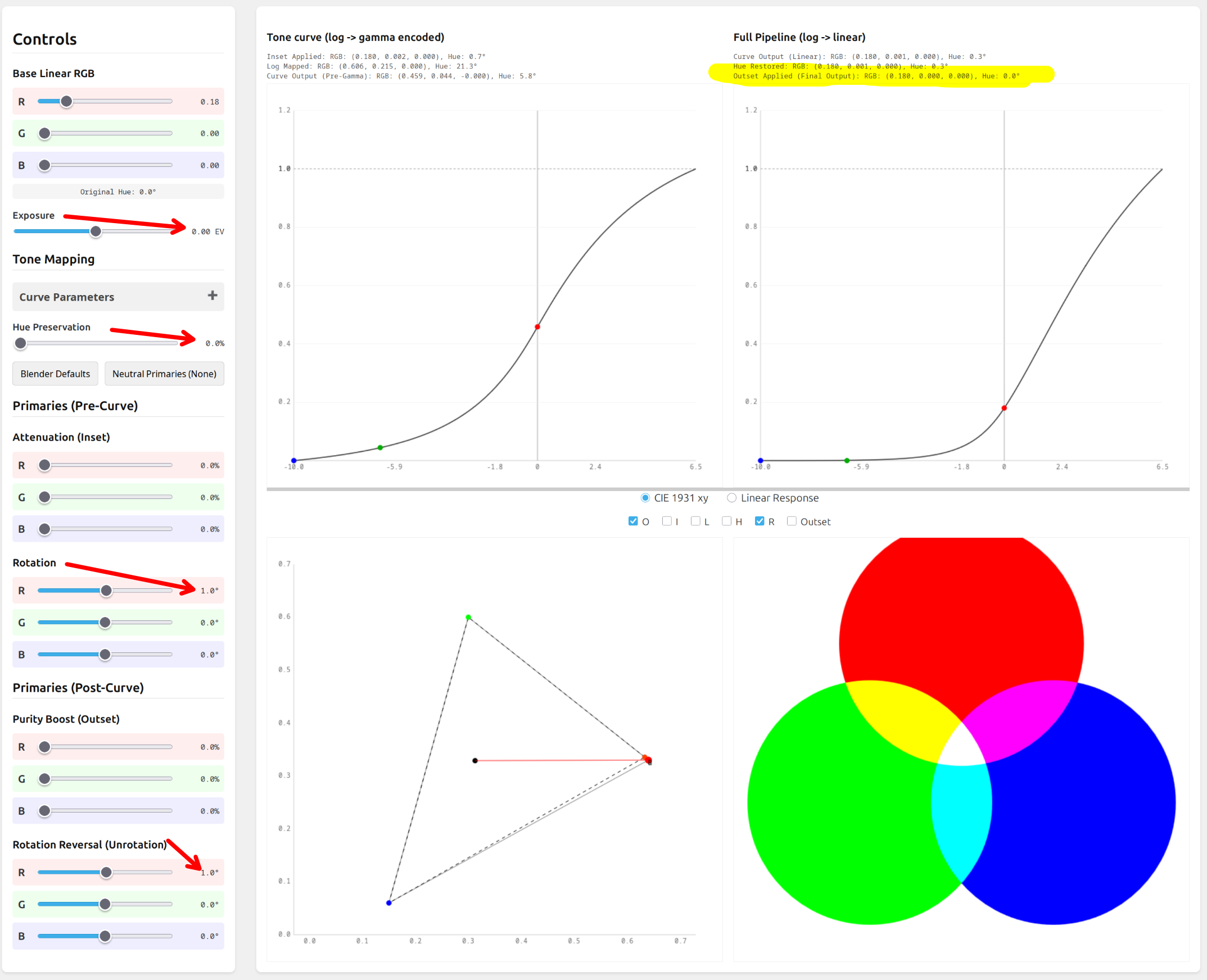
If we rotate red towards green, we add some energy to the green channel, which (unless we add hue preservation) means N6 will occur, shifting bright, slightly rotated red more and more towards yellow, as values increase. Even if we perform unrotation on the red primary, the N6-shifted values will not be restored to pure red – which is exactly what we want: to shoft bright reds towards yellow.
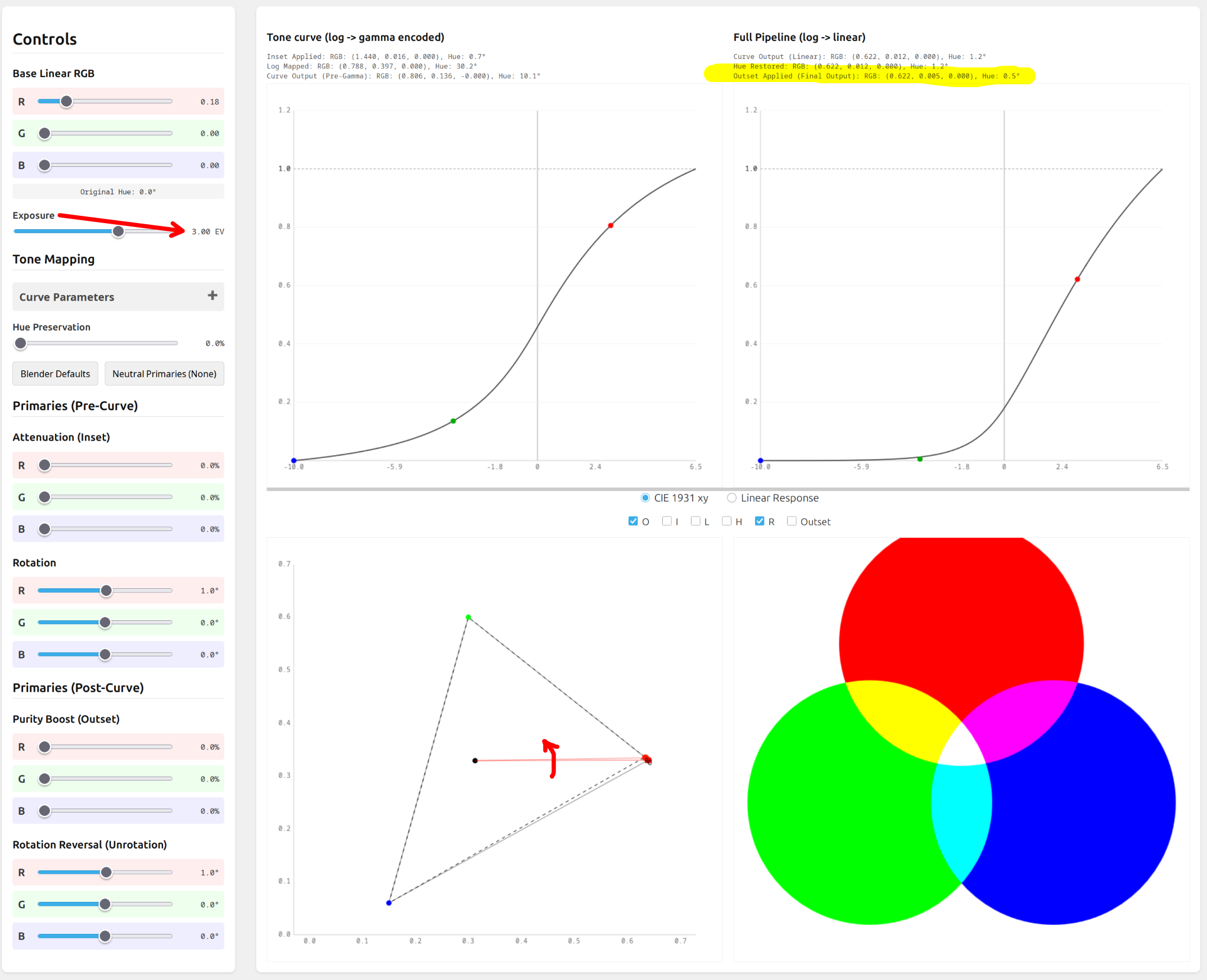
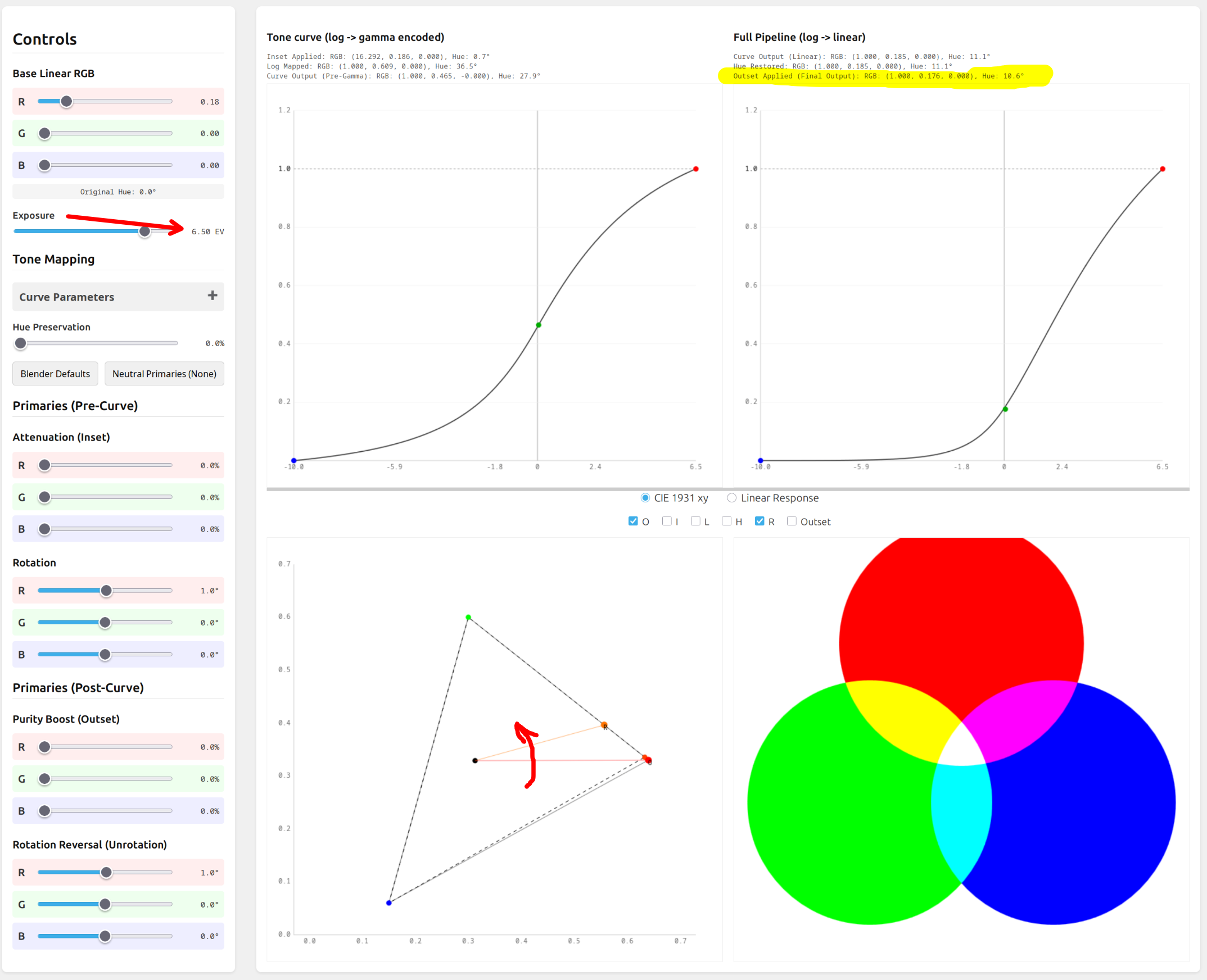
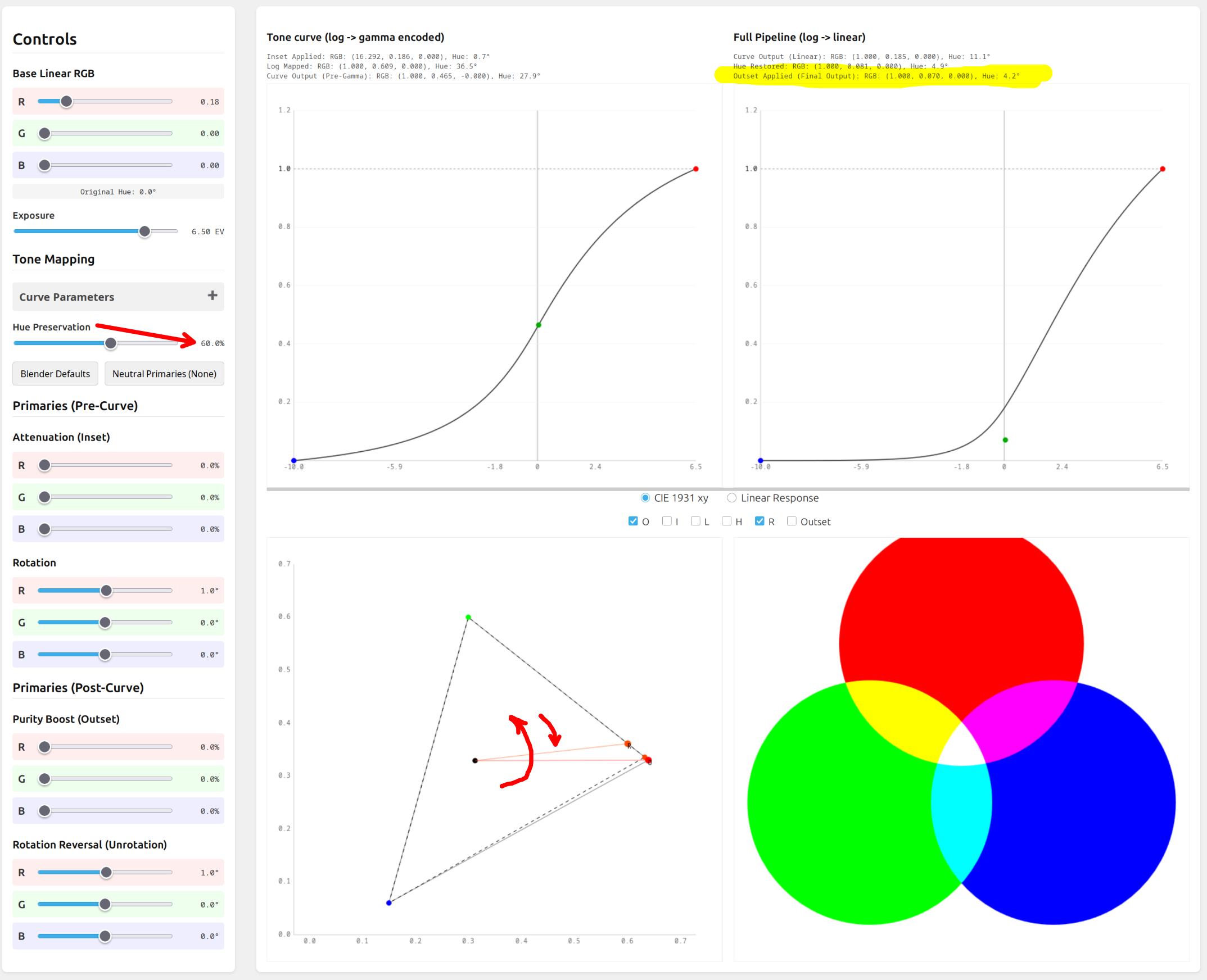
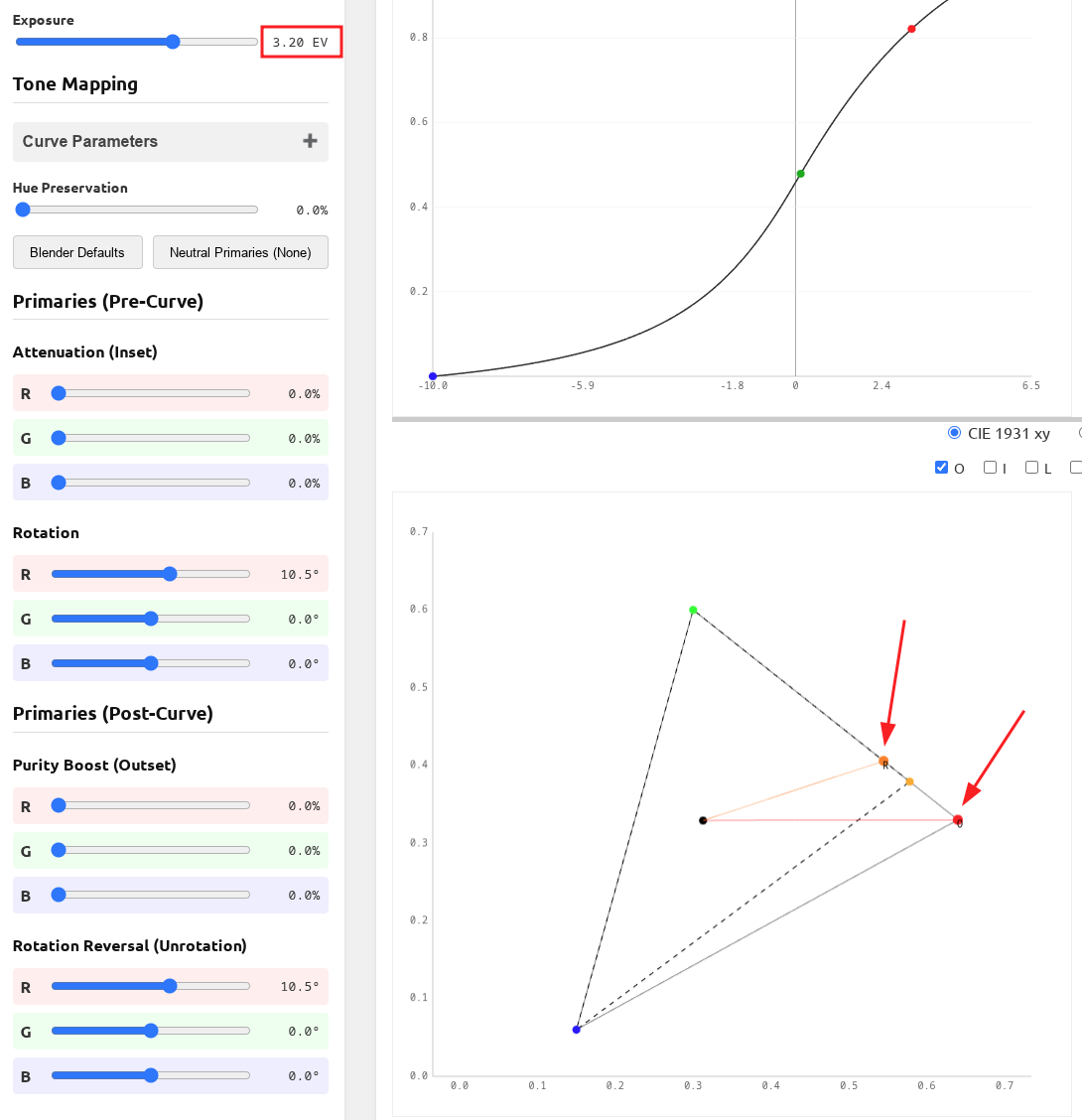
In the plot with the triangle, O is the original value, R the result.
We shift the red by 1° and restore it:

I’ve now increased exposure by 3 EV. The hue shift increased to 0.5°:

At 6.5 EV (set as the white relative EV), the hue shift is 11.1°:

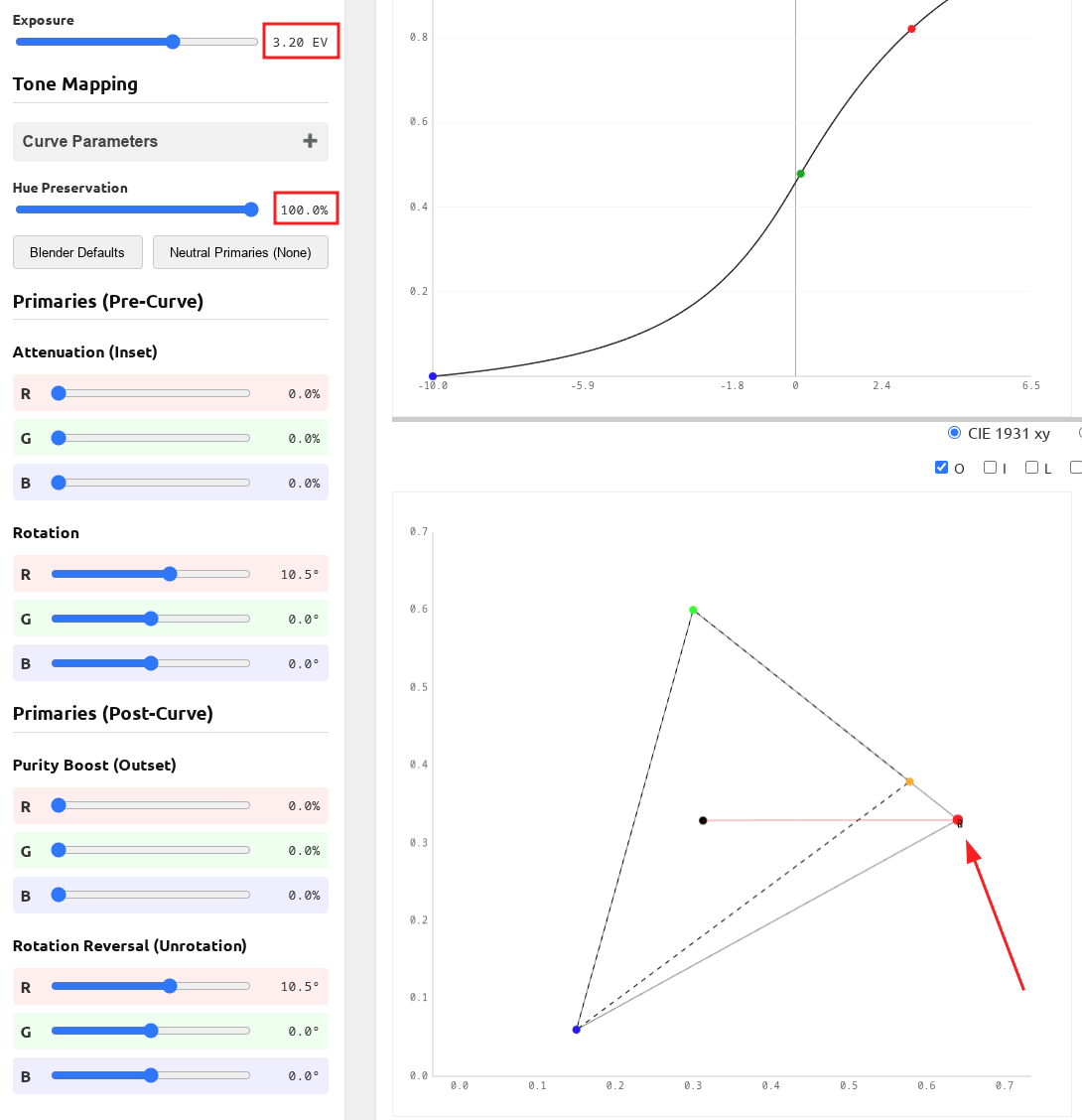
Applying hue preservation then allows us to keep the N6 in check, while still getting some shift in the primaries:

@s7habo , @garibaldi, @nwinspeare, @Qor , maybe this will be useful to you.
If you agree this is what’s going on, I’ll add this to the manual, too.

7 Likes

I’ve updated the visualisation tool, it should no longer jump around (so much). AGX Color Transform Simulation

On video: first, with only attenuation (desaturation), but without rotating the primaries; then, with also rotation, which is completely restored, except that the N6 amplifies the effect for brighter values. Finally, the effect of hue preservation.

4 Likes

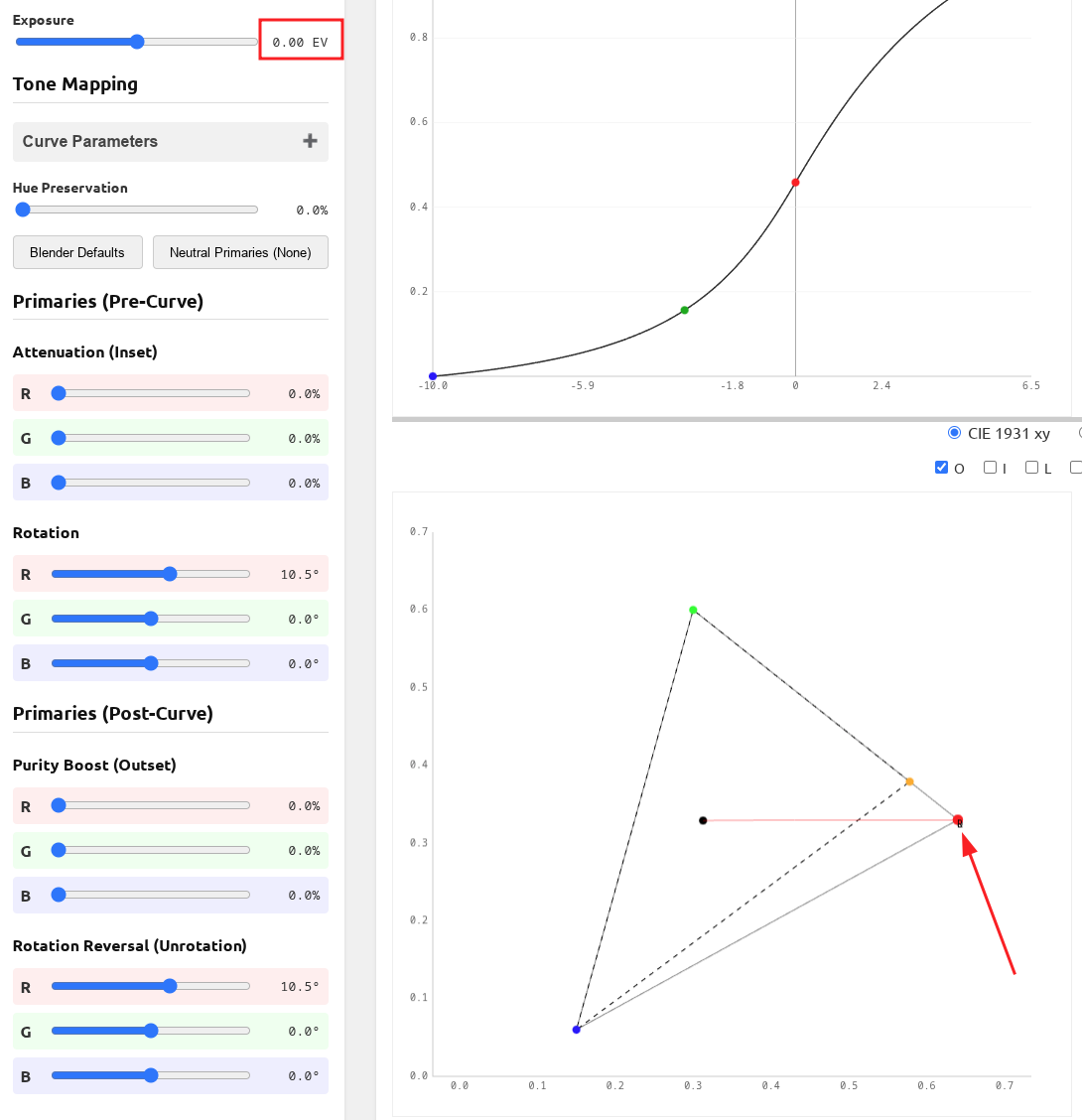
Thank you, this is very helpful! What is particularly striking is how a large rotation (and unrotation) at 0.0 EV shows no difference between O and R:

Yet the same rotation at a high EV value, as you showed, demonstrates a significant shift:

And then enabling Hue Preservation brings it back to pure red, even at higher EVs:

It’s really helpful to visualize it like this

We don’t want to bring it back to red completely, though, as reds are perceived to shift towards orange/yellow, as luminance increases.
The Blender-based (including the scene-referred default) presets have no rotation reversal, either. smooth, taken from sigmoid, does, as sigmoid hardcodes the reversal.

Right, I realize you’d want to leave some shift in but it’s helpful to visualize how each of these sliders work together

1 Like

The presets on the primaries tab…

Is there any way that we could have user-defined presets?

It occurs to me that, maybe no, because they might be weights and balances applied to the processing rather than actual set values. But I find myself making almost identical changes on many, many pics.

1 Like

We used to have the ability to load the primaries from any user-defined preset (as opposed to applying the whole preset), but it it was pretty messy code and was rejected by the core team (for a good reason: maintainability). And it’s not code that could just be cleaned up, as it added more coupling to the module: besides already having UI and processing maths, it added SQL and parameter extraction to the mix, all with an AgX-only, custom hack.

The real solution would be partial presets or partial application of presets (in all of darktable, not just AgX), but that will be a tough nut to crack.

For now, you can use the 3 built-in settings via that small pop-up menu, or apply a preset as usual. You can then use the history, hover over the AgX entry and check what values need to be copied before the preset was applied. Alternatively, you can take notes and dial in the primaries settings manually. Neither of which is convenient, I know.

1 Like

Perhaps you could use a Style with just one item, AgX?

I think @Thad_E_Ginathom meant to replace only the primaries settings (The presets on the primaries tab… Is there any way that we could have user-defined presets?). A style with only one item is meaningless, one could use a module preset. The problem still remains: you still replace all settings.

Maybe we could come up with something via darktablerc, as we have for example in case of the crop module (aspect ratios). I’ll have to ask the core team if they would agree to that. But defining that would require using a very unreadable line in darktablerc, with the values of 14 sliders and the base space, even if we ignore the checkboxes. And it would break if new primaries params were added.

1 Like