my macos 11 focused arm64 build is without coreML since that’s just supported for macos 14.4 and later - for intel build there’s no coreml option.
You need to use the arm64 nightly buils provided on darktables github to be able to make use of coreML …
2 Likes
This Denoising really looks VERY promising and frankly speaking could be another piece of the puzzle for me finally leaving the Lightroom world (again).
What I need to figure out for me is a workflow, that leverages this denoising for crucial images on final export and how final sharpeing then will come into play. So any experiences, hints are welcome on how to optimize a workflow with NIND-Denoise for very high ISO images and how to finalize exports then with sharpening considerations.
But as said, this is a really really NICE adition to dt! Thx a lot for all involved !
1 Like
There is a lua script to do RL sharpening on export…you could experiment with that and see if you can hit on a sweet spot …
I am currently on Mac OS. So not sure how this GMIC based export sharpening would work. So am not sure how to get the best workflow for very igh ISO images leveraging AI denoise and then resizing and sharpen could best be done on the Mac…
You could be right I don’t know much about the Mac options! Good luck finding your recipe…
After enabling the features for dt latest nightly build, I have been experimenting a little with the denoise feature (MacOS 15.7). No issues so far - in fact the result with default settings is fine. I didn’t measure the processing time but on a M1 Ultra it was very fast, perhaps only a few seconds. I will have a closer look when I’m finished with my current project. Thanks for pursuing this; it is the sole AI-type feature that I probably will use on my dt projects.
1 Like
I accidentally posted this in the masking thread and was sent here, so:
Just tested 5.5.0+928~g06f2ded73e appimage for denoising. Wondering what I do wrong since there is a severe color shift (denoise, 16bit TIF, detail 40%, ISO 6400)
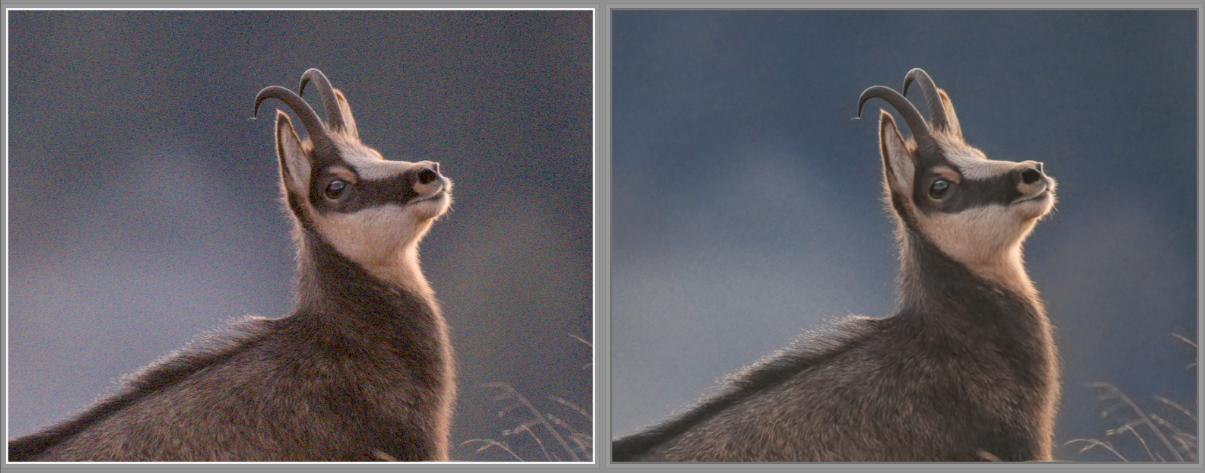
This is not the case with “conventional” denoising (denoise profile, 2 instances in this case combined with some surface blur, denoised on the left):
The NIND version is tif … so maybe you are having strange import / export color settings?
You have not asked for it …
I just think the denoising is not very effective with this nind ai thing . Plus you end up with a tif ….
Adding denoising at the end of workflow is not ideal … from my POV , it’s like a trip back in time with PS plugins !!!
But this is just my thought.
I think a better way for DT users is …. RawForge plugin !!!
The quality is ” miles ” ahead of NIND … well for me personally, not to talk about DXO PR
Btw … lovely portrait of the Chamois !!!
For many critical images I prefer DXO PR, but lately the quality of RAW images out of darktable is very close in terms of image detail and color. What is only lacking in dt is de-noising quality above ISO 4000. Its early days for AI de-noising and @anry is making great progress and it could still evolve and change.
I have to smile … regarding your thoughts about the IQ of DT compared to DXO .
Not sure , what you are thinking about Iso 4000 ? Is the value high iso for you ?
I rarely do work with images below … Iso 4000 … so for me it is fully normal to deal with this level of noise . So from my perspective … the DT denoise quality is miles behind the DXO level . I am not a DXO representative … just a paying user of the software .
RawForge does a way better job … well for me … than any other tool in DT , and the output is good enough for social media posts or for " play raw " . But for sure NOT for high end output !!!
As we all know tastes and expectations differ a lot amongst users … but this are just my thoughts about this .
1 Like
The NIND version is tif … so maybe you are having strange import / export color settings?
I hope this is not too strange …
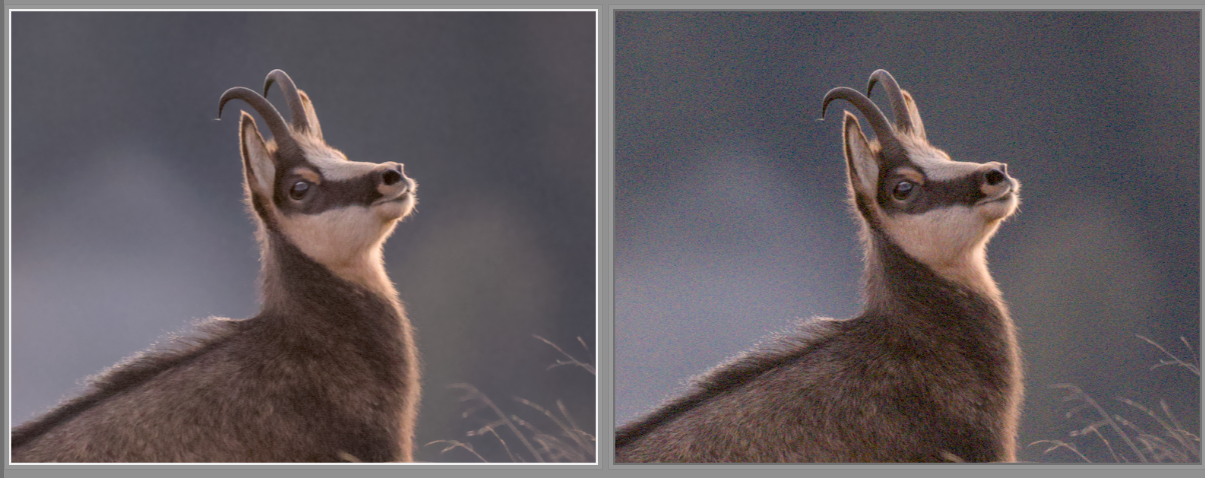
RAW image:
TIF image:
indeed - my focus is to test this thing and discuss my findings - in case there is an issue to be posted in github if there is some systematic problem.
thanks!
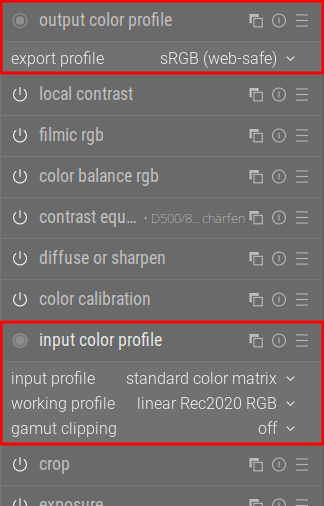
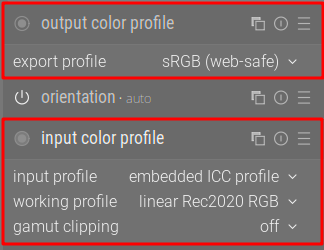
Hi … well your settings are not understandable , for me personally , of the export color space . But that is another thing and does " maybe " not explain the color shift .
I tried it with my settings … but ending up with a color shift myself with two of my shots .
I had a shift from " greenish " foliage in the BG … to a more " reddish /magenta " hue , specially in the darker tones .
If I remember correctly … I think I have read about the need to " rework " the TIF in DT to match the original raw file .
Which makes it even more useless to use this NIND noise reduction …
You invest time to develop your image , make tonal and color adjustments … maybe even extract detail in local areas … and then ending up with a processed TIF which needs reediting to a degree ???
Does that makes sense ?
At least not for me
But hey we all think differently
@helgeschneider, I am just wondering, what is the problem that NIND denoise plugin is producing a TIF file?
Rawforge is also producing a TIF! (But just in a DNG container). (See RawForge/RawForge/application/dng_utils.py at main · rymuelle/RawForge · GitHub if you don’t believe me)
THX for chiming in …
these code lines are way beyond my understanding , LOL , I am simple minded user and do not care at all about the things that are going on in the BG of a software .
I do see the performance of both versions … and for me personally RawForge does win by far in speed and output quality .
With the RF dng … i can treat it as a raw file , well if I understand it all correctly .
But hey I actually do not care that much about … the DT noise reduction , as it is by far not reaching the quality of DXO . But I would not expect the same quality … to be honest , for noise reduction that does cost no extra money .
And if people go for NIND or RawForge and do think it does suite their needs … fair enough . I just have a play with them …
I agree with you. In Section 3.3 of the NIND paper, they explain the processing steps, and they only adjust for exposure and white balance. I haven’t personally tested this, but becasue NIND was trained with pictures with no edits, I think we could get better results from NIND if we apply it earlier.
I also agree with you, but I don’t think the problem is that NIND exports as TIFFs. The main advantage of RawForge is that it uses raw Bayer input and also ISO as a conditioning input. I believe these two elements makes it perform better than NIND.
4 Likes
Hello @bilddateien,
Thank you for sharing a wonderful photo!
Can you share the raw file? It is perfectly understandable if you do not want to do this, in this case.
I have also noticed at least slight color changes, in some instances, but not so dramatic as in your case.
One thing that could matter is that the denoised output file is created using the working profile (input color profile → working profile) and the darktable default is LinearRec2020.
To display a file using LinearRec2020 is fine, but the viewer has to be color managed. In the darktable export module then the final color profile can be selected as usual. EDIT: But this can not be the reason here, a linear profile in a non color managed viewer would be totally off, I think.
From the command line I check the embedded profile using:
exiftool -icc_profile:* <filename>
Or just opening in GIMP and reading the profile from the title of the window.
I wasn’t aware of RawForge, which seems to be an alpha release. The tool has a command line interface, making is simple to write a LUA script to call it to transform one or many (in batch) RAW files and add them to the current collection. Maybe it can even be called with parameters through an external editor line. How long does the processing take compared to NIND?
This is what exiftools tells mee:
NIND processed image:
$ exiftool -icc_profile:* 20241103_N861643_denoise.tif
Profile CMM Type                : Little CMS
Profile Version                 : 2.4.0
Profile Class                   : Display Device Profile
Color Space Data                : RGB
Profile Connection Space        : XYZ
Profile Date Time               : 2026:04:11 18:34:07
Profile File Signature          : acsp
Primary Platform                : Apple Computer Inc.
CMM Flags                       : Embedded, Independent
Device Manufacturer             :
Device Model                    :
Device Attributes               : Reflective, Glossy, Positive, Color
Rendering Intent                : Perceptual
Connection Space Illuminant     : 0.9642 1 0.82491
Profile Creator                 : Little CMS
Profile ID                      : 0
Profile Description             : Linear Rec2020 RGB
Profile Copyright               : Public Domain
Media White Point               : 0.9642 1 0.82491
Chromatic Adaptation            : 1.04788 0.02292 -0.0502 0.02959 0.99046 -0.01707 -0.00925 0.01506 0.75179
Red Matrix Column               : 0.67348 0.27904 -0.00194
Blue Matrix Column              : 0.12505 0.04561 0.79684
Green Matrix Column             : 0.16568 0.67535 0.02998
Red Tone Reproduction Curve     : (Binary data 14 bytes, use -b option to extract)
Green Tone Reproduction Curve   : (Binary data 14 bytes, use -b option to extract)
Blue Tone Reproduction Curve    : (Binary data 14 bytes, use -b option to extract)
Chromaticity Channels           : 3
Chromaticity Colorant           : Unknown
Chromaticity Channel 1          : 0.70799 0.29201
Chromaticity Channel 2          : 0.17 0.797
Chromaticity Channel 3          : 0.131 0.04601
Device Model Desc               : Linear Rec2020 RGB
Device Mfg Desc                 : darktable
and for the RAW file this is empty, not surprising.
Don’t know why this tells me
since this is a Debian Linux Box …
One thing to note: above screenshots were made from darktable lighttable in the culling view - no other software, no converting, just native as it is shown in darktable itself.