I have same issue with Mac_intel.
update: thank you
libre-dt-lab-ba33703b31-x86_64.dmg is working without crashing.
Hello,
@helgeschneider @siamak
I’m sorry, this is a backward compatibility issue (introspection).
I don’t have time right now to fix this, and I think the best solution is to delete the configuration directory and all the .lab.xmp sidecar files.
Edit,
I just tested by copying and pasting a section of code to create a new version.
I recommend that you download the new version before deleting your database.
I’ll get back to you later with more details about the new curve, which is giving me excellent results.
I’ve uploaded a new version
Greetings from the Luberon,
Christian
Thanks. libre-dt-lab-ba33703b31-x86_64.dmg works on my osx_intel.
BTW, never kept sidecar files.
1 Like
Hello,
Have you tested the latest version, d3b164eb47?
Thank you for your help,
Christian
Hello,
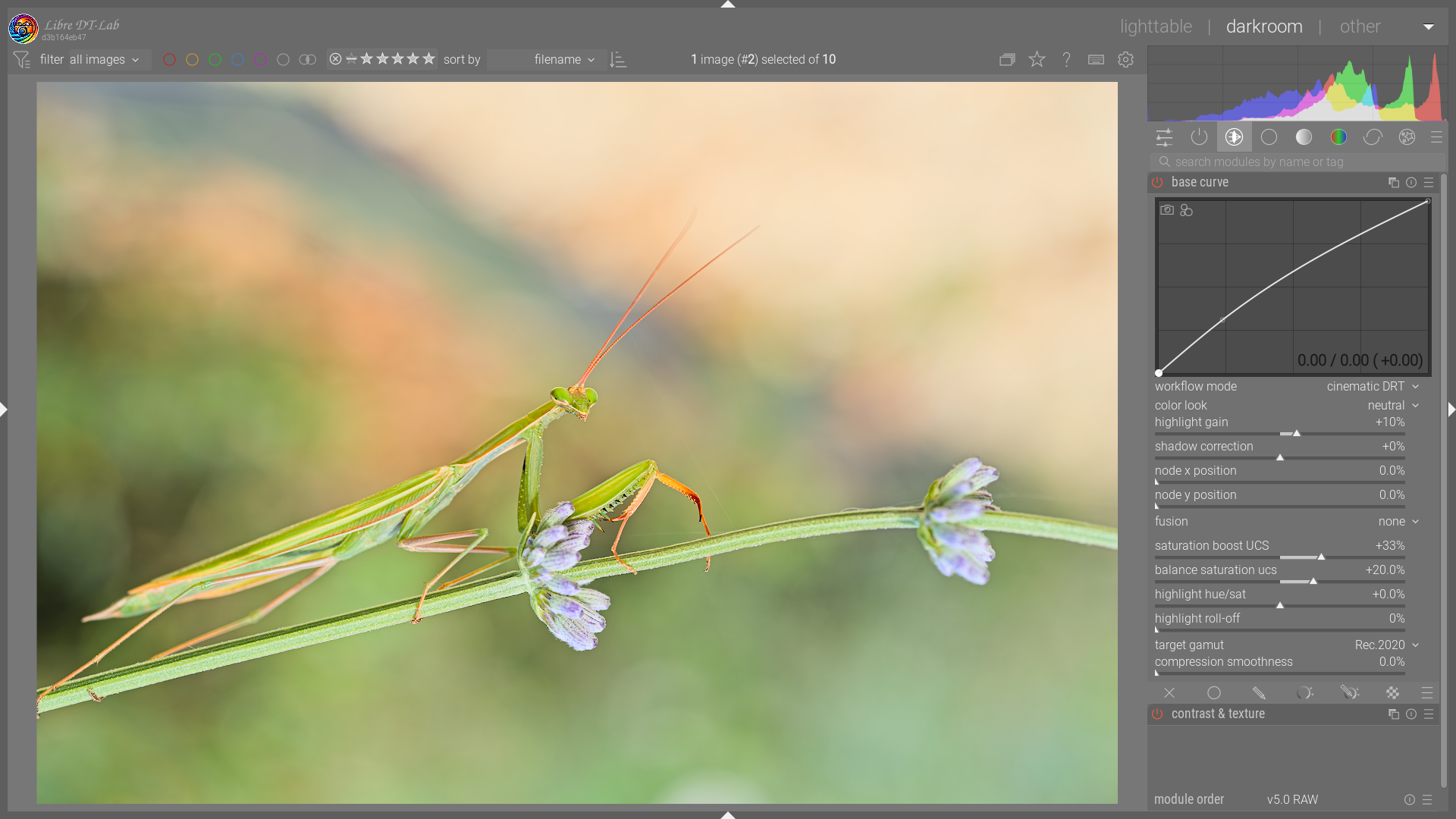
I would like to introduce an update to the Base Curve module: the addition of a third curve, “Cinematic DRT”, loosely based on OpenDRT.
Cinematic DRT (mode 3) is a Display Rendering Transform (DRT) operating in the Oklab color space (UCS). It is designed to deliver organic rendering without hue drift, even under heavy dynamic range compression.
Key points:
Pre-compression Brilliance : To avoid the “neon” look of highly saturated colors (flowers, LEDs, neon signs), the module intelligently reduces their intensity before tonemapping, proportionally to their saturation. This is the Pre-tonescale Brilliance concept borrowed from OpenDRT.
ACES Tonal Mapping : This mode uses the rational approximation of the ACES curve (Stephen Hill / BakingLab). A +0.25 EV compensation factor (1.189f) is applied to correct for the curve’s natural density. Shadow lift and highlight gain are integrated directly into the curve’s power equation for smooth, artifact-free transitions.
Saturation Gate : A mechanism that reduces saturation proportionally to the compression applied by the tonescale: the more a pixel is pushed toward the highlights, the more it loses color. This guarantees clean, neutral whites even under strong contrast : no more cyan skies or yellowish skin tones in overexposed areas.
Perceptual Saturation Boost : A new slider that boosts saturation in the midtones within UCS space, while protecting areas that are already heavily saturated. Its behavior is similar to a vibrance slider.
UCS Saturation Balance : A sigmoid centered on middle gray is used as a tonal mask. It allows selective saturation of shadows while desaturating highlights (or vice versa), simulating the analog film rendering where highlights naturally lose their color.
Highlight Roll-off : A final stage that progressively desaturates pixels exceeding 80% luminance to ensure a smooth transition to display white. This roll-off was previously hard-coded in the module; it is now a slider available across all three modes.
Sources and Technical References
-
Oklab color space : Björn Ottosson (2020), A perceptual color space for image processing A perceptual color space for image processing
-
ACES tonal curve : approximation (Modes 1, 2 & 3) — Stephen Hill / BakingLab, RRTAndODTFit approximation BakingLab/BakingLab/ACES.hlsl at master · TheRealMJP/BakingLab · GitHub
-
ACES 1.0 tonal curve : approximation (Mode 1 : Kinematic) — Krzysztof Narkowicz (2016), ACES Filmic Tone Mapping Curve ACES Filmic Tone Mapping Curve | Krzysztof Narkowicz
-
JzAzBz (used in the Kinematic and Dynamic modes of the same module) : Muhammad Safdar et al. (2017), Perceptually uniform color space for image signals including high dynamic range and wide gamut , Optics Express https://opg.optica.org/oe/fulltext.cfm?uri=oe-25-13-15131
-
OpenDRT (source of inspiration for the vector norm and pre-tonescale Brilliance) : Jed Smith GitHub - jedypod/open-display-transform: Open Display Transform is a collection of tools and experiments for rendering wide-gamut scene-linear data into an image for an SDR or HDR display device. · GitHub
Greetings from the Luberon, 
Christian
5 Likes
You have been busy…
2 Likes
d3b164eb47 working on some images specifically dng. I will continue testing and report back.
Update: As you earlier mentioned it. It had to do with the backward compatibility. I do not save xml files for any of my raw images at all.
In this case before taking any drastic measure, I did delete the history stack and the crashing stoped. Now I can activate the base module without crashing as well.
However, I continue to test and will report of any issues.
Thank you again @Christian-B
1 Like
Brilliance is a term already used in darktable, and I think the brilliance in OpenDRT is a related by different quantity. Unless I’m mistaken, darktable’s brilliance affects greys, OpenDRT’s does not, and they handle colours differently, too (darktable preserves perceptual saturation, OpenDRT the RGB ratios). I haven’t checked your code, whether you reused the idea of OpenDRT’s brilliance, but used an implementation like darktable’s color balance rgb uses, or if you lifted over more.
And, of course, what I wrote about could be totally wrong. I relied on AI to scan the code; the wording above is my understanding of their findings.
1 Like
Hello,
Thank you for the precise question, you are right to point out the difference.
The term “brilliance” does cover slightly different but related concepts depending on the context:
- In darktable’s color balance rgb, the brilliance slider acts on perceptual luminance (the J component of JzAzBz), while preserving perceptual saturation.
- In OpenDRT, pre-tonescale brilliance darkens more saturated stimuli before the tonescale by operating on a vector norm, affecting RGB ratios rather than perceptual saturation independently.
- In Cinematic UCS mode 3,
OKLAB_BRILLIANCE_POWERapplies a power function toV_norm = √(L² + chroma²), the Oklab vector norm. This is closer in spirit to OpenDRT’s approach than to darktable’s color balance rgb. It is not a port of color balance rgb, and it does not operate on JzAzBz at all , mode 3 works entirely within Oklab.
The practical effect: by increasing the contrast of the vector norm before the tonescale, highly saturated and bright colors are pushed further into the compression zone of the tonemapper, naturally reducing their final intensity. The current value of 1.10 was found empirically. After several days of real-world use, I’m considering exposing it as a user slider to allow more creative control over pre-tonescale contrast.
As I’ve already posted, I am a pastry chef by trade and a self-taught.
To me, this curve is a good example of assembling existing technologies , much like a cake combines different recipes (cream, sponge, glaze) into a harmonious whole.
Each technical “ingredient” brings a specific property:
- Oklab , the foundation (sponge): a perceptually uniform space where all manipulations happen without hue drift.
- OpenDRT concepts (vector norm, purity compression) , the “texture work” (cream): managing color volume and controlling brilliance before tonemapping.
- Stephen Hill’s ACES RRT+ODT approximation , the “glaze”: mapping scene luminances to display in a cinematic way.
Each of these was developed by different researchers. I am simply assembling them according to a certain logic to create a finished product with its own characteristics.
Greetings from the Luberon,
Christian
6 Likes
Thanks Christian. I look forward to the final tasting of your cake when it is merged into the master.
It is interesting what some of the developers do for a daytime job. If I ever get to Luberon in my travels I must find your bakery and try some of your wares.
2 Likes
Thank you very much, but just so you know, I’m retired after a somewhat unconventional career path.
As for the module, I’m still in the testing phase; I realize I submitted a PR way too early.
Have you tested the module?
Have a nice day,
Christian
1 Like
Hi Christian … just discovered today , that the Open CL GPU acceleration is not available on my MBP M1 running latest Tahoe ?!
The new added functions are a nice add-on to base curve module .
Just one thing that does bother me a bit … is the fact that the basic contrast is quite strong for my personal taste .
I prefer to start with a much lower global contrast level …
I have no idea about all the techs that are going on behind the module , I do read them as per your info … but hardly understand them , LOL .
BTW … highlights are now better rendered !!!
Andreas
1 Like
I haven’t tried it yet. Does your windows version run totally independent of my DT 5.5 and DT5.4 installs or will it share DB and configure files. I am just worried I might screw up like I did once before when trying an experimental build. I can be a moron with computers sometimes.
1 Like
This experimental version does have everything on it´s own !!!
You get another " libra-dt-lab " folder created in your config folder .
At least on macOS …
So there should be no issue …
1 Like
Yes, as Andreas says, that’s the main purpose of the experimental fork—it’s completely self-contained.
It can read Darktable’s XMP files, but it uses its own .lab.xmp sidecars and its own configuration folder.
For Windows, you can either use an installer or a portable version.
2 Likes
Just download the portable version ie the zip file from the link that was shared…download and unzip to run it… Christian renamed it to Libre …and it uses the DT startup where you can specify not to create xmp…l think he might have even renamed the xmps so it’s pretty safe with little to do …
1 Like
Generally speaking, I really like a high-contrast look, but I have to admit that for certain photos, I also need to reduce the contrast a bit. That’s why I’m thinking of adding a slider for Mode 3 (Cinematic DRT). The other two modes have slightly less contrast to begin with.
Greetings from the Luberon,
Christian
It did a pretty nice job on the recent egret playraw…I didn’t post that version as I thought I should do a version with the official software in the thread for other users but you could get a nice range of looks with the options that you have included
1 Like
Hello Todd,
Thank you for your feedback; I’m also quite happy with the results I’m getting. Here’s an almond blossom, I really like the rendering of the flower’s petals, especially in the printed version.

If you’d like, you can share the results you got with the egret here
Greetings from the Luberon,
Christian
1 Like